- HomeElectronicsAccessories & SuppliesAudio & Video AccessoriesCables & InterconnectsVideo CablesHDMI Cables
Description
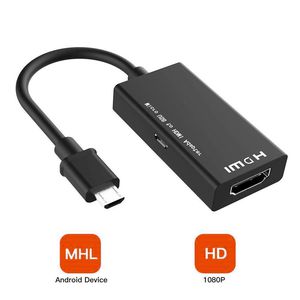
Feature: The MHL to HDMI by connecting the device to the MHL interface, allowing you to enjoy a better viewing experience on a large screen. The adapter supports video resolutions up to 1080p (Full HD). The MHL 2.0 technology supports a higher refresh rate (60Hz) than MHL 1.0.
Support Device:
Samsung Galaxy S5 i9600
Samsung Galaxy S4 i9500
Samsung Galaxy S4 i9505 LTE
Samsung Galaxy S3 i9300
Samsung Galaxy S3 i9305 LTE
Samsung Galaxy S3 Verizon i535
Samsung Galaxy S3 T-Mobile T999
Samsung Galaxy S3 at&t i747
Samsung Galaxy S3 Sprint L710
Samsung Galaxy Tab 3 7.0
Samsung Galaxy Tab 3 8.0 SM-T310
Samsung Galaxy Tab 3 10.1 P5200 P5210
Samsung Galaxy Note 8.0 GT-N5100 N5110 N5120
Samsung Galaxy Note 10.1 2014 Edition SM-P600
Samsung Galaxy Note 2 N7100 N7105
More MHL Supported Devices.
Not Support Device:
Google Nexus 5
Google Nexus 7
Samsung Galaxy S9
Samsung Galaxy S8
Samsung Galaxy S7
Samsung Galaxy S6
LG G2 G3 G4 V10 Vista
Nokia 635, ZTE ZMAX 2
Samsung Galaxy Note 5
Samsung Galaxy Note 10.1
Samsung Galaxy S7 Edge
Samsung Galaxy Tab 3 7.0
Samsung Galaxy Note 3 N9008V
Samsung Galaxy Grand Prime
Samsung Galaxy Stratosphere II
Other device don't support MHL function.
How to operate
1.Pls connect the Micro USB cable to your MHL adaptor directly .
2.Plug the HDMI Port with HDTV Cable.
3.Pls connect this adapter with an external power supply (≥5V 1A).
4.Restart Your Phone.
➤➤Package Included:
1 x MHL to HDMI Adapter.
Support Device:
Samsung Galaxy S5 i9600
Samsung Galaxy S4 i9500
Samsung Galaxy S4 i9505 LTE
Samsung Galaxy S3 i9300
Samsung Galaxy S3 i9305 LTE
Samsung Galaxy S3 Verizon i535
Samsung Galaxy S3 T-Mobile T999
Samsung Galaxy S3 at&t i747
Samsung Galaxy S3 Sprint L710
Samsung Galaxy Tab 3 7.0
Samsung Galaxy Tab 3 8.0 SM-T310
Samsung Galaxy Tab 3 10.1 P5200 P5210
Samsung Galaxy Note 8.0 GT-N5100 N5110 N5120
Samsung Galaxy Note 10.1 2014 Edition SM-P600
Samsung Galaxy Note 2 N7100 N7105
More MHL Supported Devices.
Not Support Device:
Google Nexus 5
Google Nexus 7
Samsung Galaxy S9
Samsung Galaxy S8
Samsung Galaxy S7
Samsung Galaxy S6
LG G2 G3 G4 V10 Vista
Nokia 635, ZTE ZMAX 2
Samsung Galaxy Note 5
Samsung Galaxy Note 10.1
Samsung Galaxy S7 Edge
Samsung Galaxy Tab 3 7.0
Samsung Galaxy Note 3 N9008V
Samsung Galaxy Grand Prime
Samsung Galaxy Stratosphere II
Other device don't support MHL function.
How to operate
1.Pls connect the Micro USB cable to your MHL adaptor directly .
2.Plug the HDMI Port with HDTV Cable.
3.Pls connect this adapter with an external power supply (≥5V 1A).
4.Restart Your Phone.
➤➤Package Included:
1 x MHL to HDMI Adapter.
Micro USB to HDMI MHL Adapter, 5Pin MHL to HDMI Converter, MHL to HDMI Adapter, Micro USB to HDMI Adapter 1080P HDTV for Note 4, Note Edge, S2 One M8
Current Price
$8.99
Average
$8.49
Min Price
$7.99
Max Price
$8.99
Price dynamics
6%
Description
Feature: The MHL to HDMI by connecting the device to the MHL interface, allowing you to enjoy a better viewing experience on a large screen. The adapter supports video resolutions up to 1080p (Full HD). The MHL 2.0 technology supports a higher refresh rate (60Hz) than MHL 1.0.
Support Device:
Samsung Galaxy S5 i9600
Samsung Galaxy S4 i9500
Samsung Galaxy S4 i9505 LTE
Samsung Galaxy S3 i9300
Samsung Galaxy S3 i9305 LTE
Samsung Galaxy S3 Verizon i535
Samsung Galaxy S3 T-Mobile T999
Samsung Galaxy S3 at&t i747
Samsung Galaxy S3 Sprint L710
Samsung Galaxy Tab 3 7.0
Samsung Galaxy Tab 3 8.0 SM-T310
Samsung Galaxy Tab 3 10.1 P5200 P5210
Samsung Galaxy Note 8.0 GT-N5100 N5110 N5120
Samsung Galaxy Note 10.1 2014 Edition SM-P600
Samsung Galaxy Note 2 N7100 N7105
More MHL Supported Devices.
Not Support Device:
Google Nexus 5
Google Nexus 7
Samsung Galaxy S9
Samsung Galaxy S8
Samsung Galaxy S7
Samsung Galaxy S6
LG G2 G3 G4 V10 Vista
Nokia 635, ZTE ZMAX 2
Samsung Galaxy Note 5
Samsung Galaxy Note 10.1
Samsung Galaxy S7 Edge
Samsung Galaxy Tab 3 7.0
Samsung Galaxy Note 3 N9008V
Samsung Galaxy Grand Prime
Samsung Galaxy Stratosphere II
Other device don't support MHL function.
How to operate
1.Pls connect the Micro USB cable to your MHL adaptor directly .
2.Plug the HDMI Port with HDTV Cable.
3.Pls connect this adapter with an external power supply (≥5V 1A).
4.Restart Your Phone.
➤➤Package Included:
1 x MHL to HDMI Adapter.
Support Device:
Samsung Galaxy S5 i9600
Samsung Galaxy S4 i9500
Samsung Galaxy S4 i9505 LTE
Samsung Galaxy S3 i9300
Samsung Galaxy S3 i9305 LTE
Samsung Galaxy S3 Verizon i535
Samsung Galaxy S3 T-Mobile T999
Samsung Galaxy S3 at&t i747
Samsung Galaxy S3 Sprint L710
Samsung Galaxy Tab 3 7.0
Samsung Galaxy Tab 3 8.0 SM-T310
Samsung Galaxy Tab 3 10.1 P5200 P5210
Samsung Galaxy Note 8.0 GT-N5100 N5110 N5120
Samsung Galaxy Note 10.1 2014 Edition SM-P600
Samsung Galaxy Note 2 N7100 N7105
More MHL Supported Devices.
Not Support Device:
Google Nexus 5
Google Nexus 7
Samsung Galaxy S9
Samsung Galaxy S8
Samsung Galaxy S7
Samsung Galaxy S6
LG G2 G3 G4 V10 Vista
Nokia 635, ZTE ZMAX 2
Samsung Galaxy Note 5
Samsung Galaxy Note 10.1
Samsung Galaxy S7 Edge
Samsung Galaxy Tab 3 7.0
Samsung Galaxy Note 3 N9008V
Samsung Galaxy Grand Prime
Samsung Galaxy Stratosphere II
Other device don't support MHL function.
How to operate
1.Pls connect the Micro USB cable to your MHL adaptor directly .
2.Plug the HDMI Port with HDTV Cable.
3.Pls connect this adapter with an external power supply (≥5V 1A).
4.Restart Your Phone.
➤➤Package Included:
1 x MHL to HDMI Adapter.
Price will be lower
in next 2 weeks
in next 2 weeks
According to the data, price will be lower in next two weeks, so not waste your money and track better price!
Product review & video
everybody this is Dennis from ATX power supplies coming at you again here with another little device today I'm going to be looking at this Samsung Galaxy mobile phone for HD TV so basically what this is supposed to do is take the HDMI port on your cell phone and send it out to the TV so that way you can watch your Netflix and all that kind of stuff so I want to try this out it works good we're going to sell a few of them so what we got here is basically a little cord adapter here that's gonna HDMI it goes to your TV it's got a small HDMI for your cell phone it looks a lot like a Micro Micro USB fan I'm gonna go from there and then they've got a USB that it actually uses to power the HDMI circuit so let's see what this is all about I'm trying this for the first time there has been no practice on this video here so what you're seeing is exactly what I see we're having the first impression



Similar products






































