- HomeElectronicsAccessories & SuppliesAudio & Video AccessoriesCables & InterconnectsVideo CablesHDMI Cables
Description
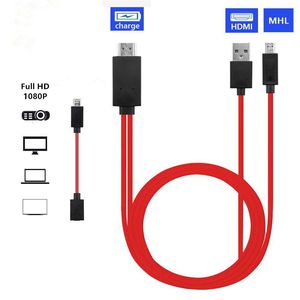
This MHL to HDMI Adapter can be used for mirroring what's display on your mobile phone to TV through the standard HDMI output on a compatible TV. Perfect for sharing photos with family or friends or giving a presentation to a client.
Compatible devices (Full list):
For 11 Pin Devices:
AT&T Galaxy S II/ AT&T Galaxy S II Skyrocket/ AT&T Galaxy S III/ Captivate Glide/ Cricket Galaxy S III/ Galaxy Express/ Galaxy K Zoom/ Galaxy Note 3/ Galaxy Note 3 Neo/ Galaxy Note 4/ Galaxy Note 8/ Galaxy Note Edge/ Galaxy Note II/ Galaxy Note Pro/ Galaxy S II / Galaxy S III/ Galaxy S4/ Galaxy S4 TD-LTE/ Galaxy S5 Dual Sim/ Galaxy S5 Zoom/ Galaxy Tab 3 8", 10.1"/ Galaxy Tab S 10.5"/ Galaxy Tab S 8.4"/ Galaxy Tab
For 5 Pin Devices
AT&T Galaxy Note LTE 5.3"/ Galaxy Nexus 2/ Epic 4G Touch/ Galaxy Note 5.3"/ Sprint Galaxy Nexus/ Verizon Galaxy Nexus LTE/ SC-01F/ SC-02F/ SCL22/ SGH-M819N/ SHV-E470S/ SM-G900T3/ SM-G906S/ SM-G910S/ SM-N9002/ SM-N9005/ SM-N9006/ SM-N9008/ SM-N9009/ SM-N900A/ SM-N900D/ SM-N900DSM-N900J/ SM-N900J/ SM-N900K/ SM-N900L/ SM-N900P/ SM-N900R4/ SM-N900S/ SM-N900T/ SM-N900V/ SM-N900W8/ SM-N900W9/ SM-N900X/ SM-N910A/ SM-N916S/ SM- P600/ SM-P601/ SM-P605/ SM
How to use:
Connect the Micro USB cable into your cell phone or tablet.
Connect TV through the HDMI port, Switch the TV to HDMI channel.
Connect the USB cable to a power adapter (at least 5V 1A) to supply power for the HDMI connector, you had better use the original adapter. Restart your device after the whole connection finished.
Notice:
►►DO NOT fit for : Galaxy Tab 3 7.0, Note 10.1, Note 3 N9008V S6 S7 S6 edge
►►MHL must be powered by an external power supply (>5V 1A)
►►After connected with the MHL cable, the phone must be restarted
Pls check on the website if your devices are MHL Supported: http://www.mhltech.org/devices.aspx
Compatible devices (Full list):
For 11 Pin Devices:
AT&T Galaxy S II/ AT&T Galaxy S II Skyrocket/ AT&T Galaxy S III/ Captivate Glide/ Cricket Galaxy S III/ Galaxy Express/ Galaxy K Zoom/ Galaxy Note 3/ Galaxy Note 3 Neo/ Galaxy Note 4/ Galaxy Note 8/ Galaxy Note Edge/ Galaxy Note II/ Galaxy Note Pro/ Galaxy S II / Galaxy S III/ Galaxy S4/ Galaxy S4 TD-LTE/ Galaxy S5 Dual Sim/ Galaxy S5 Zoom/ Galaxy Tab 3 8", 10.1"/ Galaxy Tab S 10.5"/ Galaxy Tab S 8.4"/ Galaxy Tab
For 5 Pin Devices
AT&T Galaxy Note LTE 5.3"/ Galaxy Nexus 2/ Epic 4G Touch/ Galaxy Note 5.3"/ Sprint Galaxy Nexus/ Verizon Galaxy Nexus LTE/ SC-01F/ SC-02F/ SCL22/ SGH-M819N/ SHV-E470S/ SM-G900T3/ SM-G906S/ SM-G910S/ SM-N9002/ SM-N9005/ SM-N9006/ SM-N9008/ SM-N9009/ SM-N900A/ SM-N900D/ SM-N900DSM-N900J/ SM-N900J/ SM-N900K/ SM-N900L/ SM-N900P/ SM-N900R4/ SM-N900S/ SM-N900T/ SM-N900V/ SM-N900W8/ SM-N900W9/ SM-N900X/ SM-N910A/ SM-N916S/ SM- P600/ SM-P601/ SM-P605/ SM
How to use:
Connect the Micro USB cable into your cell phone or tablet.
Connect TV through the HDMI port, Switch the TV to HDMI channel.
Connect the USB cable to a power adapter (at least 5V 1A) to supply power for the HDMI connector, you had better use the original adapter. Restart your device after the whole connection finished.
Notice:
►►DO NOT fit for : Galaxy Tab 3 7.0, Note 10.1, Note 3 N9008V S6 S7 S6 edge
►►MHL must be powered by an external power supply (>5V 1A)
►►After connected with the MHL cable, the phone must be restarted
Pls check on the website if your devices are MHL Supported: http://www.mhltech.org/devices.aspx
Micro USB to HDMI, MHL to HDMI, Micro USB to HDMI Converter for Android Smart Phones, Micro 5pin to 11pin Adapter, MHL Micro USB to HDMI Cable Adapter (Red)
Current Price
$13.66
Average
$13.21
Min Price
$9.99
Max Price
$13.99
Price dynamics
3%
Description
This MHL to HDMI Adapter can be used for mirroring what's display on your mobile phone to TV through the standard HDMI output on a compatible TV. Perfect for sharing photos with family or friends or giving a presentation to a client.
Compatible devices (Full list):
For 11 Pin Devices:
AT&T Galaxy S II/ AT&T Galaxy S II Skyrocket/ AT&T Galaxy S III/ Captivate Glide/ Cricket Galaxy S III/ Galaxy Express/ Galaxy K Zoom/ Galaxy Note 3/ Galaxy Note 3 Neo/ Galaxy Note 4/ Galaxy Note 8/ Galaxy Note Edge/ Galaxy Note II/ Galaxy Note Pro/ Galaxy S II / Galaxy S III/ Galaxy S4/ Galaxy S4 TD-LTE/ Galaxy S5 Dual Sim/ Galaxy S5 Zoom/ Galaxy Tab 3 8", 10.1"/ Galaxy Tab S 10.5"/ Galaxy Tab S 8.4"/ Galaxy Tab
For 5 Pin Devices
AT&T Galaxy Note LTE 5.3"/ Galaxy Nexus 2/ Epic 4G Touch/ Galaxy Note 5.3"/ Sprint Galaxy Nexus/ Verizon Galaxy Nexus LTE/ SC-01F/ SC-02F/ SCL22/ SGH-M819N/ SHV-E470S/ SM-G900T3/ SM-G906S/ SM-G910S/ SM-N9002/ SM-N9005/ SM-N9006/ SM-N9008/ SM-N9009/ SM-N900A/ SM-N900D/ SM-N900DSM-N900J/ SM-N900J/ SM-N900K/ SM-N900L/ SM-N900P/ SM-N900R4/ SM-N900S/ SM-N900T/ SM-N900V/ SM-N900W8/ SM-N900W9/ SM-N900X/ SM-N910A/ SM-N916S/ SM- P600/ SM-P601/ SM-P605/ SM
How to use:
Connect the Micro USB cable into your cell phone or tablet.
Connect TV through the HDMI port, Switch the TV to HDMI channel.
Connect the USB cable to a power adapter (at least 5V 1A) to supply power for the HDMI connector, you had better use the original adapter. Restart your device after the whole connection finished.
Notice:
►►DO NOT fit for : Galaxy Tab 3 7.0, Note 10.1, Note 3 N9008V S6 S7 S6 edge
►►MHL must be powered by an external power supply (>5V 1A)
►►After connected with the MHL cable, the phone must be restarted
Pls check on the website if your devices are MHL Supported: http://www.mhltech.org/devices.aspx
Compatible devices (Full list):
For 11 Pin Devices:
AT&T Galaxy S II/ AT&T Galaxy S II Skyrocket/ AT&T Galaxy S III/ Captivate Glide/ Cricket Galaxy S III/ Galaxy Express/ Galaxy K Zoom/ Galaxy Note 3/ Galaxy Note 3 Neo/ Galaxy Note 4/ Galaxy Note 8/ Galaxy Note Edge/ Galaxy Note II/ Galaxy Note Pro/ Galaxy S II / Galaxy S III/ Galaxy S4/ Galaxy S4 TD-LTE/ Galaxy S5 Dual Sim/ Galaxy S5 Zoom/ Galaxy Tab 3 8", 10.1"/ Galaxy Tab S 10.5"/ Galaxy Tab S 8.4"/ Galaxy Tab
For 5 Pin Devices
AT&T Galaxy Note LTE 5.3"/ Galaxy Nexus 2/ Epic 4G Touch/ Galaxy Note 5.3"/ Sprint Galaxy Nexus/ Verizon Galaxy Nexus LTE/ SC-01F/ SC-02F/ SCL22/ SGH-M819N/ SHV-E470S/ SM-G900T3/ SM-G906S/ SM-G910S/ SM-N9002/ SM-N9005/ SM-N9006/ SM-N9008/ SM-N9009/ SM-N900A/ SM-N900D/ SM-N900DSM-N900J/ SM-N900J/ SM-N900K/ SM-N900L/ SM-N900P/ SM-N900R4/ SM-N900S/ SM-N900T/ SM-N900V/ SM-N900W8/ SM-N900W9/ SM-N900X/ SM-N910A/ SM-N916S/ SM- P600/ SM-P601/ SM-P605/ SM
How to use:
Connect the Micro USB cable into your cell phone or tablet.
Connect TV through the HDMI port, Switch the TV to HDMI channel.
Connect the USB cable to a power adapter (at least 5V 1A) to supply power for the HDMI connector, you had better use the original adapter. Restart your device after the whole connection finished.
Notice:
►►DO NOT fit for : Galaxy Tab 3 7.0, Note 10.1, Note 3 N9008V S6 S7 S6 edge
►►MHL must be powered by an external power supply (>5V 1A)
►►After connected with the MHL cable, the phone must be restarted
Pls check on the website if your devices are MHL Supported: http://www.mhltech.org/devices.aspx
Price will be lower
in next 2 weeks
in next 2 weeks
According to the data, price will be lower in next two weeks, so not waste your money and track better price!
Product review & video
everybody this is Dennis from ATX power supplies coming at you again here with another little device today I'm going to be looking at this Samsung Galaxy mobile phone for HD TV so basically what this is supposed to do is take the HDMI port on your cell phone and send it out to the TV so that way you can watch your Netflix and all that kind of stuff so I want to try this out it works good we're going to sell a few of them so what we got here is basically a little cord adapter here that's gonna HDMI it goes to your TV it's got a small HDMI for your cell phone it looks a lot like a Micro Micro USB fan I'm gonna go from there and then they've got a USB that it actually uses to power the HDMI circuit so let's see what this is all about I'm trying this for the first time there has been no practice on this video here so what you're seeing is exactly what I see we're having the first impression



Similar products






































