- HomeElectronicsAccessories & SuppliesAudio & Video AccessoriesCables & InterconnectsVideo CablesHDMI Cables
Description
Alinker 4K@60Hz HDMI Cable Connection Plug and Play The Cable Matters USB Type-C to HDMI Cable is specifically designed to connect new release thin computers and some smartphones to a UHD TV, 4K monitor, or projector with HDMI. Stream audio and video from your computer with this convenient cable. No dongles required. Superior Construction in a Single Cable This single cable supports the latest video resolutions and audio features. Constructed with gold-plated connectors that resist corrosion, provide durability, and improve the signal transmission, this cable is designed for long life and frequent use. Strain relief collars and a lip edge on the connectors provide easy unplugging. Foil and braid shielding, and bare copper conductors reduce EMI electromagnetic noise and enhance the cable performance. Suitable Length 1.8M / 6Ft length makes it perfect for connected your phones or laptops to UHD TV or projector. Compatible lists(Tested in lab) Laptops - 2018/2017/2016 MacBook Pro - 2017/2016/2015 MacBook - iPad Pro 2018 - 2017 iMac - Surface Book 2 - ChromeBook Pixel - HP EliteBook Folio G1 - Dell XPS 13-9350-R1609 13.3", XPS 15 9360 Note: 1.It is NOT recommended to use on Lenovo Yoga 910 /Dell XPS 13 9360/ HP Spectre x360, the video or audio signal is unstable. 2.The cable works for Thunderbolt 3 compatible Type-C port only. 3. The cable is not compatible with devices which do not support the protocol of DP Alt Mode. 4.Warm reminding: It takes a little time to synchronize data from the computer to the monitor
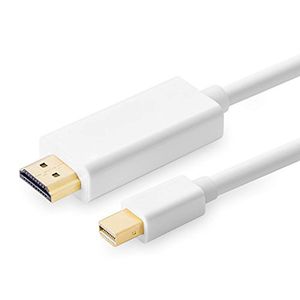
Mini Displayport to HDMI Cable(6 Feet/1.8m),Mini DP Port/Thunderbolt to HDMI 1080p Full HDCable for Surface Pro, MacBook Pro, iMac, Mac Mini etc
Price is below average
Current Price
$7.7
Average
$10.99
Min Price
$6.45
Max Price
$15.99
Price dynamics
30%
Description
Alinker 4K@60Hz HDMI Cable Connection Plug and Play The Cable Matters USB Type-C to HDMI Cable is specifically designed to connect new release thin computers and some smartphones to a UHD TV, 4K monitor, or projector with HDMI. Stream audio and video from your computer with this convenient cable. No dongles required. Superior Construction in a Single Cable This single cable supports the latest video resolutions and audio features. Constructed with gold-plated connectors that resist corrosion, provide durability, and improve the signal transmission, this cable is designed for long life and frequent use. Strain relief collars and a lip edge on the connectors provide easy unplugging. Foil and braid shielding, and bare copper conductors reduce EMI electromagnetic noise and enhance the cable performance. Suitable Length 1.8M / 6Ft length makes it perfect for connected your phones or laptops to UHD TV or projector. Compatible lists(Tested in lab) Laptops - 2018/2017/2016 MacBook Pro - 2017/2016/2015 MacBook - iPad Pro 2018 - 2017 iMac - Surface Book 2 - ChromeBook Pixel - HP EliteBook Folio G1 - Dell XPS 13-9350-R1609 13.3", XPS 15 9360 Note: 1.It is NOT recommended to use on Lenovo Yoga 910 /Dell XPS 13 9360/ HP Spectre x360, the video or audio signal is unstable. 2.The cable works for Thunderbolt 3 compatible Type-C port only. 3. The cable is not compatible with devices which do not support the protocol of DP Alt Mode. 4.Warm reminding: It takes a little time to synchronize data from the computer to the monitor
Price will be lower
in next 2 weeks
in next 2 weeks
According to the data, price will be lower in next two weeks, so not waste your money and track better price!
Product review & video
[Music] hey guys as promised here's a quick setup video so as you guys know this part will go to your HDMI cable so you guys just plug that in and obviously that's the HDMI cable was connected to your monitor this part ok just get a close-up this will go right here so this is the back of my iMac on your macbook you guys should see the same thing when you guys can plug it into either one of these ports so just plug it into one of these ports and then from your Mac I just go into system preferences and don't have your monitor turned on by the way when you're making these connections just have it off for now and then once it's connected you guys can go to System Preferences alright let me just so you can see you guys can actually see this thing and then on this place you guys will see your monitor so at this time it's good to turn on your monitor so I have my monitor right here I'm gonna t



Similar products






































