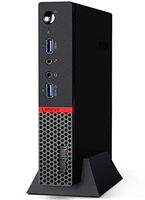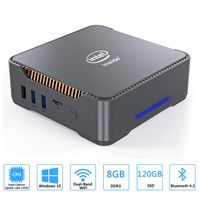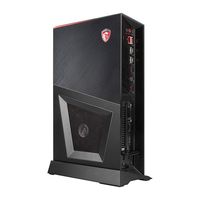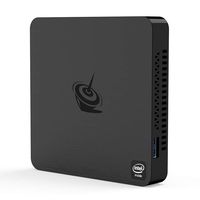
Description
MFY Mini pc Common problems and solutions
1. Blues creen:
System reason, reset system
2.Normal shutdown method:
Click win, select power, select shut down/win+x, select shut down or sign out, select shut down
3. System update failure:
First check whether the storage space has 40GB of available space. If not enough, you can't finish the online update, or you can choose to update by phone.
4. Unable to activate:
Contact customer service and need new Windows key activation.
5. Connect the monitor not working, Or stop working after a period of use: It is caused by abnormal power outages of customers. Treatment methods:
(1): Hold the reset button (the small hole behind the machine interface) for more than 5 seconds without power supply, release the power and switch on again;
(2): Disassemble the RTC battery on the motherboard of the bottom shell and unplug it for a few seconds, then plug it into the bottom shell
Product Specification
Instruction Set: 64-bit
Model: MFY J45 4G/128G
Dimension: 115 * 102.5* 41 mm
Item Weight: 321g (PC Only)
System Config
DDR: LPDDR4 4G
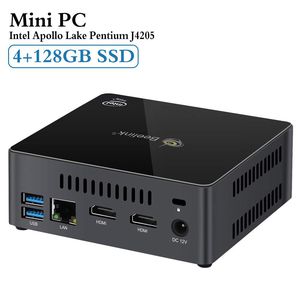
Storage: 128GB SSD
Operating System: Windows 10 Home
CPU: Intel Apollo Lake Pentium Processor J4205 (2M Cache, up to 2.6GHz)
Wireless Function: BT 4.0, Dual Band 2.4G+5.8G
Ethernet: 1000Mbps LAN
Graphics: Intel HD Graphics 505 (4K 30Hz)
Expand Storage: SATA 2.5-inch Hard Disk / TF Card
Interface
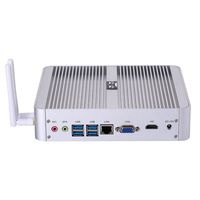
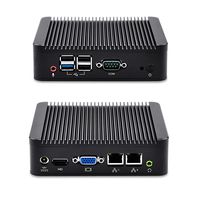
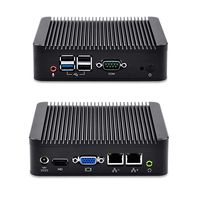
2* HDMI Port
4* USB3.0Port
1* RJ45 (1000Mbps LAN) Port
1* TF Card Port
1* Headphone Microphone Jack
1* DC in Port
Package Included:
1* Mini PC
1* US Power Plug
2* HDMI Cable (80cm&20cm)
1* VESA Mount & Screws
1*English Manual
1. Blues creen:
System reason, reset system
2.Normal shutdown method:
Click win, select power, select shut down/win+x, select shut down or sign out, select shut down
3. System update failure:
First check whether the storage space has 40GB of available space. If not enough, you can't finish the online update, or you can choose to update by phone.
4. Unable to activate:
Contact customer service and need new Windows key activation.
5. Connect the monitor not working, Or stop working after a period of use: It is caused by abnormal power outages of customers. Treatment methods:
(1): Hold the reset button (the small hole behind the machine interface) for more than 5 seconds without power supply, release the power and switch on again;
(2): Disassemble the RTC battery on the motherboard of the bottom shell and unplug it for a few seconds, then plug it into the bottom shell
Product Specification
Instruction Set: 64-bit
Model: MFY J45 4G/128G
Dimension: 115 * 102.5* 41 mm
Item Weight: 321g (PC Only)
System Config
DDR: LPDDR4 4G
Storage: 128GB SSD
Operating System: Windows 10 Home
CPU: Intel Apollo Lake Pentium Processor J4205 (2M Cache, up to 2.6GHz)
Wireless Function: BT 4.0, Dual Band 2.4G+5.8G
Ethernet: 1000Mbps LAN
Graphics: Intel HD Graphics 505 (4K 30Hz)
Expand Storage: SATA 2.5-inch Hard Disk / TF Card
Interface
2* HDMI Port
4* USB3.0Port
1* RJ45 (1000Mbps LAN) Port
1* TF Card Port
1* Headphone Microphone Jack
1* DC in Port
Package Included:
1* Mini PC
1* US Power Plug
2* HDMI Cable (80cm&20cm)
1* VESA Mount & Screws
1*English Manual
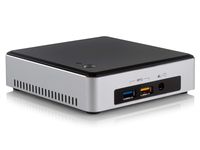
Mini PC, 4GB/128GB Windows 10, Apollo Lake J4205 , Support 4K/2.5'SATA/Dual HDMI/ WiFi/BT4.0, Mini Computer (J4205 4G/128G)
Price is below average
Current Price
$229
Average
$238.61
Min Price
$204.4
Max Price
$269.99
Price dynamics
4%
Description
MFY Mini pc Common problems and solutions
1. Blues creen:
System reason, reset system
2.Normal shutdown method:
Click win, select power, select shut down/win+x, select shut down or sign out, select shut down
3. System update failure:
First check whether the storage space has 40GB of available space. If not enough, you can't finish the online update, or you can choose to update by phone.
4. Unable to activate:
Contact customer service and need new Windows key activation.
5. Connect the monitor not working, Or stop working after a period of use: It is caused by abnormal power outages of customers. Treatment methods:
(1): Hold the reset button (the small hole behind the machine interface) for more than 5 seconds without power supply, release the power and switch on again;
(2): Disassemble the RTC battery on the motherboard of the bottom shell and unplug it for a few seconds, then plug it into the bottom shell
Product Specification
Instruction Set: 64-bit
Model: MFY J45 4G/128G
Dimension: 115 * 102.5* 41 mm
Item Weight: 321g (PC Only)
System Config
DDR: LPDDR4 4G
Storage: 128GB SSD
Operating System: Windows 10 Home
CPU: Intel Apollo Lake Pentium Processor J4205 (2M Cache, up to 2.6GHz)
Wireless Function: BT 4.0, Dual Band 2.4G+5.8G
Ethernet: 1000Mbps LAN
Graphics: Intel HD Graphics 505 (4K 30Hz)
Expand Storage: SATA 2.5-inch Hard Disk / TF Card
Interface
2* HDMI Port
4* USB3.0Port
1* RJ45 (1000Mbps LAN) Port
1* TF Card Port
1* Headphone Microphone Jack
1* DC in Port
Package Included:
1* Mini PC
1* US Power Plug
2* HDMI Cable (80cm&20cm)
1* VESA Mount & Screws
1*English Manual
1. Blues creen:
System reason, reset system
2.Normal shutdown method:
Click win, select power, select shut down/win+x, select shut down or sign out, select shut down
3. System update failure:
First check whether the storage space has 40GB of available space. If not enough, you can't finish the online update, or you can choose to update by phone.
4. Unable to activate:
Contact customer service and need new Windows key activation.
5. Connect the monitor not working, Or stop working after a period of use: It is caused by abnormal power outages of customers. Treatment methods:
(1): Hold the reset button (the small hole behind the machine interface) for more than 5 seconds without power supply, release the power and switch on again;
(2): Disassemble the RTC battery on the motherboard of the bottom shell and unplug it for a few seconds, then plug it into the bottom shell
Product Specification
Instruction Set: 64-bit
Model: MFY J45 4G/128G
Dimension: 115 * 102.5* 41 mm
Item Weight: 321g (PC Only)
System Config
DDR: LPDDR4 4G
Storage: 128GB SSD
Operating System: Windows 10 Home
CPU: Intel Apollo Lake Pentium Processor J4205 (2M Cache, up to 2.6GHz)
Wireless Function: BT 4.0, Dual Band 2.4G+5.8G
Ethernet: 1000Mbps LAN
Graphics: Intel HD Graphics 505 (4K 30Hz)
Expand Storage: SATA 2.5-inch Hard Disk / TF Card
Interface
2* HDMI Port
4* USB3.0Port
1* RJ45 (1000Mbps LAN) Port
1* TF Card Port
1* Headphone Microphone Jack
1* DC in Port
Package Included:
1* Mini PC
1* US Power Plug
2* HDMI Cable (80cm&20cm)
1* VESA Mount & Screws
1*English Manual
Price will be lower
in next 2 weeks
in next 2 weeks
According to the data, price will be lower in next two weeks, so not waste your money and track better price!
Product review & video
if you want a windows computer hooked up to your tv check this out what's happening pandenasia peter von pandey here i will tell you that i actually want a windows computer hooked up to my tv and here's the reason why there are times when i want to just have a full browser that i can access now i actually have an android tv box and i've connected that to my tv before and it gives me the android chrome browser but it's not like the full bore browser and i've noticed that when i'm trying to stream videos or go to some websites it gives me the mobile version sometimes it doesn't play the video sometimes it doesn't lay things out quite the same way and so i tried actually just plugging my laptop into the tv and that works fine i can do everything that i want and i thought well why have this like stripped down android thing instead of just a full on windows computer and while having that lap


Similar products