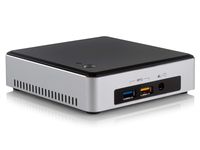
Description
✍Tips to better use this mini pc:
1.Delete the software distribution folder in windows directory regularly. This folder is used for updates for windows.
2.Uninstall any program or app that isn't needed or used. Once done, there was enough space to update Windows.
Turn on Auto Power On
1.Press "DEL" after boot or reset to enter BIOS. 2. Select the Boot interface, select ""Power on type", select "Auto power on". 3. Press F4 "Save & Exit" ,Auto power on after power failure.
✍System Configuration:
OS: Windows 10 (64-bit)
CPU: Intel Atom x5-Z8500 Processor (2M Cache, up to 2.24GHz)
GPU:Processor Graphics(Support resolutions is 3840x2160@30Hz)
RAM: 4GB DDR3
System Disk:64GB eMMC
WIFI: 802.11 a/b/g/n/ac, Dual-band WiFi 2.4GHz/5GHz , Dual wireless antenna
Bluetooth: BT4.0
✍Performance:
# of Cores:4
# of Threads:4
Processor Base Frequency:1.44 GHz
Burst Frequency:2.24 GHz
Cache:2 MB
Scenario Design Power (SDP):2 W
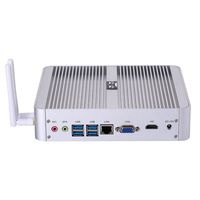
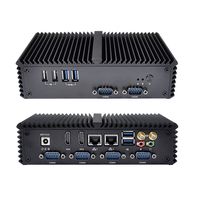
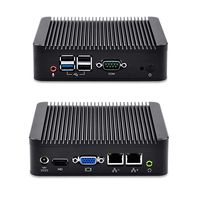
✍Button and Ports:
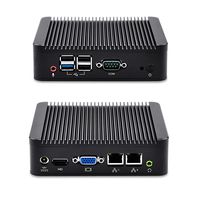
1*Power Button
3* USB 3.0 Port
1* HDMI Port(4K@30Hz)
1* DP Port
1* RJ45 (1000Mbps LAN) Port
1* DC in Port
1* Headphone Microphone Port
🎁Package Included:
1* Beelink BT4 Mini PC
1* Power Adaptor (12V/1.5A)
2* HDMI Cable (100cm&20cm)
1* User Manual
1*VESA Mount
1.Delete the software distribution folder in windows directory regularly. This folder is used for updates for windows.
2.Uninstall any program or app that isn't needed or used. Once done, there was enough space to update Windows.
Turn on Auto Power On
1.Press "DEL" after boot or reset to enter BIOS. 2. Select the Boot interface, select ""Power on type", select "Auto power on". 3. Press F4 "Save & Exit" ,Auto power on after power failure.
✍System Configuration:
OS: Windows 10 (64-bit)
CPU: Intel Atom x5-Z8500 Processor (2M Cache, up to 2.24GHz)
GPU:Processor Graphics(Support resolutions is 3840x2160@30Hz)
RAM: 4GB DDR3
System Disk:64GB eMMC
WIFI: 802.11 a/b/g/n/ac, Dual-band WiFi 2.4GHz/5GHz , Dual wireless antenna
Bluetooth: BT4.0
✍Performance:
# of Cores:4
# of Threads:4
Processor Base Frequency:1.44 GHz
Burst Frequency:2.24 GHz
Cache:2 MB
Scenario Design Power (SDP):2 W
✍Button and Ports:
1*Power Button
3* USB 3.0 Port
1* HDMI Port(4K@30Hz)
1* DP Port
1* RJ45 (1000Mbps LAN) Port
1* DC in Port
1* Headphone Microphone Port
🎁Package Included:
1* Beelink BT4 Mini PC
1* Power Adaptor (12V/1.5A)
2* HDMI Cable (100cm&20cm)
1* User Manual
1*VESA Mount
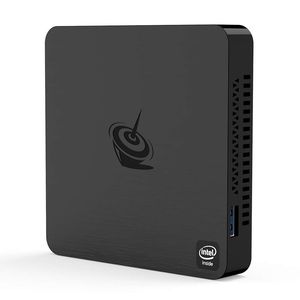
Mini PC Beelink T4,Windows 10 Intel Atom X5-Z8500 Quad Core Ultra-Quiet Mini Computer,4GB DDR/64GB eMMC,HDMI&DP Port,4K@30Hz HD,2.4G+5G WiFi,Support Auto Power On, PXE Boot, WOL, RTC Wake
Price is below average
Current Price
$149.9
Average
$157.4
Min Price
$149.9
Max Price
$159.9
Price dynamics
5%
Description
✍Tips to better use this mini pc:
1.Delete the software distribution folder in windows directory regularly. This folder is used for updates for windows.
2.Uninstall any program or app that isn't needed or used. Once done, there was enough space to update Windows.
Turn on Auto Power On
1.Press "DEL" after boot or reset to enter BIOS. 2. Select the Boot interface, select ""Power on type", select "Auto power on". 3. Press F4 "Save & Exit" ,Auto power on after power failure.
✍System Configuration:
OS: Windows 10 (64-bit)
CPU: Intel Atom x5-Z8500 Processor (2M Cache, up to 2.24GHz)
GPU:Processor Graphics(Support resolutions is 3840x2160@30Hz)
RAM: 4GB DDR3
System Disk:64GB eMMC
WIFI: 802.11 a/b/g/n/ac, Dual-band WiFi 2.4GHz/5GHz , Dual wireless antenna
Bluetooth: BT4.0
✍Performance:
# of Cores:4
# of Threads:4
Processor Base Frequency:1.44 GHz
Burst Frequency:2.24 GHz
Cache:2 MB
Scenario Design Power (SDP):2 W
✍Button and Ports:
1*Power Button
3* USB 3.0 Port
1* HDMI Port(4K@30Hz)
1* DP Port
1* RJ45 (1000Mbps LAN) Port
1* DC in Port
1* Headphone Microphone Port
🎁Package Included:
1* Beelink BT4 Mini PC
1* Power Adaptor (12V/1.5A)
2* HDMI Cable (100cm&20cm)
1* User Manual
1*VESA Mount
1.Delete the software distribution folder in windows directory regularly. This folder is used for updates for windows.
2.Uninstall any program or app that isn't needed or used. Once done, there was enough space to update Windows.
Turn on Auto Power On
1.Press "DEL" after boot or reset to enter BIOS. 2. Select the Boot interface, select ""Power on type", select "Auto power on". 3. Press F4 "Save & Exit" ,Auto power on after power failure.
✍System Configuration:
OS: Windows 10 (64-bit)
CPU: Intel Atom x5-Z8500 Processor (2M Cache, up to 2.24GHz)
GPU:Processor Graphics(Support resolutions is 3840x2160@30Hz)
RAM: 4GB DDR3
System Disk:64GB eMMC
WIFI: 802.11 a/b/g/n/ac, Dual-band WiFi 2.4GHz/5GHz , Dual wireless antenna
Bluetooth: BT4.0
✍Performance:
# of Cores:4
# of Threads:4
Processor Base Frequency:1.44 GHz
Burst Frequency:2.24 GHz
Cache:2 MB
Scenario Design Power (SDP):2 W
✍Button and Ports:
1*Power Button
3* USB 3.0 Port
1* HDMI Port(4K@30Hz)
1* DP Port
1* RJ45 (1000Mbps LAN) Port
1* DC in Port
1* Headphone Microphone Port
🎁Package Included:
1* Beelink BT4 Mini PC
1* Power Adaptor (12V/1.5A)
2* HDMI Cable (100cm&20cm)
1* User Manual
1*VESA Mount
Price will be lower
in next 2 weeks
in next 2 weeks
According to the data, price will be lower in next two weeks, so not waste your money and track better price!
Product review & video
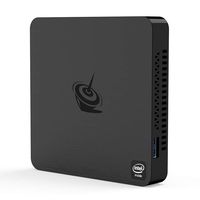
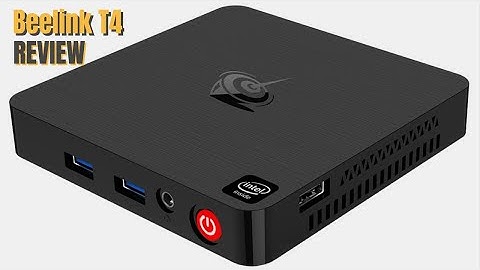
peeling tea for windows thin-client review the cheapest Windows 10 PC is here Intel belatedly acknowledged and apologized to its customers for CPU shipment delays that have been a bit of a distraction for the chip giant smaller vendors outside of the usual suspects Dell Lenovo or HP have had to make do with scraps B link is one of them and has been forced to be very creative in finding parts for its latest entry level windows thin client the BT four not to be confused with the BT 4 or the BT 3 pro this is why they didn't have any other choice but to use a processor that will be 5 years old next year the Chinese PC manufacturer is not an unknown quantity over the past three years we examined the B link l55 the m1 the a1 and the bt7 and they all left a good impression during their reviews the t4 is tiny at 106 by 106 by 17.7 millimeters it feels solidly built out of a black matte plastic

Similar products