Description
Aobi passed the professional the quality inspection and security certification.
All products have been well tested before shipped out.
Specifications:
1. Charging: Please charge the headset before use it(The red light will turn off when fully charged).
2. Pairing: If you can't pair the bluetooth with your phone, please keep pressing the button for 5-7 seconds until the LED light flashing red and blue.
If you still can't pair it, please check if the headset is previously connected with other devices. Please find that device and disconnect it and then try again.
Or please check if your phone has already been connected with other bluetooth device.
3. Connecting: Open the bluetooth on your cellphone, and then you finish the pairing, the passcode is 0000. If your phone can't search the bluetooth, please kindly try to restart your phone.
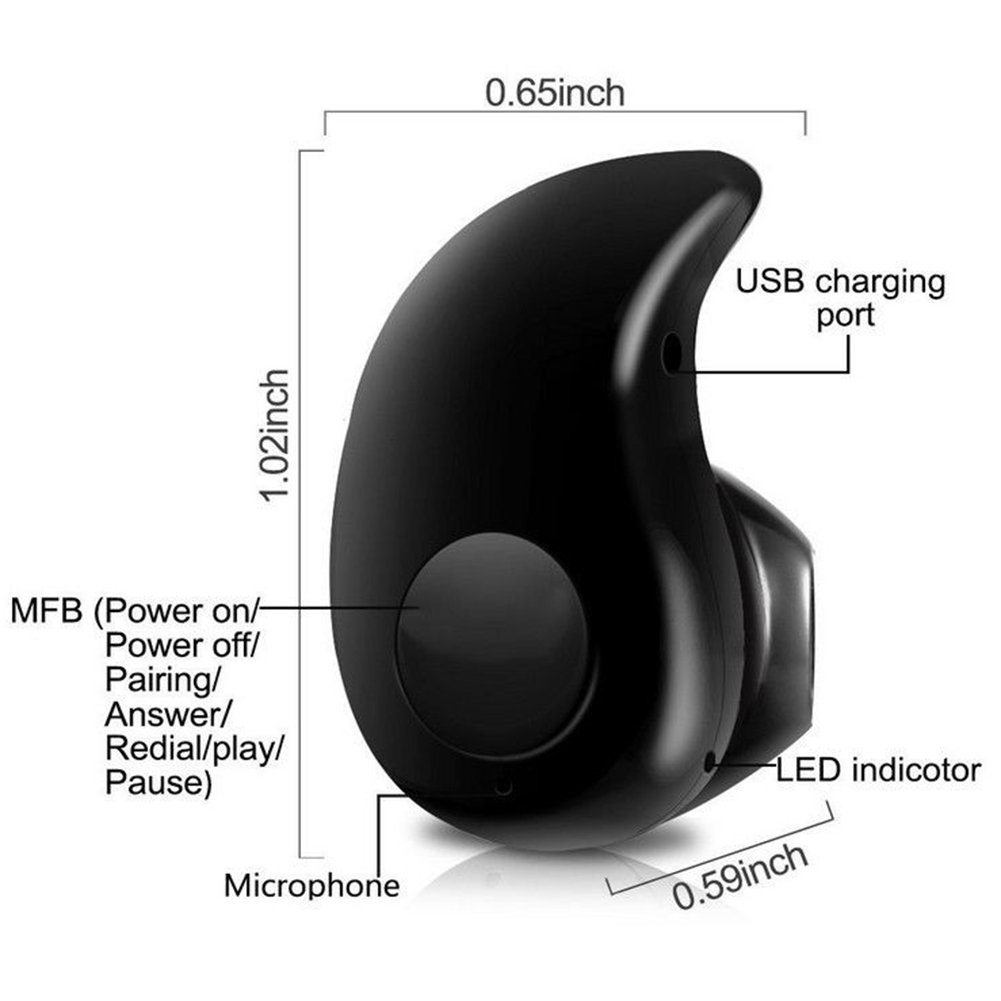
4. LED indicator: If the LED light flashing blue, it means that the headset is only turned on. In this case, you are able to connect it with your cellphone. Please turn off the headset and then have a try.
If the LED light flashing red, it means that the headset is turned off.
If the LED light flashing blue and red, it means that the headset is going into pairing mode, in this case, you can connect it with your cellphone.
5. Language change: There will be voice prompt in each steps, if you change the language to Chinese by accident, please try the below steps to change it back: turn on the headset, before bluetooth pairing, long press the function key 1-2 seconds to change the language from Chinese to English.
Package included:
1 x Headset(Just one for your right or left ear)
1 x instruction
1 x USB cable
All products have been well tested before shipped out.
Specifications:
1. Charging: Please charge the headset before use it(The red light will turn off when fully charged).
2. Pairing: If you can't pair the bluetooth with your phone, please keep pressing the button for 5-7 seconds until the LED light flashing red and blue.
If you still can't pair it, please check if the headset is previously connected with other devices. Please find that device and disconnect it and then try again.
Or please check if your phone has already been connected with other bluetooth device.
3. Connecting: Open the bluetooth on your cellphone, and then you finish the pairing, the passcode is 0000. If your phone can't search the bluetooth, please kindly try to restart your phone.
4. LED indicator: If the LED light flashing blue, it means that the headset is only turned on. In this case, you are able to connect it with your cellphone. Please turn off the headset and then have a try.
If the LED light flashing red, it means that the headset is turned off.
If the LED light flashing blue and red, it means that the headset is going into pairing mode, in this case, you can connect it with your cellphone.
5. Language change: There will be voice prompt in each steps, if you change the language to Chinese by accident, please try the below steps to change it back: turn on the headset, before bluetooth pairing, long press the function key 1-2 seconds to change the language from Chinese to English.
Package included:
1 x Headset(Just one for your right or left ear)
1 x instruction
1 x USB cable
Mini Wireless Bluetooth 4.0 Stereo in-Ear Headset Earphone for iPhone Samsung LG Sony HTC and Other Smartphones Tablets (Black)
Current Price
$9.99
Average
$4.94
Min Price
$1.41
Max Price
$9.99
Price dynamics
51%
Description
Aobi passed the professional the quality inspection and security certification.
All products have been well tested before shipped out.
Specifications:
1. Charging: Please charge the headset before use it(The red light will turn off when fully charged).
2. Pairing: If you can't pair the bluetooth with your phone, please keep pressing the button for 5-7 seconds until the LED light flashing red and blue.
If you still can't pair it, please check if the headset is previously connected with other devices. Please find that device and disconnect it and then try again.
Or please check if your phone has already been connected with other bluetooth device.
3. Connecting: Open the bluetooth on your cellphone, and then you finish the pairing, the passcode is 0000. If your phone can't search the bluetooth, please kindly try to restart your phone.
4. LED indicator: If the LED light flashing blue, it means that the headset is only turned on. In this case, you are able to connect it with your cellphone. Please turn off the headset and then have a try.
If the LED light flashing red, it means that the headset is turned off.
If the LED light flashing blue and red, it means that the headset is going into pairing mode, in this case, you can connect it with your cellphone.
5. Language change: There will be voice prompt in each steps, if you change the language to Chinese by accident, please try the below steps to change it back: turn on the headset, before bluetooth pairing, long press the function key 1-2 seconds to change the language from Chinese to English.
Package included:
1 x Headset(Just one for your right or left ear)
1 x instruction
1 x USB cable
All products have been well tested before shipped out.
Specifications:
1. Charging: Please charge the headset before use it(The red light will turn off when fully charged).
2. Pairing: If you can't pair the bluetooth with your phone, please keep pressing the button for 5-7 seconds until the LED light flashing red and blue.
If you still can't pair it, please check if the headset is previously connected with other devices. Please find that device and disconnect it and then try again.
Or please check if your phone has already been connected with other bluetooth device.
3. Connecting: Open the bluetooth on your cellphone, and then you finish the pairing, the passcode is 0000. If your phone can't search the bluetooth, please kindly try to restart your phone.
4. LED indicator: If the LED light flashing blue, it means that the headset is only turned on. In this case, you are able to connect it with your cellphone. Please turn off the headset and then have a try.
If the LED light flashing red, it means that the headset is turned off.
If the LED light flashing blue and red, it means that the headset is going into pairing mode, in this case, you can connect it with your cellphone.
5. Language change: There will be voice prompt in each steps, if you change the language to Chinese by accident, please try the below steps to change it back: turn on the headset, before bluetooth pairing, long press the function key 1-2 seconds to change the language from Chinese to English.
Package included:
1 x Headset(Just one for your right or left ear)
1 x instruction
1 x USB cable
Price will be lower
in next 2 weeks
in next 2 weeks
According to the data, price will be lower in next two weeks, so not waste your money and track better price!
Product review & video
pop goes the weasel what doesn't that mean what's going on here look at that fancy packaging if that doesn't pique your interest I don't know what would eco-friendly types of packs kind of fitting the shape of it the futuristic vibe because inside is a highly requested piece of tech started out on Kickstarter you've seen in your headphones you've seen over ear headphones and this is a combination of both some level of intelligence here able to tune sound specifically for your anatomical makeup that your unique eardrums function that sounds incredibly sophisticated and my understanding is that it is if this is the future right here I need to know about it and so do you they're called neuro the actual headphones are called neuro phone type-c cable lightning cable micro USB and also an analog cable some people's reactions to these things were banana Wow what we're gonna find out if the min


Similar products