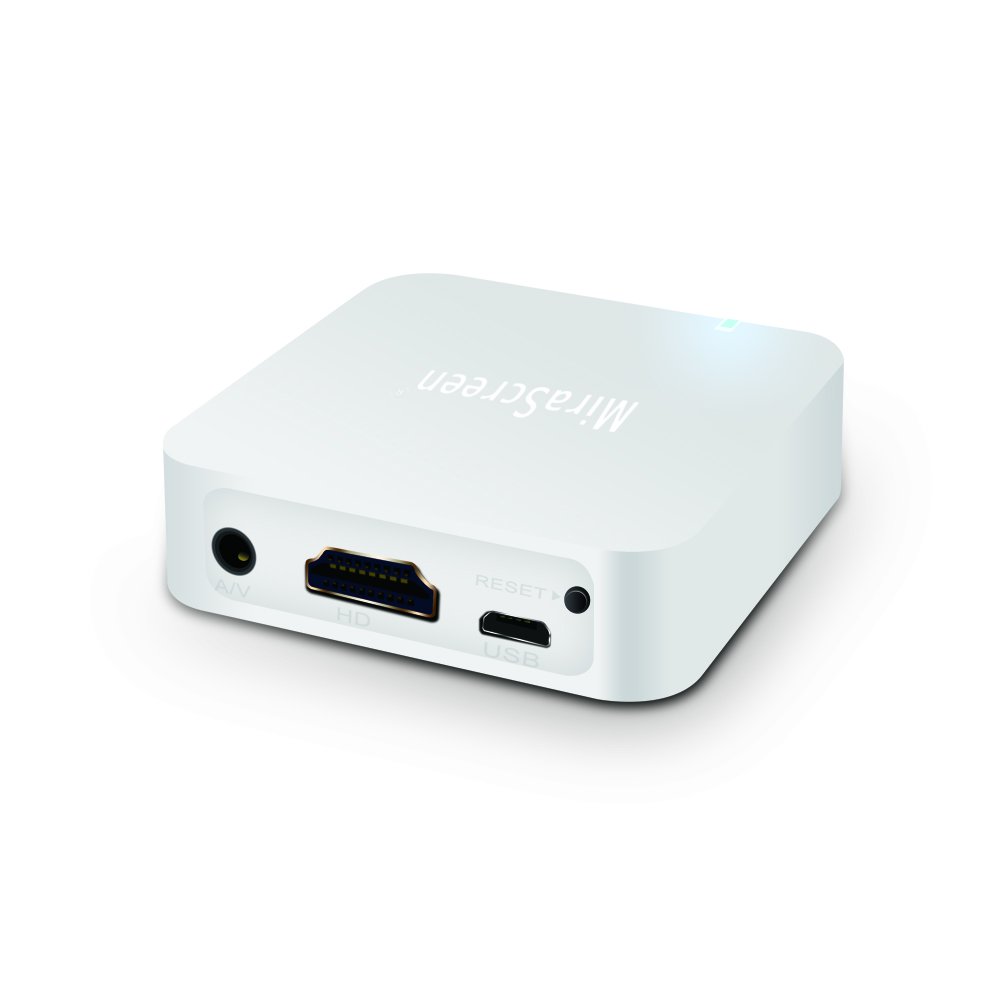
Description
Mirascreen Car Screen Mirroring Dongle Cast Phone to Car Screen Support iOS Android GPS Navigation with RCA(CVBS) and HDMI Output
MiraScreen X7 Specifications:
CPU: AM8252B
DDR: DDR3 1Gbit
Network: IEEE 802.11 b/g/n
Compatible: for Android / IOS system
Input: WiFi, supports AirPlay&Miracast/Allsharecast/Screen Mirroring/DLNA
A/V Output: CVBS/HDMI(HDMI cable is not included)
Resolution Support: HDMI 720P; CVBS 720P
Voltage: DC 5V
Power: 12V 1A
Working environment temperature: -20C°-70 C°
Hardware Installation
1. Turn on your TV and power up the MiraScreen dongle by connecting the USB cable from the dongle to a USB adapter (5V1A). Please place the Wi-Fi receiver at a location with good Wi-Fi reception
2. Connect the MiraScreen dongle directly into an HDTV input port on your TV
3. If you prefer to use the RCA ports, please unplug the HDTV cable before connecting power. Then connect to the monitor with the RCA cables and select the appropriate signal source
4. Your MiraScreen dongle now starts up and will display instructions on your TV screen. Follow the instructions to complete setup
Note: HD and AV output can't exsist at the same time Please choose one of them. HD signals maybe the first choice
NOTE:
1. Please MAKE SURE your car Display has HDMI or CVBS input port. As this Car Miracast Box needs to connect with your car display by them
2. Please plug the USB cable to supply power, power must be no less than 5V/2A
3. Car Airplay Adapter can be used to mirror your mobile device to a car display, Mirror Link Adapter for car can also mirror your mobile device to your HDTV or projector or monitors. WiFi Mirror Car Adapter can be widely used in live broadcast, teaching or meeting or sharing, etc. Transfer images, files, audios, and videos to the big screen
4. Please Note that the car airplay adapter doesn't work with paid APP which are encrypted and are not authorized
MiraScreen X7 Specifications:
CPU: AM8252B
DDR: DDR3 1Gbit
Network: IEEE 802.11 b/g/n
Compatible: for Android / IOS system
Input: WiFi, supports AirPlay&Miracast/Allsharecast/Screen Mirroring/DLNA
A/V Output: CVBS/HDMI(HDMI cable is not included)
Resolution Support: HDMI 720P; CVBS 720P
Voltage: DC 5V
Power: 12V 1A
Working environment temperature: -20C°-70 C°
Hardware Installation
1. Turn on your TV and power up the MiraScreen dongle by connecting the USB cable from the dongle to a USB adapter (5V1A). Please place the Wi-Fi receiver at a location with good Wi-Fi reception
2. Connect the MiraScreen dongle directly into an HDTV input port on your TV
3. If you prefer to use the RCA ports, please unplug the HDTV cable before connecting power. Then connect to the monitor with the RCA cables and select the appropriate signal source
4. Your MiraScreen dongle now starts up and will display instructions on your TV screen. Follow the instructions to complete setup
Note: HD and AV output can't exsist at the same time Please choose one of them. HD signals maybe the first choice
NOTE:
1. Please MAKE SURE your car Display has HDMI or CVBS input port. As this Car Miracast Box needs to connect with your car display by them
2. Please plug the USB cable to supply power, power must be no less than 5V/2A
3. Car Airplay Adapter can be used to mirror your mobile device to a car display, Mirror Link Adapter for car can also mirror your mobile device to your HDTV or projector or monitors. WiFi Mirror Car Adapter can be widely used in live broadcast, teaching or meeting or sharing, etc. Transfer images, files, audios, and videos to the big screen
4. Please Note that the car airplay adapter doesn't work with paid APP which are encrypted and are not authorized
Mirascreen Car WiFi Display Box Mirror Phone to Car Screen Mirroring Airplay DLNA Miracast Support iOS Android GPS Navigation with RCA(CVBS) and HDMI Output
Current Price
$31.99
Average
$30.34
Min Price
$28.99
Max Price
$31.99
Price dynamics
5%
Description
Mirascreen Car Screen Mirroring Dongle Cast Phone to Car Screen Support iOS Android GPS Navigation with RCA(CVBS) and HDMI Output
MiraScreen X7 Specifications:
CPU: AM8252B
DDR: DDR3 1Gbit
Network: IEEE 802.11 b/g/n
Compatible: for Android / IOS system
Input: WiFi, supports AirPlay&Miracast/Allsharecast/Screen Mirroring/DLNA
A/V Output: CVBS/HDMI(HDMI cable is not included)
Resolution Support: HDMI 720P; CVBS 720P
Voltage: DC 5V
Power: 12V 1A
Working environment temperature: -20C°-70 C°
Hardware Installation
1. Turn on your TV and power up the MiraScreen dongle by connecting the USB cable from the dongle to a USB adapter (5V1A). Please place the Wi-Fi receiver at a location with good Wi-Fi reception
2. Connect the MiraScreen dongle directly into an HDTV input port on your TV
3. If you prefer to use the RCA ports, please unplug the HDTV cable before connecting power. Then connect to the monitor with the RCA cables and select the appropriate signal source
4. Your MiraScreen dongle now starts up and will display instructions on your TV screen. Follow the instructions to complete setup
Note: HD and AV output can't exsist at the same time Please choose one of them. HD signals maybe the first choice
NOTE:
1. Please MAKE SURE your car Display has HDMI or CVBS input port. As this Car Miracast Box needs to connect with your car display by them
2. Please plug the USB cable to supply power, power must be no less than 5V/2A
3. Car Airplay Adapter can be used to mirror your mobile device to a car display, Mirror Link Adapter for car can also mirror your mobile device to your HDTV or projector or monitors. WiFi Mirror Car Adapter can be widely used in live broadcast, teaching or meeting or sharing, etc. Transfer images, files, audios, and videos to the big screen
4. Please Note that the car airplay adapter doesn't work with paid APP which are encrypted and are not authorized
MiraScreen X7 Specifications:
CPU: AM8252B
DDR: DDR3 1Gbit
Network: IEEE 802.11 b/g/n
Compatible: for Android / IOS system
Input: WiFi, supports AirPlay&Miracast/Allsharecast/Screen Mirroring/DLNA
A/V Output: CVBS/HDMI(HDMI cable is not included)
Resolution Support: HDMI 720P; CVBS 720P
Voltage: DC 5V
Power: 12V 1A
Working environment temperature: -20C°-70 C°
Hardware Installation
1. Turn on your TV and power up the MiraScreen dongle by connecting the USB cable from the dongle to a USB adapter (5V1A). Please place the Wi-Fi receiver at a location with good Wi-Fi reception
2. Connect the MiraScreen dongle directly into an HDTV input port on your TV
3. If you prefer to use the RCA ports, please unplug the HDTV cable before connecting power. Then connect to the monitor with the RCA cables and select the appropriate signal source
4. Your MiraScreen dongle now starts up and will display instructions on your TV screen. Follow the instructions to complete setup
Note: HD and AV output can't exsist at the same time Please choose one of them. HD signals maybe the first choice
NOTE:
1. Please MAKE SURE your car Display has HDMI or CVBS input port. As this Car Miracast Box needs to connect with your car display by them
2. Please plug the USB cable to supply power, power must be no less than 5V/2A
3. Car Airplay Adapter can be used to mirror your mobile device to a car display, Mirror Link Adapter for car can also mirror your mobile device to your HDTV or projector or monitors. WiFi Mirror Car Adapter can be widely used in live broadcast, teaching or meeting or sharing, etc. Transfer images, files, audios, and videos to the big screen
4. Please Note that the car airplay adapter doesn't work with paid APP which are encrypted and are not authorized
Price will be lower
in next 2 weeks
in next 2 weeks
According to the data, price will be lower in next two weeks, so not waste your money and track better price!

Similar products