- HomeElectronicsAccessories & SuppliesAudio & Video AccessoriesCables & InterconnectsVideo CablesHDMI Cables
Description
MiraScreen L7-5 HDMI HDTV Adapter Digital 1080P AV Display Adapter for Apple iPhone iPad Samsung Android Smartphones Screen Sharing Casting Mirroring
For your message:
1.Please check your TV whether with HDMI port on first before you purchase this item.
2.Not work with iPhone 4, 4s and Android 4.4 below devices. Please check whether your phone's version is compatible before you purchase.
3.Select the corresponding HDMI channel.
Compatible Device: Compatible with Apple and Android devices. Compatible with iOS 9+, iPhone X/iPhone 8 plus/iPhone 7/7 Plus/iPhone 6/6s/6 Plus/6s Plus/iPhone 5/5c/5s and iPad devices, also Compatible with Android 4.4+ Samsung Galaxy S7/S7edge/S6/S6 edge/S/S4/S3 NOTE2/3/4/5/7/Edge,Google Nexus 5/ 5x/ 6p,Huawei P8/P9 etc. Please check whether your phone's version is compatible with before you purchase.
How to operate:
You have to make sure all cords are connected or they will not work.
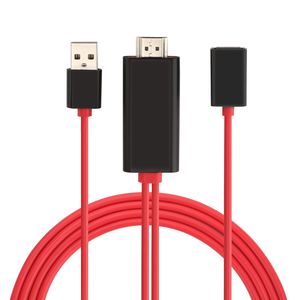
1. Plug the HDMI connector to the TV (Projector/Monitor) HDMI port.
2. Connect the USB cable to a power adapter(at least 5V 1A) to supply power for the HDMI connector.
3. Plug your phone charging cable to the female connector and lightning to your iPhone or micro-USB/Type-C into your Android device
4. Then the screen will pop out a "Trust" option, just click it.
5. Wait for a few seconds for initialization, the screen will be shown on TV.
What's in the package:
1x MiraScreen dongle
1x Manual User
For your message:
1.Please check your TV whether with HDMI port on first before you purchase this item.
2.Not work with iPhone 4, 4s and Android 4.4 below devices. Please check whether your phone's version is compatible before you purchase.
3.Select the corresponding HDMI channel.
Compatible Device: Compatible with Apple and Android devices. Compatible with iOS 9+, iPhone X/iPhone 8 plus/iPhone 7/7 Plus/iPhone 6/6s/6 Plus/6s Plus/iPhone 5/5c/5s and iPad devices, also Compatible with Android 4.4+ Samsung Galaxy S7/S7edge/S6/S6 edge/S/S4/S3 NOTE2/3/4/5/7/Edge,Google Nexus 5/ 5x/ 6p,Huawei P8/P9 etc. Please check whether your phone's version is compatible with before you purchase.
How to operate:
You have to make sure all cords are connected or they will not work.
1. Plug the HDMI connector to the TV (Projector/Monitor) HDMI port.
2. Connect the USB cable to a power adapter(at least 5V 1A) to supply power for the HDMI connector.
3. Plug your phone charging cable to the female connector and lightning to your iPhone or micro-USB/Type-C into your Android device
4. Then the screen will pop out a "Trust" option, just click it.
5. Wait for a few seconds for initialization, the screen will be shown on TV.
What's in the package:
1x MiraScreen dongle
1x Manual User
MiraScreen HDMI HDTV Adapter Digital 1080P AV Display Adapter for Apple iPhone iPad Samsung Android Smartphones Screen Sharing Casting Mirroring
Current Price
$18.99
Average
$17.99
Min Price
$16.99
Max Price
$18.99
Price dynamics
5%
Description
MiraScreen L7-5 HDMI HDTV Adapter Digital 1080P AV Display Adapter for Apple iPhone iPad Samsung Android Smartphones Screen Sharing Casting Mirroring
For your message:
1.Please check your TV whether with HDMI port on first before you purchase this item.
2.Not work with iPhone 4, 4s and Android 4.4 below devices. Please check whether your phone's version is compatible before you purchase.
3.Select the corresponding HDMI channel.
Compatible Device: Compatible with Apple and Android devices. Compatible with iOS 9+, iPhone X/iPhone 8 plus/iPhone 7/7 Plus/iPhone 6/6s/6 Plus/6s Plus/iPhone 5/5c/5s and iPad devices, also Compatible with Android 4.4+ Samsung Galaxy S7/S7edge/S6/S6 edge/S/S4/S3 NOTE2/3/4/5/7/Edge,Google Nexus 5/ 5x/ 6p,Huawei P8/P9 etc. Please check whether your phone's version is compatible with before you purchase.
How to operate:
You have to make sure all cords are connected or they will not work.
1. Plug the HDMI connector to the TV (Projector/Monitor) HDMI port.
2. Connect the USB cable to a power adapter(at least 5V 1A) to supply power for the HDMI connector.
3. Plug your phone charging cable to the female connector and lightning to your iPhone or micro-USB/Type-C into your Android device
4. Then the screen will pop out a "Trust" option, just click it.
5. Wait for a few seconds for initialization, the screen will be shown on TV.
What's in the package:
1x MiraScreen dongle
1x Manual User
For your message:
1.Please check your TV whether with HDMI port on first before you purchase this item.
2.Not work with iPhone 4, 4s and Android 4.4 below devices. Please check whether your phone's version is compatible before you purchase.
3.Select the corresponding HDMI channel.
Compatible Device: Compatible with Apple and Android devices. Compatible with iOS 9+, iPhone X/iPhone 8 plus/iPhone 7/7 Plus/iPhone 6/6s/6 Plus/6s Plus/iPhone 5/5c/5s and iPad devices, also Compatible with Android 4.4+ Samsung Galaxy S7/S7edge/S6/S6 edge/S/S4/S3 NOTE2/3/4/5/7/Edge,Google Nexus 5/ 5x/ 6p,Huawei P8/P9 etc. Please check whether your phone's version is compatible with before you purchase.
How to operate:
You have to make sure all cords are connected or they will not work.
1. Plug the HDMI connector to the TV (Projector/Monitor) HDMI port.
2. Connect the USB cable to a power adapter(at least 5V 1A) to supply power for the HDMI connector.
3. Plug your phone charging cable to the female connector and lightning to your iPhone or micro-USB/Type-C into your Android device
4. Then the screen will pop out a "Trust" option, just click it.
5. Wait for a few seconds for initialization, the screen will be shown on TV.
What's in the package:
1x MiraScreen dongle
1x Manual User
Price will be lower
in next 2 weeks
in next 2 weeks
According to the data, price will be lower in next two weeks, so not waste your money and track better price!

Similar products






































