Description
3 Optional Alarm Sounds with High/Low Volume Adjustment
Enjoying waking up by nature’s sound: wave, bird’s singing or chord ringtone.
The alarm volume can be set to high or low with one button switch.
Easy-to-use Control Buttons
With large snooze button on top, mornings just got easier. Enjoy a comfortable and prolonged wake-up with the repeating snooze option, and experience zero stress when setting the time or alarm.
Large 5 inch Display
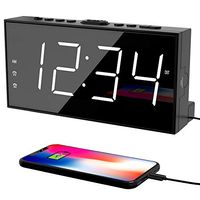
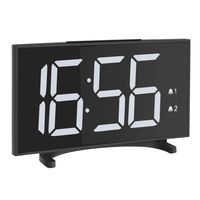
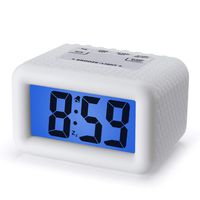
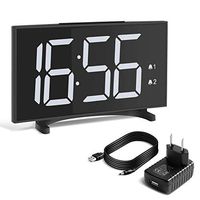
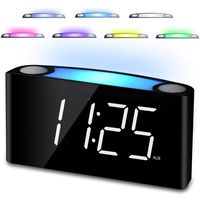
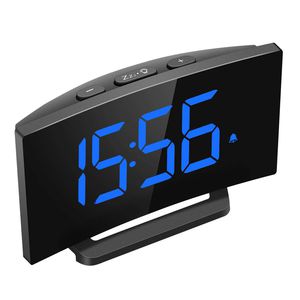
Mpow digital alarm clock boasts a large, 1.4-inch LED for increased visibility. The time and alarm indicator are clearly displayed on it. Time displays in both 12 and 24 hours formats.
How to Set Alarm Clock Ringtones:
1. In the Time Display mode, press “+” button once, it will play one ringtone.
2. Press the “+”button once more, it will switch to other ringtone. Three ringtones can be changed circularly.
3. Each ringtone will automatically turn off after 5 minutes. The last ringtone you selected will be set as the alarm sounds.
NOTE: Before selecting the ringtones, please push the button to the “LOCK” position.
How to Set Snooze Time:
1. When the alarm is activated, the alarm icon will be displayed on the screen. When the alarm is ringing, the alarm icon will flash, press the “Snooze” button once to temporarily stop the alarm. It will ring again after 9 minutes.
2. When the alarm is sounding, press “+” or “-“button to turn off the snooze function, the alarm will stop ringing.
Package Included:
1 × Mpow Digital Alarm Clock
1 × Power Adapter
1 ×USB Charging Cable
1 × User Manual
Enjoying waking up by nature’s sound: wave, bird’s singing or chord ringtone.
The alarm volume can be set to high or low with one button switch.
Easy-to-use Control Buttons
With large snooze button on top, mornings just got easier. Enjoy a comfortable and prolonged wake-up with the repeating snooze option, and experience zero stress when setting the time or alarm.
Large 5 inch Display
Mpow digital alarm clock boasts a large, 1.4-inch LED for increased visibility. The time and alarm indicator are clearly displayed on it. Time displays in both 12 and 24 hours formats.
How to Set Alarm Clock Ringtones:
1. In the Time Display mode, press “+” button once, it will play one ringtone.
2. Press the “+”button once more, it will switch to other ringtone. Three ringtones can be changed circularly.
3. Each ringtone will automatically turn off after 5 minutes. The last ringtone you selected will be set as the alarm sounds.
NOTE: Before selecting the ringtones, please push the button to the “LOCK” position.
How to Set Snooze Time:
1. When the alarm is activated, the alarm icon will be displayed on the screen. When the alarm is ringing, the alarm icon will flash, press the “Snooze” button once to temporarily stop the alarm. It will ring again after 9 minutes.
2. When the alarm is sounding, press “+” or “-“button to turn off the snooze function, the alarm will stop ringing.
Package Included:
1 × Mpow Digital Alarm Clock
1 × Power Adapter
1 ×USB Charging Cable
1 × User Manual
Mpow Digital Alarm Clock, 5'' Curved LED Screen, 6 Brightness, 3 Alarm Sounds, Easy Digital Clock for Kids and Adults, Alarm Clocks for Bedrooms Kitchen Office, Adjustable Volume, Snooze, 12/24H
Price is below average
Current Price
$15.99
Average
$17.33
Min Price
$11.99
Max Price
$33.09
Price dynamics
8%
Description
3 Optional Alarm Sounds with High/Low Volume Adjustment
Enjoying waking up by nature’s sound: wave, bird’s singing or chord ringtone.
The alarm volume can be set to high or low with one button switch.
Easy-to-use Control Buttons
With large snooze button on top, mornings just got easier. Enjoy a comfortable and prolonged wake-up with the repeating snooze option, and experience zero stress when setting the time or alarm.
Large 5 inch Display
Mpow digital alarm clock boasts a large, 1.4-inch LED for increased visibility. The time and alarm indicator are clearly displayed on it. Time displays in both 12 and 24 hours formats.
How to Set Alarm Clock Ringtones:
1. In the Time Display mode, press “+” button once, it will play one ringtone.
2. Press the “+”button once more, it will switch to other ringtone. Three ringtones can be changed circularly.
3. Each ringtone will automatically turn off after 5 minutes. The last ringtone you selected will be set as the alarm sounds.
NOTE: Before selecting the ringtones, please push the button to the “LOCK” position.
How to Set Snooze Time:
1. When the alarm is activated, the alarm icon will be displayed on the screen. When the alarm is ringing, the alarm icon will flash, press the “Snooze” button once to temporarily stop the alarm. It will ring again after 9 minutes.
2. When the alarm is sounding, press “+” or “-“button to turn off the snooze function, the alarm will stop ringing.
Package Included:
1 × Mpow Digital Alarm Clock
1 × Power Adapter
1 ×USB Charging Cable
1 × User Manual
Enjoying waking up by nature’s sound: wave, bird’s singing or chord ringtone.
The alarm volume can be set to high or low with one button switch.
Easy-to-use Control Buttons
With large snooze button on top, mornings just got easier. Enjoy a comfortable and prolonged wake-up with the repeating snooze option, and experience zero stress when setting the time or alarm.
Large 5 inch Display
Mpow digital alarm clock boasts a large, 1.4-inch LED for increased visibility. The time and alarm indicator are clearly displayed on it. Time displays in both 12 and 24 hours formats.
How to Set Alarm Clock Ringtones:
1. In the Time Display mode, press “+” button once, it will play one ringtone.
2. Press the “+”button once more, it will switch to other ringtone. Three ringtones can be changed circularly.
3. Each ringtone will automatically turn off after 5 minutes. The last ringtone you selected will be set as the alarm sounds.
NOTE: Before selecting the ringtones, please push the button to the “LOCK” position.
How to Set Snooze Time:
1. When the alarm is activated, the alarm icon will be displayed on the screen. When the alarm is ringing, the alarm icon will flash, press the “Snooze” button once to temporarily stop the alarm. It will ring again after 9 minutes.
2. When the alarm is sounding, press “+” or “-“button to turn off the snooze function, the alarm will stop ringing.
Package Included:
1 × Mpow Digital Alarm Clock
1 × Power Adapter
1 ×USB Charging Cable
1 × User Manual
Price will be lower
in next 2 weeks
in next 2 weeks
According to the data, price will be lower in next two weeks, so not waste your money and track better price!
Similar products