Description
Description
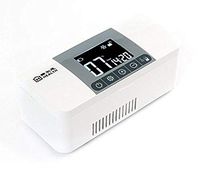
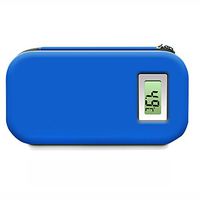
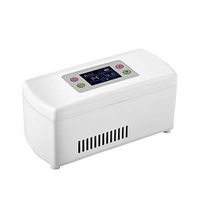
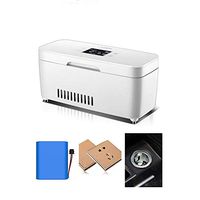
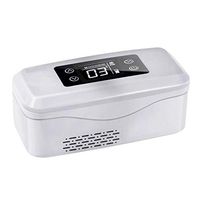
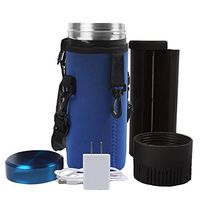
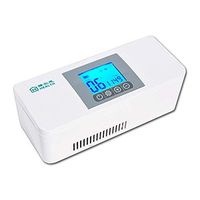
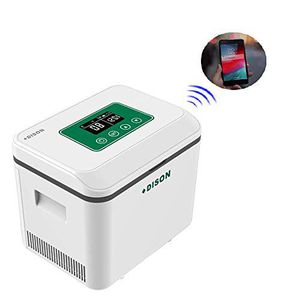
★The body is designed with five layers of backing enamel, 2.6-inch LCD screen, UV protection, no trace of wear and tear, more durable outdoor use, carrying a car charger when traveling.
Mobile APP connection process:
1. QR code on the mobile phone scanning manual, download DISONCARE APP.
2. Press and hold the SET button on the refrigerated box, the wifi will flash on the screen.
3. Mobile phone open APP.
4. Open "Phone Settings" to find "WLAN".
5. Find the "DisonSmart" hotspot in the mobile WLAN, click on the connection.
6. Return to DISONCARE APP.
7. Click on the top right corner and select "Wifi Settings".
8. Enter the wifi account and password you want to connect to.
9. After hearing the "click", waiting for the connection, the wifi screen of the refrigerated box does not flash, it means the connection is successful.
Note:
❣ Please allow 1-3mm error due to manual measurement.
❣ Due to the light and screen differences, the color of the item may be slightly different from the display.
Specifications
Product model: BC-1500R
Material: PC+ABS
Product size: 240*170*195mm
Product capacity: 180*100*80mm
Product weight: 3.5KG
Refrigeration temperature: 2-25 ° C (35.6-77℉)
Battery capacity: 7.4V 13000MAH
Display: 2.6 inch LCD screen
If you have any questions, do not hesitate to contact us and send us a message
We will contact you within 24 business hours and provide a satisfactory solution.
★The body is designed with five layers of backing enamel, 2.6-inch LCD screen, UV protection, no trace of wear and tear, more durable outdoor use, carrying a car charger when traveling.
Mobile APP connection process:
1. QR code on the mobile phone scanning manual, download DISONCARE APP.
2. Press and hold the SET button on the refrigerated box, the wifi will flash on the screen.
3. Mobile phone open APP.
4. Open "Phone Settings" to find "WLAN".
5. Find the "DisonSmart" hotspot in the mobile WLAN, click on the connection.
6. Return to DISONCARE APP.
7. Click on the top right corner and select "Wifi Settings".
8. Enter the wifi account and password you want to connect to.
9. After hearing the "click", waiting for the connection, the wifi screen of the refrigerated box does not flash, it means the connection is successful.
Note:
❣ Please allow 1-3mm error due to manual measurement.
❣ Due to the light and screen differences, the color of the item may be slightly different from the display.
Specifications
Product model: BC-1500R
Material: PC+ABS
Product size: 240*170*195mm
Product capacity: 180*100*80mm
Product weight: 3.5KG
Refrigeration temperature: 2-25 ° C (35.6-77℉)
Battery capacity: 7.4V 13000MAH
Display: 2.6 inch LCD screen
If you have any questions, do not hesitate to contact us and send us a message
We will contact you within 24 business hours and provide a satisfactory solution.
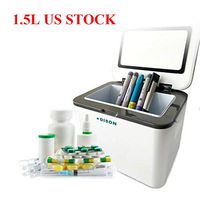
MTPLUM Portable Large Capacity Insulin Refrigerated Box, Medicine Cooler Refrigerator for Car, Travel, Home - LCD Display with App Connecting Medication Reminder (1500ml)
Current Price
$508.99
Average
$508.99
Min Price
$508.99
Max Price
$508.99
Description
Description
★The body is designed with five layers of backing enamel, 2.6-inch LCD screen, UV protection, no trace of wear and tear, more durable outdoor use, carrying a car charger when traveling.
Mobile APP connection process:
1. QR code on the mobile phone scanning manual, download DISONCARE APP.
2. Press and hold the SET button on the refrigerated box, the wifi will flash on the screen.
3. Mobile phone open APP.
4. Open "Phone Settings" to find "WLAN".
5. Find the "DisonSmart" hotspot in the mobile WLAN, click on the connection.
6. Return to DISONCARE APP.
7. Click on the top right corner and select "Wifi Settings".
8. Enter the wifi account and password you want to connect to.
9. After hearing the "click", waiting for the connection, the wifi screen of the refrigerated box does not flash, it means the connection is successful.
Note:
❣ Please allow 1-3mm error due to manual measurement.
❣ Due to the light and screen differences, the color of the item may be slightly different from the display.
Specifications
Product model: BC-1500R
Material: PC+ABS
Product size: 240*170*195mm
Product capacity: 180*100*80mm
Product weight: 3.5KG
Refrigeration temperature: 2-25 ° C (35.6-77℉)
Battery capacity: 7.4V 13000MAH
Display: 2.6 inch LCD screen
If you have any questions, do not hesitate to contact us and send us a message
We will contact you within 24 business hours and provide a satisfactory solution.
★The body is designed with five layers of backing enamel, 2.6-inch LCD screen, UV protection, no trace of wear and tear, more durable outdoor use, carrying a car charger when traveling.
Mobile APP connection process:
1. QR code on the mobile phone scanning manual, download DISONCARE APP.
2. Press and hold the SET button on the refrigerated box, the wifi will flash on the screen.
3. Mobile phone open APP.
4. Open "Phone Settings" to find "WLAN".
5. Find the "DisonSmart" hotspot in the mobile WLAN, click on the connection.
6. Return to DISONCARE APP.
7. Click on the top right corner and select "Wifi Settings".
8. Enter the wifi account and password you want to connect to.
9. After hearing the "click", waiting for the connection, the wifi screen of the refrigerated box does not flash, it means the connection is successful.
Note:
❣ Please allow 1-3mm error due to manual measurement.
❣ Due to the light and screen differences, the color of the item may be slightly different from the display.
Specifications
Product model: BC-1500R
Material: PC+ABS
Product size: 240*170*195mm
Product capacity: 180*100*80mm
Product weight: 3.5KG
Refrigeration temperature: 2-25 ° C (35.6-77℉)
Battery capacity: 7.4V 13000MAH
Display: 2.6 inch LCD screen
If you have any questions, do not hesitate to contact us and send us a message
We will contact you within 24 business hours and provide a satisfactory solution.
Price will be lower
in next 2 weeks
in next 2 weeks
According to the data, price will be lower in next two weeks, so not waste your money and track better price!