Description
After entering the code function setting, it is also possible to press the setup button for more than 2 seconds to skip to the next parameter setting. Short-press the setup button to adjust the parameter value. Refer to the following table for the meaning of the code:
Ac: Temperature 1 error calibration parameter. A positive number represents an increase, a negative number represents a decrease, and the unit is degree. The adjustment range is -5~5. For example, if you think that the displayed temperature is 1 degree higher than the actual temperature, then set Ac:-1 so that the electronic clock is automatically displayed after subtracting 1 degree. (Note: If you do not have a standard thermometer for reference, it is recommended to keep this item as Ac: 0)
Dd: Display item during custom cycle display [dd: 0] Time + temperature + voltage [dd: 1] Time + voltage [dd: 2] Time + temperature
dF: Switching interval when the custom cycle is displayed, the unit is second, the adjustment range is 1~9. For example dF: 3, just
The switching interval is about 3 seconds to switch display items.
LL: Displays the brightness level, the adjustment range is 1~5, LL: 1 is the darkest, and LL:5 is the brightest.
AL: Automatic brightness control switch, AL:0 is the automatic brightness control, AL:1 is the automatic brightness control. When set to AL:1, the electronic clock will change the brightness to level
0.0u: The voltage measurement error is corrected. A positive number indicates an increase, and a negative number indicates a decrease. For example, the actual supply voltage is 12.0V, but the table shows 11.9V, then it is adjusted to 0.1u.
After adjusting the AL option, press the SET button for more than 2 seconds at the end. After returning to the normal display state, all parameters and time settings can be saved.
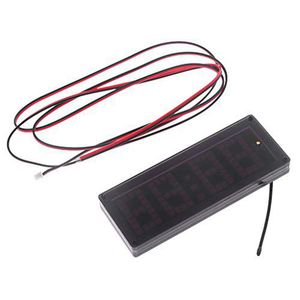
Mwergkou Car LED Dot Matrix Clock Temperature Voltage Display 4.0~25V Multi-Function 3in1 Time Thermometer Voltmeter
Current Price
$8.99
Average
$8.99
Min Price
$8.99
Max Price
$8.99
Price dynamics
0%
Description
After entering the code function setting, it is also possible to press the setup button for more than 2 seconds to skip to the next parameter setting. Short-press the setup button to adjust the parameter value. Refer to the following table for the meaning of the code:
Ac: Temperature 1 error calibration parameter. A positive number represents an increase, a negative number represents a decrease, and the unit is degree. The adjustment range is -5~5. For example, if you think that the displayed temperature is 1 degree higher than the actual temperature, then set Ac:-1 so that the electronic clock is automatically displayed after subtracting 1 degree. (Note: If you do not have a standard thermometer for reference, it is recommended to keep this item as Ac: 0)
Dd: Display item during custom cycle display [dd: 0] Time + temperature + voltage [dd: 1] Time + voltage [dd: 2] Time + temperature
dF: Switching interval when the custom cycle is displayed, the unit is second, the adjustment range is 1~9. For example dF: 3, just
The switching interval is about 3 seconds to switch display items.
LL: Displays the brightness level, the adjustment range is 1~5, LL: 1 is the darkest, and LL:5 is the brightest.
AL: Automatic brightness control switch, AL:0 is the automatic brightness control, AL:1 is the automatic brightness control. When set to AL:1, the electronic clock will change the brightness to level
0.0u: The voltage measurement error is corrected. A positive number indicates an increase, and a negative number indicates a decrease. For example, the actual supply voltage is 12.0V, but the table shows 11.9V, then it is adjusted to 0.1u.
After adjusting the AL option, press the SET button for more than 2 seconds at the end. After returning to the normal display state, all parameters and time settings can be saved.
Price will be lower
in next 2 weeks
in next 2 weeks
According to the data, price will be lower in next two weeks, so not waste your money and track better price!
Similar products