Description
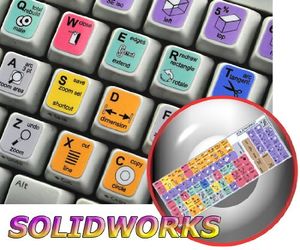
The SolidWorks stickers can easily transform your standard keyboard into a customised one within minutes, depending on your own need and preference.
The SolidWorks's keyboard stickers are ideal for all users, for beginners as well as professionals.
The SolidWorks keyboard stickers are compatible with all default shortcuts. Therefore, by applying these stickers on your standard keyboard you can immediately start editing with SolidWorks software.
The SolidWorks keyboard stickers are designed to improve your productivity and to enjoy your work all the way through.
By using the SolidWorks stickers your productivity will be increased by 15 - 40 percent, which ultimately will save your precious time.
Stickers are made of high-quality non-transparent matt vinyl, thickness - 80mkn.
Each sticker is laminated, and therefore, it guarantees their lifetime durability.
Discover the World of perfection and simplicity with our Product.
OUR MOTTO IS - QUALITY!
The product listed above is copyrighted, has been manufactured and distributed by Royal Galaxy Ltd.
Usage of the images posted, distribution or resale has NOT been authorized by Royal Galaxy Ltd, and is in direct violation of its written terms.
Federal law provides severe civil and criminal penalties for the unauthorized usage, distribution or resale of copyrighted product, its listings with all imaged posted.
For all requests regarding usage of images of this product, its distribution and resale, please contact us by email.
New SOLIDWORKS Keyboard Stickers Shortcuts for Desktop, Laptop and Notebook
Current Price
$6.96
Average
$6.14
Min Price
$4.49
Max Price
$6.96
Price dynamics
12%
Description
The SolidWorks stickers can easily transform your standard keyboard into a customised one within minutes, depending on your own need and preference.
The SolidWorks's keyboard stickers are ideal for all users, for beginners as well as professionals.
The SolidWorks keyboard stickers are compatible with all default shortcuts. Therefore, by applying these stickers on your standard keyboard you can immediately start editing with SolidWorks software.
The SolidWorks keyboard stickers are designed to improve your productivity and to enjoy your work all the way through.
By using the SolidWorks stickers your productivity will be increased by 15 - 40 percent, which ultimately will save your precious time.
Stickers are made of high-quality non-transparent matt vinyl, thickness - 80mkn.
Each sticker is laminated, and therefore, it guarantees their lifetime durability.
Discover the World of perfection and simplicity with our Product.
OUR MOTTO IS - QUALITY!
The product listed above is copyrighted, has been manufactured and distributed by Royal Galaxy Ltd.
Usage of the images posted, distribution or resale has NOT been authorized by Royal Galaxy Ltd, and is in direct violation of its written terms.
Federal law provides severe civil and criminal penalties for the unauthorized usage, distribution or resale of copyrighted product, its listings with all imaged posted.
For all requests regarding usage of images of this product, its distribution and resale, please contact us by email.
Price will be lower
in next 2 weeks
in next 2 weeks
According to the data, price will be lower in next two weeks, so not waste your money and track better price!
Product review & video
all right my name is Adam Hughes I'm an application engineer with go engineer and today we are going to talk about hot keys and how we can use them to make our design work more efficient start by highlighting any one of these icons up here right click select customize next looking at the tabs at the top and select keyboard now what we can see is what hot keys correlate to what functions in SolidWorks so we're gonna start off by applying some hot keys to our basic sketch commands ones we use all the time so scroll down a ways how you find your sketch commands now there are many ways to hotkey your sketch commands today we're gonna show you my preference we have these top four followed by the next 400 and X 4 so I'm gonna use Q wer asdf z XC v so starting off with line I already set that one up is q Q next we're gonna find this circle and you can select what circle you want just depends o


Similar products