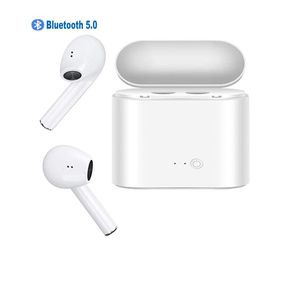
Description
Aopiuuo No wires tangling
MULTIPOINT CONNECTION & SHARE MODE-Each Bluetooth earbud can work individually or in pair, wear one or both earbuds depending your own needs It can connect with 2 different devices simultaneously, and would connect automatically with a phone paired previously(33 feet). For the sake of your safety when you are driving, all earphones allow only one earbud has calling function. for the original version, it is the right earbud.
How to Sync Between Bluetooth Headphones?
Step 1. Press and hold the button for 3 seconds of either earbud and release after the LED flashes between Red and Blue. (Voice Prompts: Power on)
Step 2. Double tap any one of the earbuds, and wait for 3-5 seconds, the earbuds will search for each other, one of the earbuds will stop flashes when successfully (Voice Prompts: Your headset is connected)
Step 3. Pairing the earphone with your mobile phone, the product will be in standby status after pairing completed
How to The Wireless Earbuds Pair with Your Phone?
Step 1.For initial use, press and hold the button for 3 seconds of either earbud and release after the LED flashes between Red and Blue. (Voice Notice: Power on)
Step 2. Open the mobile phone Bluetooth and , then connect it.
Step 3. Pairing the earphone with your mobile phone, the product will be in standby status after pairing completed, Blue LED flashes 5 seconds each time. (Voice Notice: Connected)
Package included:
2 x Bluetooth headphones
1 x Headset Charging Case
1 x Micro USB Charge Cable
1 x User Manual
MULTIPOINT CONNECTION & SHARE MODE-Each Bluetooth earbud can work individually or in pair, wear one or both earbuds depending your own needs It can connect with 2 different devices simultaneously, and would connect automatically with a phone paired previously(33 feet). For the sake of your safety when you are driving, all earphones allow only one earbud has calling function. for the original version, it is the right earbud.
How to Sync Between Bluetooth Headphones?
Step 1. Press and hold the button for 3 seconds of either earbud and release after the LED flashes between Red and Blue. (Voice Prompts: Power on)
Step 2. Double tap any one of the earbuds, and wait for 3-5 seconds, the earbuds will search for each other, one of the earbuds will stop flashes when successfully (Voice Prompts: Your headset is connected)
Step 3. Pairing the earphone with your mobile phone, the product will be in standby status after pairing completed
How to The Wireless Earbuds Pair with Your Phone?
Step 1.For initial use, press and hold the button for 3 seconds of either earbud and release after the LED flashes between Red and Blue. (Voice Notice: Power on)
Step 2. Open the mobile phone Bluetooth and , then connect it.
Step 3. Pairing the earphone with your mobile phone, the product will be in standby status after pairing completed, Blue LED flashes 5 seconds each time. (Voice Notice: Connected)
Package included:
2 x Bluetooth headphones
1 x Headset Charging Case
1 x Micro USB Charge Cable
1 x User Manual
Bluetooth Earbuds Wireless Headphones Earphones in-Ear for Sport Bluetooth Earphones Stereo Sound Noise Cancelling 2 Built-in Mic Earphones
Price is below average
Current Price
$14.98
Average
$15.55
Min Price
$10.88
Max Price
$32.99
Price dynamics
4%
Description
Aopiuuo No wires tangling
MULTIPOINT CONNECTION & SHARE MODE-Each Bluetooth earbud can work individually or in pair, wear one or both earbuds depending your own needs It can connect with 2 different devices simultaneously, and would connect automatically with a phone paired previously(33 feet). For the sake of your safety when you are driving, all earphones allow only one earbud has calling function. for the original version, it is the right earbud.
How to Sync Between Bluetooth Headphones?
Step 1. Press and hold the button for 3 seconds of either earbud and release after the LED flashes between Red and Blue. (Voice Prompts: Power on)
Step 2. Double tap any one of the earbuds, and wait for 3-5 seconds, the earbuds will search for each other, one of the earbuds will stop flashes when successfully (Voice Prompts: Your headset is connected)
Step 3. Pairing the earphone with your mobile phone, the product will be in standby status after pairing completed
How to The Wireless Earbuds Pair with Your Phone?
Step 1.For initial use, press and hold the button for 3 seconds of either earbud and release after the LED flashes between Red and Blue. (Voice Notice: Power on)
Step 2. Open the mobile phone Bluetooth and , then connect it.
Step 3. Pairing the earphone with your mobile phone, the product will be in standby status after pairing completed, Blue LED flashes 5 seconds each time. (Voice Notice: Connected)
Package included:
2 x Bluetooth headphones
1 x Headset Charging Case
1 x Micro USB Charge Cable
1 x User Manual
MULTIPOINT CONNECTION & SHARE MODE-Each Bluetooth earbud can work individually or in pair, wear one or both earbuds depending your own needs It can connect with 2 different devices simultaneously, and would connect automatically with a phone paired previously(33 feet). For the sake of your safety when you are driving, all earphones allow only one earbud has calling function. for the original version, it is the right earbud.
How to Sync Between Bluetooth Headphones?
Step 1. Press and hold the button for 3 seconds of either earbud and release after the LED flashes between Red and Blue. (Voice Prompts: Power on)
Step 2. Double tap any one of the earbuds, and wait for 3-5 seconds, the earbuds will search for each other, one of the earbuds will stop flashes when successfully (Voice Prompts: Your headset is connected)
Step 3. Pairing the earphone with your mobile phone, the product will be in standby status after pairing completed
How to The Wireless Earbuds Pair with Your Phone?
Step 1.For initial use, press and hold the button for 3 seconds of either earbud and release after the LED flashes between Red and Blue. (Voice Notice: Power on)
Step 2. Open the mobile phone Bluetooth and , then connect it.
Step 3. Pairing the earphone with your mobile phone, the product will be in standby status after pairing completed, Blue LED flashes 5 seconds each time. (Voice Notice: Connected)
Package included:
2 x Bluetooth headphones
1 x Headset Charging Case
1 x Micro USB Charge Cable
1 x User Manual
Price will be lower
in next 2 weeks
in next 2 weeks
According to the data, price will be lower in next two weeks, so not waste your money and track better price!
Product review & video
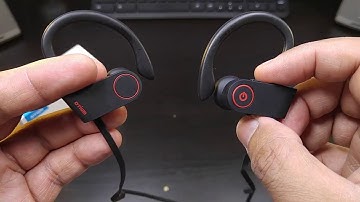
and we're back and this is the odium where eyeless sport headphones so here we have it another Bluetooth headset from otm we were reviewed one of their Bluetooth headsets before and that is my ultimate Bluetooth headset when it comes to working out let's take a look at these beautiful carbon fiber case look at this carbon fiber definite carbon fiber look looks real good ot unbranded on it all stuff black and bang here's the headphones themselves and we have nothing else in the package but you have a little area here just in case you need to put in your charger your little ear tips standard edition ear tips that we've seen on a lot of Bluetooth we have your charging cord with B two micro USB you gotta get your own brick care of it headphones themselves look at this nice simple black stealth design sometimes this is all you want something real simple with a nice pin to read and keep it go


Similar products



































