Description
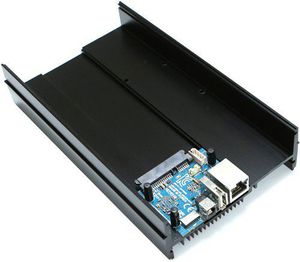
* REQUIRES A 12V/2A POWER SUPPLY (SOLD SEPARATELY) ODROID-HC2 is a mini PC which can be an affordable solution for a network attached storage (NAS) server. This home cloud-server centralizes data and enables users to share and stream multimedia files to phones, tablets and other devices on a network. Ideal for a single user on many devices, sharing between family members, developers or a group. Tailor the ODROID-HC2 to your specific needs. Plenty of software is available with only simple configuration. Determine the storage capacity of your server with a higher HDD/SSD. Depending on your needs, the frame is made to be stackable. The HC2 is based on the very powerful ODROID-XU4 platform and it can run Samba, FTP, NFS, SSH, NGINX, Apache, SQL, Docker, WordPress and other server software smoothly with full Linux distributions like Ubuntu, Debian, Arch and OMV. Available and ready-to-go OS distributions are on our WiKi. Any OS for XU4 is fully compatible with the HC2. https://wiki.odroid.com/odroid-xu4/os_images/os_images Installed with a high performance SATA port and a Gigabit Ethernet port, to build a faster network storage device. Engineered metal frame body is designed to store a 2.5 inch HDD/SSD or 3.5inch HDD with great heat dissipation. Key features * Samsung Exynos5422 Cortex-A15 2Ghz and Cortex-A7 Octa core CPUs * 2Gbyte LPDDR3 RAM PoP stacked * SATA-3 port for 3.5inch or 2.5inch HDD/SSD storage up to 27mm thickness * Gigabit Ethernet port * USB 2.0 Host * UHS-1 capable micro-SD card slot for boot media * Size : 197 x 115 x 42 mm approx.(Aluminium cooling frame size) * Linux server OS images based on modern Kernel 4.14 LTS
ODROID HC2 : Home Cloud Two
Current Price
$74.9
Average
$70.07
Min Price
$58
Max Price
$74.95
Price dynamics
6%
Description
* REQUIRES A 12V/2A POWER SUPPLY (SOLD SEPARATELY) ODROID-HC2 is a mini PC which can be an affordable solution for a network attached storage (NAS) server. This home cloud-server centralizes data and enables users to share and stream multimedia files to phones, tablets and other devices on a network. Ideal for a single user on many devices, sharing between family members, developers or a group. Tailor the ODROID-HC2 to your specific needs. Plenty of software is available with only simple configuration. Determine the storage capacity of your server with a higher HDD/SSD. Depending on your needs, the frame is made to be stackable. The HC2 is based on the very powerful ODROID-XU4 platform and it can run Samba, FTP, NFS, SSH, NGINX, Apache, SQL, Docker, WordPress and other server software smoothly with full Linux distributions like Ubuntu, Debian, Arch and OMV. Available and ready-to-go OS distributions are on our WiKi. Any OS for XU4 is fully compatible with the HC2. https://wiki.odroid.com/odroid-xu4/os_images/os_images Installed with a high performance SATA port and a Gigabit Ethernet port, to build a faster network storage device. Engineered metal frame body is designed to store a 2.5 inch HDD/SSD or 3.5inch HDD with great heat dissipation. Key features * Samsung Exynos5422 Cortex-A15 2Ghz and Cortex-A7 Octa core CPUs * 2Gbyte LPDDR3 RAM PoP stacked * SATA-3 port for 3.5inch or 2.5inch HDD/SSD storage up to 27mm thickness * Gigabit Ethernet port * USB 2.0 Host * UHS-1 capable micro-SD card slot for boot media * Size : 197 x 115 x 42 mm approx.(Aluminium cooling frame size) * Linux server OS images based on modern Kernel 4.14 LTS
Price will be lower
in next 2 weeks
in next 2 weeks
According to the data, price will be lower in next two weeks, so not waste your money and track better price!
Product review & video
hello and welcome to the Odroid hc2 getting started guide the first thing we are going to do is set up the SD card there's going to be a link in the description that's going to send you to SourceForge where you can download the open media vault image and today we're going to be using Windows 32 disk imager to write to the SD card but you can also use etcher we just find that it's faster using Windows 32 so next up for assembling dhc-2 we are going to take and log the hard drive into these connector pins we're also going to take the micro SD and slot that in and there are several holes that we can use to screw it and secure it into place next up we're going to plug in our Ethernet cable as well as our power cable to verify that the board is working there are three LEDs that we need to look for there is a blue heartbeat light that indicates that the OS is working that there is a red light


Similar products