OneStylus Fusion- Combine Microsoft's Surface Pro 3 Stylus with a universal stylus tip
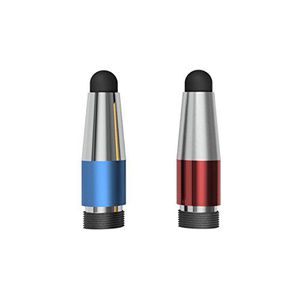
This really is a perfect gift for the Microsoft Surface 3 or Pro 3 owner! The OneStylus Fusion attaches to the eraser end of the Surface Pen to enable compatibility with any other touch device such as your smartphone or tablet. This is a great convenience for someone who enjoys the feel and function of a stylus.
The Fusion looks great and is available in various colors. It is made from military grade Type II Anodized 6061-T6511 aluminum and other durable alloys for the perfect weight, balance and protection.
Frequent Questions
• Isn't this just another generic stylus?
No. The OneStylus attaches to your native Microsoft Pen. It is a standard capacitive tip that screws onto the end of the Microsoft Pen.
But, rest assured you will still benefit from the great precision of the Microsoft Pen.
• The Microsoft Pen is already awesome. Why do I need OneStylus Fusion?
There are many benefits to adding OneStylus Fusion to your pen.
o You will only need a single stylus (or shall we say OneStylus) for multiple devices, while keeping the excellent precision of the Microsoft Pen when using it on your Surface Pro 3.
o With OneStylus you can scroll in Internet Browsers, MS Word, etc. (In contrast, the standard function of Microsoft Pen is 'select mode' which is frustrating for many).
o Use your Pen with any touch device such as your phone or another tablet.
o The OneNote button is precision machined high quality anodized aluminum. It looks nice and is durable. (The original button on the Microsoft Pen is plastic and will eventually break)
o In general, using a stylus is healthier for your hands. There are new reports showing that repetitive touch is causing painful medical conditions and in some cases surgery is required to address the problems. We believe that having the convenience











![Galaxy Tab Pro 12.2 Stylus Pen, BoxWave [Capacitive Styra] Capacitive Stylus with Rollerball Pen for Samsung Galaxy Tab Pro 12.2 - Magnet Purple](https://use4coins.com/thumbs/unsafe/fit-in/200x200/https://images-na.ssl-images-amazon.com/images/I/31my%2BgU-3-L.jpg)
![BoxWave iPad 2 Stylus Pen, [mini Capacitive Stylus - Sparkle Edition] Mini Rubber Tip Capacitive Stylus Pen for Apple iPad 2 - Jet Black](https://use4coins.com/thumbs/unsafe/fit-in/200x200/https://images-na.ssl-images-amazon.com/images/I/41qQEpT90XL.jpg)

![BoxWave Dell Venue 8 Pro Stylus Pen, [FineTouch Capacitive Stylus] Super Precise Stylus Pen for Dell Venue 8 Pro - Lunar Blue](https://use4coins.com/thumbs/unsafe/fit-in/200x200/https://images-na.ssl-images-amazon.com/images/I/71npyZ14e7L.jpg)




![Tek Styz PRO Stylus for Samsung Galaxy Book 12-inch 128GB High Accuracy Sensitive in Compact Form for Touch Screens [3 Pack-Multi-Color]](https://use4coins.com/thumbs/unsafe/fit-in/200x200/https://images-na.ssl-images-amazon.com/images/I/61cxegjHEAL.jpg)















![aibow Capacitive Stylus Pens for iPad, iPhone, Tablets, Cell Phones, All Touch Screens [ Fine Point & High Sensitivity Disc Tip Series ] with 2 Replaceable Disc Tips, Slide Cap Type2 (Black/Blue)](https://use4coins.com/thumbs/unsafe/fit-in/200x200/https://images-na.ssl-images-amazon.com/images/I/61WM3pkV09L.jpg)





