Description
Power Supply: Need 12V1A power Adapter(Included).
Add this camera to Ip-pro
1) Press the reset button on the camera for 7s to reset the camera
2) Connect your phone to the WiFi signal. (Note:Be sure to connect to your 2.4 GHz WiFi)( This camera does not support 5GHz WiFi)
3) On your phone's IP Pro App, click on the + button > select "Standalone camera" > "YES" (Before that, you need to turn on your phone's GPS service.) > The number that appears after clicking is the cloud ID of the camera > enter the user name and password of the WiFi signal your phone is currently connected to
Add this camera to Hiseeu Expandable 8 Channel Camera System
When you receive the new camera , there is no match between the NVR box and the new camera. You need to pair them.
You can refer to our video on Youtube.
https://youtu.be/kmNnFgjLiPI
1) You need to press the reset button on the camera for 7s to reset the camera.
2)Right-clik the mouse → WiFi add
3) Use the same way to pair more camera.
If there are any problem when using, please email me: johnny@hiseeu.com
Add this camera to Ip-pro
1) Press the reset button on the camera for 7s to reset the camera
2) Connect your phone to the WiFi signal. (Note:Be sure to connect to your 2.4 GHz WiFi)( This camera does not support 5GHz WiFi)
3) On your phone's IP Pro App, click on the + button > select "Standalone camera" > "YES" (Before that, you need to turn on your phone's GPS service.) > The number that appears after clicking is the cloud ID of the camera > enter the user name and password of the WiFi signal your phone is currently connected to
Add this camera to Hiseeu Expandable 8 Channel Camera System
When you receive the new camera , there is no match between the NVR box and the new camera. You need to pair them.
You can refer to our video on Youtube.
https://youtu.be/kmNnFgjLiPI
1) You need to press the reset button on the camera for 7s to reset the camera.
2)Right-clik the mouse → WiFi add
3) Use the same way to pair more camera.
If there are any problem when using, please email me: johnny@hiseeu.com
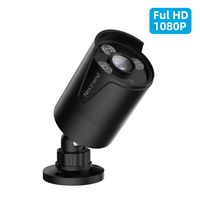
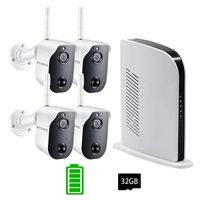
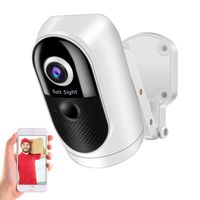
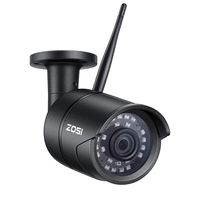
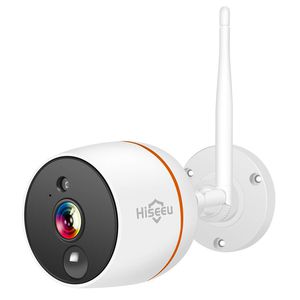
Outdoor Security Camera,1080P Home Camera,Two-Way Audio,IP66 Weatherproof,PIR Detection,App Remote,Day&Night Vision, 2.4GHz WiFi,Compatible Hiseeu Camera System
Current Price
$68.99
Average
$63.14
Min Price
$50
Max Price
$75
Price dynamics
8%
Description
Power Supply: Need 12V1A power Adapter(Included).
Add this camera to Ip-pro
1) Press the reset button on the camera for 7s to reset the camera
2) Connect your phone to the WiFi signal. (Note:Be sure to connect to your 2.4 GHz WiFi)( This camera does not support 5GHz WiFi)
3) On your phone's IP Pro App, click on the + button > select "Standalone camera" > "YES" (Before that, you need to turn on your phone's GPS service.) > The number that appears after clicking is the cloud ID of the camera > enter the user name and password of the WiFi signal your phone is currently connected to
Add this camera to Hiseeu Expandable 8 Channel Camera System
When you receive the new camera , there is no match between the NVR box and the new camera. You need to pair them.
You can refer to our video on Youtube.
https://youtu.be/kmNnFgjLiPI
1) You need to press the reset button on the camera for 7s to reset the camera.
2)Right-clik the mouse → WiFi add
3) Use the same way to pair more camera.
If there are any problem when using, please email me: johnny@hiseeu.com
Add this camera to Ip-pro
1) Press the reset button on the camera for 7s to reset the camera
2) Connect your phone to the WiFi signal. (Note:Be sure to connect to your 2.4 GHz WiFi)( This camera does not support 5GHz WiFi)
3) On your phone's IP Pro App, click on the + button > select "Standalone camera" > "YES" (Before that, you need to turn on your phone's GPS service.) > The number that appears after clicking is the cloud ID of the camera > enter the user name and password of the WiFi signal your phone is currently connected to
Add this camera to Hiseeu Expandable 8 Channel Camera System
When you receive the new camera , there is no match between the NVR box and the new camera. You need to pair them.
You can refer to our video on Youtube.
https://youtu.be/kmNnFgjLiPI
1) You need to press the reset button on the camera for 7s to reset the camera.
2)Right-clik the mouse → WiFi add
3) Use the same way to pair more camera.
If there are any problem when using, please email me: johnny@hiseeu.com
Price will be lower
in next 2 weeks
in next 2 weeks
According to the data, price will be lower in next two weeks, so not waste your money and track better price!
Product review & video
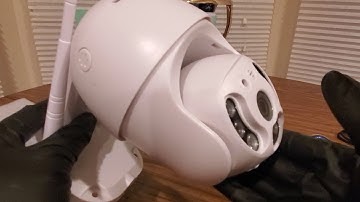
all righty youtubers here we go again it is Saturday hope everyone had a good weekend so far everybody is safe we have another special Amazon unboxing gonna do you guys could check them out link will be down below we're gonna get one at a low cost and see what other goodies they have to offer this is a Wi-Fi smart camera ip66 waterproof so this is going outdoor or you have an indoor but I am definitely setting it up for outside I've got a lot of good stuff dual antenna designed for indoor outdoor IR sensor microphone for peace white LEDs lens for peace can't see array LEDs TF card slot some really cool stuff right here so we're gonna open it up take a look set it up got my other phone right there over there let's see how this thing works got a manual definitely gonna need that because though the how the QR or just a normal search on your iOS or Android app I got the power right here I'm

Similar products