Description
Extend the functionality
Use your Surface Pen in any app that supports inking, like Windows Ink Workspace, Office apps, or Microsoft Edge.
When you bring your Surface Pen close to the touchscreen, a point appears on the screen, and the screen will ignore other input (like your hand or a mouse).
Then write or draw on your screen like you would with a regular pen and paper.
How to install:
1. Unscrew the top of the Pen from the bottom.
2. Place the AAAA battery with the positive (+) end of the battery pointing toward the writing tip.
3. Screw the top back on.
Compatible Devices
Surface Pro (5th Gen), Surface Pro 6, and Surface Book 2 15"
Surface Go
Surface Book 2 (13"), and Surface Studio (all)
Surface Pro 4, Surface Book (all)
Surface 3, Surface Pro 3, Surface Laptop (1st Gen), Surface Laptop 2
What's in the package?
✮1*Pen for Microsoft
✮1*AAAA alkaline Battery
✮1*Replaceable refills
✮1*Tip tool for fixing
Use your Surface Pen in any app that supports inking, like Windows Ink Workspace, Office apps, or Microsoft Edge.
When you bring your Surface Pen close to the touchscreen, a point appears on the screen, and the screen will ignore other input (like your hand or a mouse).
Then write or draw on your screen like you would with a regular pen and paper.
How to install:
1. Unscrew the top of the Pen from the bottom.
2. Place the AAAA battery with the positive (+) end of the battery pointing toward the writing tip.
3. Screw the top back on.
Compatible Devices
Surface Pro (5th Gen), Surface Pro 6, and Surface Book 2 15"
Surface Go
Surface Book 2 (13"), and Surface Studio (all)
Surface Pro 4, Surface Book (all)
Surface 3, Surface Pro 3, Surface Laptop (1st Gen), Surface Laptop 2
What's in the package?
✮1*Pen for Microsoft
✮1*AAAA alkaline Battery
✮1*Replaceable refills
✮1*Tip tool for fixing
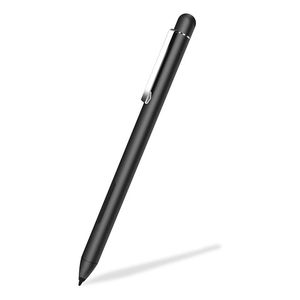
Pen for New Microsoft Surface Pro 7 - 12.3" Touch-Screen- Work with Microsoft Surface Pro 6 (Intel Core i5, 8GB RAM, 256GB) and Surface Pro X Surface Go - Black
Current Price
$34.99
Average
$34.99
Min Price
$34.99
Max Price
$34.99
Description
Extend the functionality
Use your Surface Pen in any app that supports inking, like Windows Ink Workspace, Office apps, or Microsoft Edge.
When you bring your Surface Pen close to the touchscreen, a point appears on the screen, and the screen will ignore other input (like your hand or a mouse).
Then write or draw on your screen like you would with a regular pen and paper.
How to install:
1. Unscrew the top of the Pen from the bottom.
2. Place the AAAA battery with the positive (+) end of the battery pointing toward the writing tip.
3. Screw the top back on.
Compatible Devices
Surface Pro (5th Gen), Surface Pro 6, and Surface Book 2 15"
Surface Go
Surface Book 2 (13"), and Surface Studio (all)
Surface Pro 4, Surface Book (all)
Surface 3, Surface Pro 3, Surface Laptop (1st Gen), Surface Laptop 2
What's in the package?
✮1*Pen for Microsoft
✮1*AAAA alkaline Battery
✮1*Replaceable refills
✮1*Tip tool for fixing
Use your Surface Pen in any app that supports inking, like Windows Ink Workspace, Office apps, or Microsoft Edge.
When you bring your Surface Pen close to the touchscreen, a point appears on the screen, and the screen will ignore other input (like your hand or a mouse).
Then write or draw on your screen like you would with a regular pen and paper.
How to install:
1. Unscrew the top of the Pen from the bottom.
2. Place the AAAA battery with the positive (+) end of the battery pointing toward the writing tip.
3. Screw the top back on.
Compatible Devices
Surface Pro (5th Gen), Surface Pro 6, and Surface Book 2 15"
Surface Go
Surface Book 2 (13"), and Surface Studio (all)
Surface Pro 4, Surface Book (all)
Surface 3, Surface Pro 3, Surface Laptop (1st Gen), Surface Laptop 2
What's in the package?
✮1*Pen for Microsoft
✮1*AAAA alkaline Battery
✮1*Replaceable refills
✮1*Tip tool for fixing
Price will be lower
in next 2 weeks
in next 2 weeks
According to the data, price will be lower in next two weeks, so not waste your money and track better price!

Similar products


































