Description
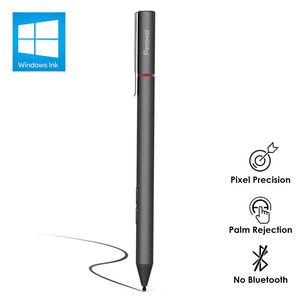
A new generation of Surface Pen, unprecedentedly powerful
Enjoy a stunning ink experience on your Surface with the new Surface Pen and the latest apps (now supporting tilt for art shadows).
Tilt for Hierarchical Shadow
The new double angle sensor can calculate the angle accurately. It makes the pen used as a traditional pencil. When you want to create a shadow, simply tilt the tip.
Apps for Surface Pen
Penoval pen works with popular apps such as Microsoft Office, OneNote, Adobe Suite Sketch-able, Sai, Bluebeam Revue, Draw board, CorelDraw, Staff pad and more.
Double Shortcut Button
Penoval Surface Pen is better and faster than ever, with one shortcut key being the Right-click context and the other being the eraser.
Compatible Model List (NOT A FULL LIST)
Microsoft Surface 3
Microsoft Surface Go
Microsoft Surface Pro 3/4/5/6/Pro (2017)
Microsoft Surface Book 1/2
Microsoft Surface Laptop (No tilt function)
Microsoft Surface Studio
HP ENVY 17-ae/17-aexxx/17-aexxxx
HP ENVY x2 12-e0 12-g0 13-J0XX 15-C0XX
HP ENVY x360 Series
HP Pavilion x360 Series
HP Pavilion X2 10-j0xx 10-K0xx
HP Spectre x2 12-c0xx
HP Spectre x360 Series
ASUS Transformer Series
ASUS ZenBooK UX370UA
ASUS Vivibook Flips 12 R211NA 14 R211NA
Sony Vaio Z Canvas/flip
Sony VAIO Duo 13/11
Dell Inspiration 13-7373/15-7573
What's in the Box
1* Penoval Surface Pen(With a hard nib installed)
1* AAAA Battery
1* Hard Exchangeable Nib
1* Nib Replacement Tool
1* User Manual
Warm Tips
1. Surface Pen tilt functionality is currently available with Surface Pro 5th Gen, Surface Pro 6, Surface Book 2 (15"), Surface Book 2(13")(when using updated firmware), Surface Go, and Surface Studio (when using updated firmware).
2. If the pen does not work correctly, please replace the battery or the pen tip.
Enjoy a stunning ink experience on your Surface with the new Surface Pen and the latest apps (now supporting tilt for art shadows).
Tilt for Hierarchical Shadow
The new double angle sensor can calculate the angle accurately. It makes the pen used as a traditional pencil. When you want to create a shadow, simply tilt the tip.
Apps for Surface Pen
Penoval pen works with popular apps such as Microsoft Office, OneNote, Adobe Suite Sketch-able, Sai, Bluebeam Revue, Draw board, CorelDraw, Staff pad and more.
Double Shortcut Button
Penoval Surface Pen is better and faster than ever, with one shortcut key being the Right-click context and the other being the eraser.
Compatible Model List (NOT A FULL LIST)
Microsoft Surface 3
Microsoft Surface Go
Microsoft Surface Pro 3/4/5/6/Pro (2017)
Microsoft Surface Book 1/2
Microsoft Surface Laptop (No tilt function)
Microsoft Surface Studio
HP ENVY 17-ae/17-aexxx/17-aexxxx
HP ENVY x2 12-e0 12-g0 13-J0XX 15-C0XX
HP ENVY x360 Series
HP Pavilion x360 Series
HP Pavilion X2 10-j0xx 10-K0xx
HP Spectre x2 12-c0xx
HP Spectre x360 Series
ASUS Transformer Series
ASUS ZenBooK UX370UA
ASUS Vivibook Flips 12 R211NA 14 R211NA
Sony Vaio Z Canvas/flip
Sony VAIO Duo 13/11
Dell Inspiration 13-7373/15-7573
What's in the Box
1* Penoval Surface Pen(With a hard nib installed)
1* AAAA Battery
1* Hard Exchangeable Nib
1* Nib Replacement Tool
1* User Manual
Warm Tips
1. Surface Pen tilt functionality is currently available with Surface Pro 5th Gen, Surface Pro 6, Surface Book 2 (15"), Surface Book 2(13")(when using updated firmware), Surface Go, and Surface Studio (when using updated firmware).
2. If the pen does not work correctly, please replace the battery or the pen tip.
Penoval Surface Pen with Microsoft Certified, 4096 Pressure Sensitivity, Aluminium Body, for Microsoft New Surface Pro 3/4/5/6/Go, Surface Book, Surface Laptop/Studio and More (4A Battery & 2 Nibs)
Price is below average
Current Price
$39.99
Average
$49.99
Min Price
$20
Max Price
$99.99
Price dynamics
20%
Description
A new generation of Surface Pen, unprecedentedly powerful
Enjoy a stunning ink experience on your Surface with the new Surface Pen and the latest apps (now supporting tilt for art shadows).
Tilt for Hierarchical Shadow
The new double angle sensor can calculate the angle accurately. It makes the pen used as a traditional pencil. When you want to create a shadow, simply tilt the tip.
Apps for Surface Pen
Penoval pen works with popular apps such as Microsoft Office, OneNote, Adobe Suite Sketch-able, Sai, Bluebeam Revue, Draw board, CorelDraw, Staff pad and more.
Double Shortcut Button
Penoval Surface Pen is better and faster than ever, with one shortcut key being the Right-click context and the other being the eraser.
Compatible Model List (NOT A FULL LIST)
Microsoft Surface 3
Microsoft Surface Go
Microsoft Surface Pro 3/4/5/6/Pro (2017)
Microsoft Surface Book 1/2
Microsoft Surface Laptop (No tilt function)
Microsoft Surface Studio
HP ENVY 17-ae/17-aexxx/17-aexxxx
HP ENVY x2 12-e0 12-g0 13-J0XX 15-C0XX
HP ENVY x360 Series
HP Pavilion x360 Series
HP Pavilion X2 10-j0xx 10-K0xx
HP Spectre x2 12-c0xx
HP Spectre x360 Series
ASUS Transformer Series
ASUS ZenBooK UX370UA
ASUS Vivibook Flips 12 R211NA 14 R211NA
Sony Vaio Z Canvas/flip
Sony VAIO Duo 13/11
Dell Inspiration 13-7373/15-7573
What's in the Box
1* Penoval Surface Pen(With a hard nib installed)
1* AAAA Battery
1* Hard Exchangeable Nib
1* Nib Replacement Tool
1* User Manual
Warm Tips
1. Surface Pen tilt functionality is currently available with Surface Pro 5th Gen, Surface Pro 6, Surface Book 2 (15"), Surface Book 2(13")(when using updated firmware), Surface Go, and Surface Studio (when using updated firmware).
2. If the pen does not work correctly, please replace the battery or the pen tip.
Enjoy a stunning ink experience on your Surface with the new Surface Pen and the latest apps (now supporting tilt for art shadows).
Tilt for Hierarchical Shadow
The new double angle sensor can calculate the angle accurately. It makes the pen used as a traditional pencil. When you want to create a shadow, simply tilt the tip.
Apps for Surface Pen
Penoval pen works with popular apps such as Microsoft Office, OneNote, Adobe Suite Sketch-able, Sai, Bluebeam Revue, Draw board, CorelDraw, Staff pad and more.
Double Shortcut Button
Penoval Surface Pen is better and faster than ever, with one shortcut key being the Right-click context and the other being the eraser.
Compatible Model List (NOT A FULL LIST)
Microsoft Surface 3
Microsoft Surface Go
Microsoft Surface Pro 3/4/5/6/Pro (2017)
Microsoft Surface Book 1/2
Microsoft Surface Laptop (No tilt function)
Microsoft Surface Studio
HP ENVY 17-ae/17-aexxx/17-aexxxx
HP ENVY x2 12-e0 12-g0 13-J0XX 15-C0XX
HP ENVY x360 Series
HP Pavilion x360 Series
HP Pavilion X2 10-j0xx 10-K0xx
HP Spectre x2 12-c0xx
HP Spectre x360 Series
ASUS Transformer Series
ASUS ZenBooK UX370UA
ASUS Vivibook Flips 12 R211NA 14 R211NA
Sony Vaio Z Canvas/flip
Sony VAIO Duo 13/11
Dell Inspiration 13-7373/15-7573
What's in the Box
1* Penoval Surface Pen(With a hard nib installed)
1* AAAA Battery
1* Hard Exchangeable Nib
1* Nib Replacement Tool
1* User Manual
Warm Tips
1. Surface Pen tilt functionality is currently available with Surface Pro 5th Gen, Surface Pro 6, Surface Book 2 (15"), Surface Book 2(13")(when using updated firmware), Surface Go, and Surface Studio (when using updated firmware).
2. If the pen does not work correctly, please replace the battery or the pen tip.
Price will be lower
in next 2 weeks
in next 2 weeks
According to the data, price will be lower in next two weeks, so not waste your money and track better price!

Similar products


































