Description
SOFTWARE INCLUDED:
1.) Gimp 2.10.4 Photo Editing Software: - The #1 Photoshop alternative software for a reason. Whether you are a graphic designer, photographer, illustrator, or home user GIMP provides you with all the essential tools to get your job done. You can further enhance your projects with the many 3rd party plugins included in this USB.Favorite Features: High Quality Photo Manipulation | Editing & Effects | Use of Layers like Photoshop | Create Original Artwork | Graphic Design Elements Included | Easy to use
GIMP Bonuses: Only included in this bundle 1.) GIMP 2.8 included for older computers. 2.) 2 Full Video Courses: GIMP 101 & Photo Retouching Mastery 3.) Full User Manual 4.) GIMP Plugins & Extensions Bundle
2.) RawTherapee RAW Image Processing & Editing Software - how else will you edit images captured on your camera? Supports almost all DSLR camera and some medium format bodies.
3.) Professional Image Converter & Resizer - convert & resize images of most formats in seconds. Single image or in bulk.
4.) Lightweight Image Cropping & Filter Tool - No need to open heavy software when you only need to add a filter or crop an image. Very handy!
5.) Retro Effects Software - create stunning images by adding vintage effects!
6.) Sketch Effects Software - Turn any photo into a cartoon or sketch image. Super fun and fast one-click effects.
7.) Inkscape SVG & Drawing Software - The graphic design software is widely used by professionals to create animations, logos, characters and more. It is the #1 Adobe Illustrator alternative program.
System Requirements:
Windows 32 & 64 Bit (10 / 8.1 / 8 / 7 / Vista and XP), Mac OS 10.6 & Newer, Linux. Note: Alternative installers are provided for Windows XP & Mac's under 10.10 :)
MORE BONUSES:
Premium Fonts Pack
Professional ClipArt & SVG Graphics Pack
1.) Gimp 2.10.4 Photo Editing Software: - The #1 Photoshop alternative software for a reason. Whether you are a graphic designer, photographer, illustrator, or home user GIMP provides you with all the essential tools to get your job done. You can further enhance your projects with the many 3rd party plugins included in this USB.Favorite Features: High Quality Photo Manipulation | Editing & Effects | Use of Layers like Photoshop | Create Original Artwork | Graphic Design Elements Included | Easy to use
GIMP Bonuses: Only included in this bundle 1.) GIMP 2.8 included for older computers. 2.) 2 Full Video Courses: GIMP 101 & Photo Retouching Mastery 3.) Full User Manual 4.) GIMP Plugins & Extensions Bundle
2.) RawTherapee RAW Image Processing & Editing Software - how else will you edit images captured on your camera? Supports almost all DSLR camera and some medium format bodies.
3.) Professional Image Converter & Resizer - convert & resize images of most formats in seconds. Single image or in bulk.
4.) Lightweight Image Cropping & Filter Tool - No need to open heavy software when you only need to add a filter or crop an image. Very handy!
5.) Retro Effects Software - create stunning images by adding vintage effects!
6.) Sketch Effects Software - Turn any photo into a cartoon or sketch image. Super fun and fast one-click effects.
7.) Inkscape SVG & Drawing Software - The graphic design software is widely used by professionals to create animations, logos, characters and more. It is the #1 Adobe Illustrator alternative program.
System Requirements:
Windows 32 & 64 Bit (10 / 8.1 / 8 / 7 / Vista and XP), Mac OS 10.6 & Newer, Linux. Note: Alternative installers are provided for Windows XP & Mac's under 10.10 :)
MORE BONUSES:
Premium Fonts Pack
Professional ClipArt & SVG Graphics Pack
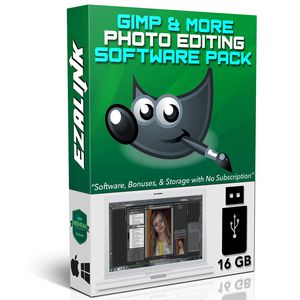
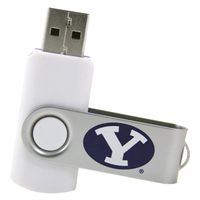
Photo Editing Software GIMP 2.10.2 PRO for Windows PC & MAC | RawTherapee RAW Editor, Inkscape Design, Image Converter, Effects {7 Programs on 32Gb USB}
Current Price
$15.87
Average
$15.87
Min Price
$15.87
Max Price
$15.87
Description
SOFTWARE INCLUDED:
1.) Gimp 2.10.4 Photo Editing Software: - The #1 Photoshop alternative software for a reason. Whether you are a graphic designer, photographer, illustrator, or home user GIMP provides you with all the essential tools to get your job done. You can further enhance your projects with the many 3rd party plugins included in this USB.Favorite Features: High Quality Photo Manipulation | Editing & Effects | Use of Layers like Photoshop | Create Original Artwork | Graphic Design Elements Included | Easy to use
GIMP Bonuses: Only included in this bundle 1.) GIMP 2.8 included for older computers. 2.) 2 Full Video Courses: GIMP 101 & Photo Retouching Mastery 3.) Full User Manual 4.) GIMP Plugins & Extensions Bundle
2.) RawTherapee RAW Image Processing & Editing Software - how else will you edit images captured on your camera? Supports almost all DSLR camera and some medium format bodies.
3.) Professional Image Converter & Resizer - convert & resize images of most formats in seconds. Single image or in bulk.
4.) Lightweight Image Cropping & Filter Tool - No need to open heavy software when you only need to add a filter or crop an image. Very handy!
5.) Retro Effects Software - create stunning images by adding vintage effects!
6.) Sketch Effects Software - Turn any photo into a cartoon or sketch image. Super fun and fast one-click effects.
7.) Inkscape SVG & Drawing Software - The graphic design software is widely used by professionals to create animations, logos, characters and more. It is the #1 Adobe Illustrator alternative program.
System Requirements:
Windows 32 & 64 Bit (10 / 8.1 / 8 / 7 / Vista and XP), Mac OS 10.6 & Newer, Linux. Note: Alternative installers are provided for Windows XP & Mac's under 10.10 :)
MORE BONUSES:
Premium Fonts Pack
Professional ClipArt & SVG Graphics Pack
1.) Gimp 2.10.4 Photo Editing Software: - The #1 Photoshop alternative software for a reason. Whether you are a graphic designer, photographer, illustrator, or home user GIMP provides you with all the essential tools to get your job done. You can further enhance your projects with the many 3rd party plugins included in this USB.Favorite Features: High Quality Photo Manipulation | Editing & Effects | Use of Layers like Photoshop | Create Original Artwork | Graphic Design Elements Included | Easy to use
GIMP Bonuses: Only included in this bundle 1.) GIMP 2.8 included for older computers. 2.) 2 Full Video Courses: GIMP 101 & Photo Retouching Mastery 3.) Full User Manual 4.) GIMP Plugins & Extensions Bundle
2.) RawTherapee RAW Image Processing & Editing Software - how else will you edit images captured on your camera? Supports almost all DSLR camera and some medium format bodies.
3.) Professional Image Converter & Resizer - convert & resize images of most formats in seconds. Single image or in bulk.
4.) Lightweight Image Cropping & Filter Tool - No need to open heavy software when you only need to add a filter or crop an image. Very handy!
5.) Retro Effects Software - create stunning images by adding vintage effects!
6.) Sketch Effects Software - Turn any photo into a cartoon or sketch image. Super fun and fast one-click effects.
7.) Inkscape SVG & Drawing Software - The graphic design software is widely used by professionals to create animations, logos, characters and more. It is the #1 Adobe Illustrator alternative program.
System Requirements:
Windows 32 & 64 Bit (10 / 8.1 / 8 / 7 / Vista and XP), Mac OS 10.6 & Newer, Linux. Note: Alternative installers are provided for Windows XP & Mac's under 10.10 :)
MORE BONUSES:
Premium Fonts Pack
Professional ClipArt & SVG Graphics Pack
Price will be lower
in next 2 weeks
in next 2 weeks
According to the data, price will be lower in next two weeks, so not waste your money and track better price!
Product review & video
Hello and welcome to yet another video
by Davies Media Design my name is Michael Davies and in this video I'll be
providing a direct comparison between GIMP and Inkscape.
Before I get into that don't forget to check out my website at
daviesmediadesign.com. As always I have tons of Inkscape and GIMP tutorials on
here, my GIMP Book of Layers, and free software
help articles so definitely check that out.
You can enroll in my GIMP 2.10 Masterclass: From Beginner to Pro Photo
Editing on Udemy. You can enroll in any of my Skillshare classes by visiting
GIMPschool.com and you can get more with a Premium
Membership to Davies Media Design. GIMP vs Inkscape: which one should you
use? Well both are going to be great free and open source software options that
can replace expensive premium or subscription programs.
However, there appears to be a decent amount of confusion as to which program
you sho

Similar products