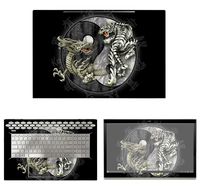
Description
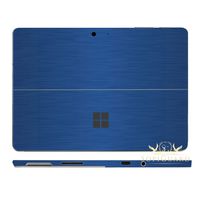
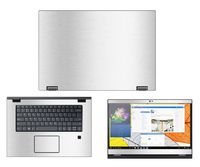
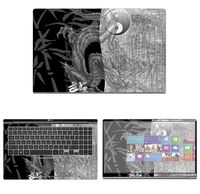
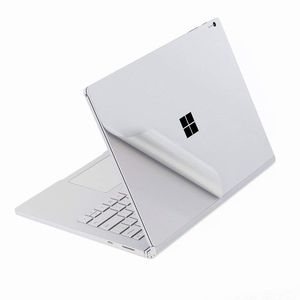
for Microsoft Surface Book 2 13.5 Inch (i7 CPU Version) Protective Skin Sticker Decals Protector.
Compatible with:
-- for 2017/2018 Microsoft Surface Book 2 15 inch version(NOT for Suface BOOK 2 13 inch version)
Product Description:
This is a wear-resistant thin film solution that can effectively protect the Surface Book against the deleterious effects of grease, scratches, smudges, and color-fade that accrete over time.
Package Included:
--1x Upper Body Skin Cover
--1x Bottom Body Skin Cover
--1x Full size Palm Rest Cover Skin
--1x Trackpad Protector Skin
--1x Wiping cloth
--1x Clearning alcohol
Before paste the skins, please noted two issues:
--After the 3M skin paste completed, do not re-lift, otherwise, the skins will be damaged.
--We design the product off 0.3 mm gap to edge,please take care of its placeholder.if you stick it to 100% fit one edge, In the process of using if often scraped to the side, may cause roll up
Pasting Instruction:
1. Please use wiping cloth to clean surface before pasting stickers.
2. Align UPPER sticker SURFACE LOGO hole>edges>corners to the laptop body.
3. Peel off and cut half side of backing paper; Align upper sticker to LOGO hole mainly, then edges/corners of laptop body, paste it on laptop easily.
4. Slowly peel off the rest of backing paper, paste the other half skin at the same time.
4-1.If the alignment process is not good, you can slowly take it away, then re-alignment, paste again.
5. Use wiping cloth wipe the laptop and squeeze out bubbles. Finally, Bubbles be disappeared; sticker fit SURFACE LOGO hole and laptop UPPER side well.
6. Paste another stickers in the same way.
7. If stickers do not paste well, please contact with seller soon.
Compatible with:
-- for 2017/2018 Microsoft Surface Book 2 15 inch version(NOT for Suface BOOK 2 13 inch version)
Product Description:
This is a wear-resistant thin film solution that can effectively protect the Surface Book against the deleterious effects of grease, scratches, smudges, and color-fade that accrete over time.
Package Included:
--1x Upper Body Skin Cover
--1x Bottom Body Skin Cover
--1x Full size Palm Rest Cover Skin
--1x Trackpad Protector Skin
--1x Wiping cloth
--1x Clearning alcohol
Before paste the skins, please noted two issues:
--After the 3M skin paste completed, do not re-lift, otherwise, the skins will be damaged.
--We design the product off 0.3 mm gap to edge,please take care of its placeholder.if you stick it to 100% fit one edge, In the process of using if often scraped to the side, may cause roll up
Pasting Instruction:
1. Please use wiping cloth to clean surface before pasting stickers.
2. Align UPPER sticker SURFACE LOGO hole>edges>corners to the laptop body.
3. Peel off and cut half side of backing paper; Align upper sticker to LOGO hole mainly, then edges/corners of laptop body, paste it on laptop easily.
4. Slowly peel off the rest of backing paper, paste the other half skin at the same time.
4-1.If the alignment process is not good, you can slowly take it away, then re-alignment, paste again.
5. Use wiping cloth wipe the laptop and squeeze out bubbles. Finally, Bubbles be disappeared; sticker fit SURFACE LOGO hole and laptop UPPER side well.
6. Paste another stickers in the same way.
7. If stickers do not paste well, please contact with seller soon.
Premium Full Body 3M Protective Skin Decals Stickers for Microsoft Surface Book 2 13.5 Inch (i7 CPU Version) - Sliver
Price is below average
Current Price
$15
Average
$18.5
Min Price
$15
Max Price
$21.99
Price dynamics
19%
Description
for Microsoft Surface Book 2 13.5 Inch (i7 CPU Version) Protective Skin Sticker Decals Protector.
Compatible with:
-- for 2017/2018 Microsoft Surface Book 2 15 inch version(NOT for Suface BOOK 2 13 inch version)
Product Description:
This is a wear-resistant thin film solution that can effectively protect the Surface Book against the deleterious effects of grease, scratches, smudges, and color-fade that accrete over time.
Package Included:
--1x Upper Body Skin Cover
--1x Bottom Body Skin Cover
--1x Full size Palm Rest Cover Skin
--1x Trackpad Protector Skin
--1x Wiping cloth
--1x Clearning alcohol
Before paste the skins, please noted two issues:
--After the 3M skin paste completed, do not re-lift, otherwise, the skins will be damaged.
--We design the product off 0.3 mm gap to edge,please take care of its placeholder.if you stick it to 100% fit one edge, In the process of using if often scraped to the side, may cause roll up
Pasting Instruction:
1. Please use wiping cloth to clean surface before pasting stickers.
2. Align UPPER sticker SURFACE LOGO hole>edges>corners to the laptop body.
3. Peel off and cut half side of backing paper; Align upper sticker to LOGO hole mainly, then edges/corners of laptop body, paste it on laptop easily.
4. Slowly peel off the rest of backing paper, paste the other half skin at the same time.
4-1.If the alignment process is not good, you can slowly take it away, then re-alignment, paste again.
5. Use wiping cloth wipe the laptop and squeeze out bubbles. Finally, Bubbles be disappeared; sticker fit SURFACE LOGO hole and laptop UPPER side well.
6. Paste another stickers in the same way.
7. If stickers do not paste well, please contact with seller soon.
Compatible with:
-- for 2017/2018 Microsoft Surface Book 2 15 inch version(NOT for Suface BOOK 2 13 inch version)
Product Description:
This is a wear-resistant thin film solution that can effectively protect the Surface Book against the deleterious effects of grease, scratches, smudges, and color-fade that accrete over time.
Package Included:
--1x Upper Body Skin Cover
--1x Bottom Body Skin Cover
--1x Full size Palm Rest Cover Skin
--1x Trackpad Protector Skin
--1x Wiping cloth
--1x Clearning alcohol
Before paste the skins, please noted two issues:
--After the 3M skin paste completed, do not re-lift, otherwise, the skins will be damaged.
--We design the product off 0.3 mm gap to edge,please take care of its placeholder.if you stick it to 100% fit one edge, In the process of using if often scraped to the side, may cause roll up
Pasting Instruction:
1. Please use wiping cloth to clean surface before pasting stickers.
2. Align UPPER sticker SURFACE LOGO hole>edges>corners to the laptop body.
3. Peel off and cut half side of backing paper; Align upper sticker to LOGO hole mainly, then edges/corners of laptop body, paste it on laptop easily.
4. Slowly peel off the rest of backing paper, paste the other half skin at the same time.
4-1.If the alignment process is not good, you can slowly take it away, then re-alignment, paste again.
5. Use wiping cloth wipe the laptop and squeeze out bubbles. Finally, Bubbles be disappeared; sticker fit SURFACE LOGO hole and laptop UPPER side well.
6. Paste another stickers in the same way.
7. If stickers do not paste well, please contact with seller soon.
Price will be lower
in next 2 weeks
in next 2 weeks
According to the data, price will be lower in next two weeks, so not waste your money and track better price!
Product review & video
this is leasing from mobile tech review and here's an exciting on the Microsoft Surface book - this is the 15 inch model now the surface books been around for two years now the original model came out two years ago right and when it did it was futuristic deeply weird in a good way and certainly keenly expensive and what was wrong with it at the time was that Microsoft really over-promised on what it was they made it something had the most powerful processor killer graphics and it it didn't really they weren't bad but they weren't all that so finally two years later with the book - it really is that killer machine that they first kind of promised us two years ago we have a quad-core CPU inside now this is a 15 watt quad-core CPU for ultrabooks and still not the 45 watt used like the Dell XPS 15 and gaming laptops but or the surface studio for it for that matter but it's still very powerf


Similar products