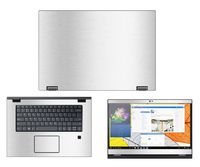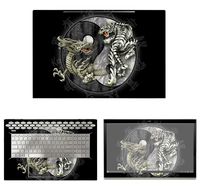
Description
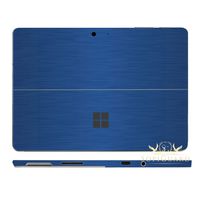
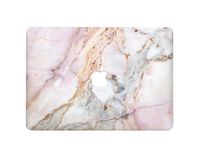
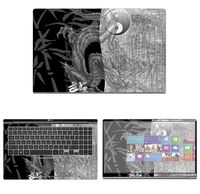
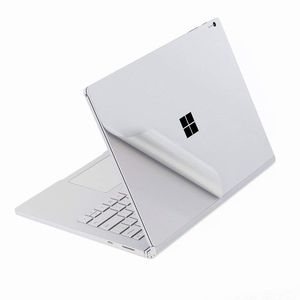
for Microsoft Surface Book 2 13.5 Inch (i5 CPU Version) Protective Skin Sticker Decals Protector.
Compatible with:
-- for 2017/2018 Microsoft Surface Book 2 15 inch version(NOT for Suface BOOK 2 13 inch version)
Product Description:
This is a wear-resistant thin film solution that can effectively protect the Surface Book against the deleterious effects of grease, scratches, smudges, and color-fade that accrete over time.
Package Included:
--1x Upper Body Skin Cover
--1x Bottom Body Skin Cover
--1x Full size Palm Rest Cover Skin
--1x Trackpad Protector Skin
--1x Wiping cloth
--1x Clearning alcohol
Before paste the skins, please noted two issues:
--After the 3M skin paste completed, do not re-lift, otherwise, the skins will be damaged.
--We design the product off 0.3 mm gap to edge,please take care of its placeholder.if you stick it to 100% fit one edge, In the process of using if often scraped to the side, may cause roll up
Pasting Instruction:
1. Please use wiping cloth to clean surface before pasting stickers.
2. Align UPPER sticker SURFACE LOGO hole>edges>corners to the laptop body.
3. Peel off and cut half side of backing paper; Align upper sticker to LOGO hole mainly, then edges/corners of laptop body, paste it on laptop easily.
4. Slowly peel off the rest of backing paper, paste the other half skin at the same time.
4-1.If the alignment process is not good, you can slowly take it away, then re-alignment, paste again.
5. Use wiping cloth wipe the laptop and squeeze out bubbles. Finally, Bubbles be disappeared; sticker fit SURFACE LOGO hole and laptop UPPER side well.
6. Paste another stickers in the same way.
7. If stickers do not paste well, please contact with seller soon.
Compatible with:
-- for 2017/2018 Microsoft Surface Book 2 15 inch version(NOT for Suface BOOK 2 13 inch version)
Product Description:
This is a wear-resistant thin film solution that can effectively protect the Surface Book against the deleterious effects of grease, scratches, smudges, and color-fade that accrete over time.
Package Included:
--1x Upper Body Skin Cover
--1x Bottom Body Skin Cover
--1x Full size Palm Rest Cover Skin
--1x Trackpad Protector Skin
--1x Wiping cloth
--1x Clearning alcohol
Before paste the skins, please noted two issues:
--After the 3M skin paste completed, do not re-lift, otherwise, the skins will be damaged.
--We design the product off 0.3 mm gap to edge,please take care of its placeholder.if you stick it to 100% fit one edge, In the process of using if often scraped to the side, may cause roll up
Pasting Instruction:
1. Please use wiping cloth to clean surface before pasting stickers.
2. Align UPPER sticker SURFACE LOGO hole>edges>corners to the laptop body.
3. Peel off and cut half side of backing paper; Align upper sticker to LOGO hole mainly, then edges/corners of laptop body, paste it on laptop easily.
4. Slowly peel off the rest of backing paper, paste the other half skin at the same time.
4-1.If the alignment process is not good, you can slowly take it away, then re-alignment, paste again.
5. Use wiping cloth wipe the laptop and squeeze out bubbles. Finally, Bubbles be disappeared; sticker fit SURFACE LOGO hole and laptop UPPER side well.
6. Paste another stickers in the same way.
7. If stickers do not paste well, please contact with seller soon.
Premium Full Body 3M Protective Skin Decals Stickers for Microsoft Surface Book 2 13.5 Inch (i5 CPU Version) - Sliver
Price is below average
Current Price
$15
Average
$18.5
Min Price
$15
Max Price
$21.99
Price dynamics
19%
Description
for Microsoft Surface Book 2 13.5 Inch (i5 CPU Version) Protective Skin Sticker Decals Protector.
Compatible with:
-- for 2017/2018 Microsoft Surface Book 2 15 inch version(NOT for Suface BOOK 2 13 inch version)
Product Description:
This is a wear-resistant thin film solution that can effectively protect the Surface Book against the deleterious effects of grease, scratches, smudges, and color-fade that accrete over time.
Package Included:
--1x Upper Body Skin Cover
--1x Bottom Body Skin Cover
--1x Full size Palm Rest Cover Skin
--1x Trackpad Protector Skin
--1x Wiping cloth
--1x Clearning alcohol
Before paste the skins, please noted two issues:
--After the 3M skin paste completed, do not re-lift, otherwise, the skins will be damaged.
--We design the product off 0.3 mm gap to edge,please take care of its placeholder.if you stick it to 100% fit one edge, In the process of using if often scraped to the side, may cause roll up
Pasting Instruction:
1. Please use wiping cloth to clean surface before pasting stickers.
2. Align UPPER sticker SURFACE LOGO hole>edges>corners to the laptop body.
3. Peel off and cut half side of backing paper; Align upper sticker to LOGO hole mainly, then edges/corners of laptop body, paste it on laptop easily.
4. Slowly peel off the rest of backing paper, paste the other half skin at the same time.
4-1.If the alignment process is not good, you can slowly take it away, then re-alignment, paste again.
5. Use wiping cloth wipe the laptop and squeeze out bubbles. Finally, Bubbles be disappeared; sticker fit SURFACE LOGO hole and laptop UPPER side well.
6. Paste another stickers in the same way.
7. If stickers do not paste well, please contact with seller soon.
Compatible with:
-- for 2017/2018 Microsoft Surface Book 2 15 inch version(NOT for Suface BOOK 2 13 inch version)
Product Description:
This is a wear-resistant thin film solution that can effectively protect the Surface Book against the deleterious effects of grease, scratches, smudges, and color-fade that accrete over time.
Package Included:
--1x Upper Body Skin Cover
--1x Bottom Body Skin Cover
--1x Full size Palm Rest Cover Skin
--1x Trackpad Protector Skin
--1x Wiping cloth
--1x Clearning alcohol
Before paste the skins, please noted two issues:
--After the 3M skin paste completed, do not re-lift, otherwise, the skins will be damaged.
--We design the product off 0.3 mm gap to edge,please take care of its placeholder.if you stick it to 100% fit one edge, In the process of using if often scraped to the side, may cause roll up
Pasting Instruction:
1. Please use wiping cloth to clean surface before pasting stickers.
2. Align UPPER sticker SURFACE LOGO hole>edges>corners to the laptop body.
3. Peel off and cut half side of backing paper; Align upper sticker to LOGO hole mainly, then edges/corners of laptop body, paste it on laptop easily.
4. Slowly peel off the rest of backing paper, paste the other half skin at the same time.
4-1.If the alignment process is not good, you can slowly take it away, then re-alignment, paste again.
5. Use wiping cloth wipe the laptop and squeeze out bubbles. Finally, Bubbles be disappeared; sticker fit SURFACE LOGO hole and laptop UPPER side well.
6. Paste another stickers in the same way.
7. If stickers do not paste well, please contact with seller soon.
Price will be lower
in next 2 weeks
in next 2 weeks
According to the data, price will be lower in next two weeks, so not waste your money and track better price!
Product review & video
this is Lisa from mobile tech review and this is Microsoft's latest two-part invention it's the Microsoft Surface book looks like a 13-inch laptop it is a 13-inch laptop but it's got a real neat trick you press a little button on the keyboard and it separates and becomes a tablet or a clipboard as Microsoft likes to call it you have a 13.5 inch display slightly odd size instead 13.3 inch and that is the brains just like a surface pro in many ways everything is in here except for the optional dedicated GPU if you do get that that is in the keyboard and that introduces a few wrinkles and a few bugs that we're going to talk about but Microsoft is said a lot about how this is the most powerful 13-inch laptop ever and it's twice as fast as a MacBook Pro with Retina display they didn't specify the size will assume 13-inch not quite the case in some ways it is a case we'll talk about that too


Similar products