Description
How to Use:
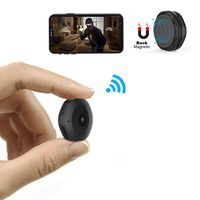
Step1: Scan the qr code to download our App.
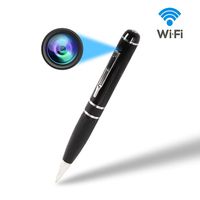
Step2: Connect your phone to the camera's WIFI hotspot.No password needed, just click and connect.
Step3: Open the APP, you will see your camera successfully added. Then you can see live video in the app.
Step 4: Open the APP now, locate setting icon - Device Settings - WiFi Config, then you will see a WIFI list in the APP. Choose your own WIFI and enter password.
Step 5: Wait till camera gets back online in a few seconds. If not, close the APP and reopen it. If still nothing, then repeat all the steps above.
Tips of Reset:
1.Connect the power supply to ensure sufficient power.
(Note: Insufficient power will also cause the wifi function to stop
2.Restart your camera.
3.Wait at least 2 minutes, the reset key will be useful.
4.Now the reset key is useful, press the reset key till the light be off.
5.Wait 2-3 minutes, it will reset successfully.
Technical Specifications:
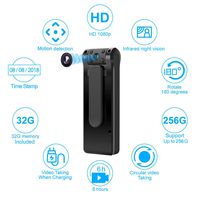
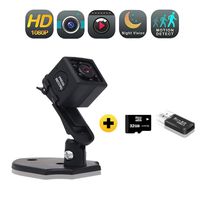
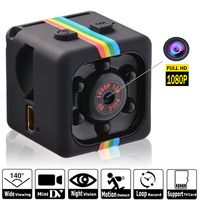
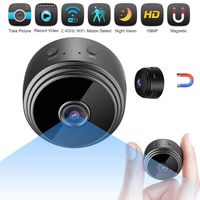
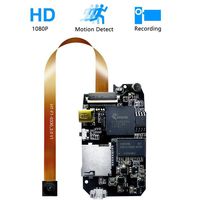
- Resolution: 1920x1080P
- Wide Angle: 136°
- Memory: supsport Micro SD/TF card up to 64GB
- Battery Capacity: 2200mAH
- Working time: 4 hours
- Distance of Motion Detection: 6m
- Body Size: 3.93 in x 1.69 in x 1.45 in
If you can't connect your home wifi or see remotely:
1. Pls to check whether you connect your 2.4G home wifi, the camera only support 2.4G not 5G.
2. Pls reset camera, then to operate again.
3. Please make sure camera connected your wifi and the put the camera to where the wifi signal is good, then you can see live video remotely.
4. If you still can't solve your problem, please kindly write to us via email: ymstech@outlook.com. We are always be here to help you!
Step1: Scan the qr code to download our App.
Step2: Connect your phone to the camera's WIFI hotspot.No password needed, just click and connect.
Step3: Open the APP, you will see your camera successfully added. Then you can see live video in the app.
Step 4: Open the APP now, locate setting icon - Device Settings - WiFi Config, then you will see a WIFI list in the APP. Choose your own WIFI and enter password.
Step 5: Wait till camera gets back online in a few seconds. If not, close the APP and reopen it. If still nothing, then repeat all the steps above.
Tips of Reset:
1.Connect the power supply to ensure sufficient power.
(Note: Insufficient power will also cause the wifi function to stop
2.Restart your camera.
3.Wait at least 2 minutes, the reset key will be useful.
4.Now the reset key is useful, press the reset key till the light be off.
5.Wait 2-3 minutes, it will reset successfully.
Technical Specifications:
- Resolution: 1920x1080P
- Wide Angle: 136°
- Memory: supsport Micro SD/TF card up to 64GB
- Battery Capacity: 2200mAH
- Working time: 4 hours
- Distance of Motion Detection: 6m
- Body Size: 3.93 in x 1.69 in x 1.45 in
If you can't connect your home wifi or see remotely:
1. Pls to check whether you connect your 2.4G home wifi, the camera only support 2.4G not 5G.
2. Pls reset camera, then to operate again.
3. Please make sure camera connected your wifi and the put the camera to where the wifi signal is good, then you can see live video remotely.
4. If you still can't solve your problem, please kindly write to us via email: ymstech@outlook.com. We are always be here to help you!
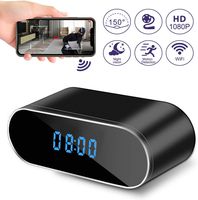
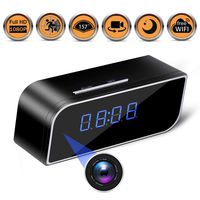
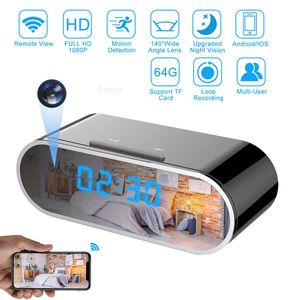
Qouya Spy Camera Wireless Hidden Camera Wifi Clock Camera Features 140 Degrees Wide Angle Lens / Night Vision / Remotely View / Motion Activated
Current Price
$58.99
Average
$52.18
Min Price
$33.79
Max Price
$61.99
Price dynamics
12%
Description
How to Use:
Step1: Scan the qr code to download our App.
Step2: Connect your phone to the camera's WIFI hotspot.No password needed, just click and connect.
Step3: Open the APP, you will see your camera successfully added. Then you can see live video in the app.
Step 4: Open the APP now, locate setting icon - Device Settings - WiFi Config, then you will see a WIFI list in the APP. Choose your own WIFI and enter password.
Step 5: Wait till camera gets back online in a few seconds. If not, close the APP and reopen it. If still nothing, then repeat all the steps above.
Tips of Reset:
1.Connect the power supply to ensure sufficient power.
(Note: Insufficient power will also cause the wifi function to stop
2.Restart your camera.
3.Wait at least 2 minutes, the reset key will be useful.
4.Now the reset key is useful, press the reset key till the light be off.
5.Wait 2-3 minutes, it will reset successfully.
Technical Specifications:
- Resolution: 1920x1080P
- Wide Angle: 136°
- Memory: supsport Micro SD/TF card up to 64GB
- Battery Capacity: 2200mAH
- Working time: 4 hours
- Distance of Motion Detection: 6m
- Body Size: 3.93 in x 1.69 in x 1.45 in
If you can't connect your home wifi or see remotely:
1. Pls to check whether you connect your 2.4G home wifi, the camera only support 2.4G not 5G.
2. Pls reset camera, then to operate again.
3. Please make sure camera connected your wifi and the put the camera to where the wifi signal is good, then you can see live video remotely.
4. If you still can't solve your problem, please kindly write to us via email: ymstech@outlook.com. We are always be here to help you!
Step1: Scan the qr code to download our App.
Step2: Connect your phone to the camera's WIFI hotspot.No password needed, just click and connect.
Step3: Open the APP, you will see your camera successfully added. Then you can see live video in the app.
Step 4: Open the APP now, locate setting icon - Device Settings - WiFi Config, then you will see a WIFI list in the APP. Choose your own WIFI and enter password.
Step 5: Wait till camera gets back online in a few seconds. If not, close the APP and reopen it. If still nothing, then repeat all the steps above.
Tips of Reset:
1.Connect the power supply to ensure sufficient power.
(Note: Insufficient power will also cause the wifi function to stop
2.Restart your camera.
3.Wait at least 2 minutes, the reset key will be useful.
4.Now the reset key is useful, press the reset key till the light be off.
5.Wait 2-3 minutes, it will reset successfully.
Technical Specifications:
- Resolution: 1920x1080P
- Wide Angle: 136°
- Memory: supsport Micro SD/TF card up to 64GB
- Battery Capacity: 2200mAH
- Working time: 4 hours
- Distance of Motion Detection: 6m
- Body Size: 3.93 in x 1.69 in x 1.45 in
If you can't connect your home wifi or see remotely:
1. Pls to check whether you connect your 2.4G home wifi, the camera only support 2.4G not 5G.
2. Pls reset camera, then to operate again.
3. Please make sure camera connected your wifi and the put the camera to where the wifi signal is good, then you can see live video remotely.
4. If you still can't solve your problem, please kindly write to us via email: ymstech@outlook.com. We are always be here to help you!
Price will be lower
in next 2 weeks
in next 2 weeks
According to the data, price will be lower in next two weeks, so not waste your money and track better price!
Product review & video
[Music] hi there today our unboxing a Wi-Fi camera so this is a Wi-Fi camera with a bit of a twist it's actually a hidden camera within a clock so it retails on Amazon for around 35 pounds details are in the description below if you're interested in having a look so let's take a look at the packaging very simple packaging just got HD Wi-Fi clock camera on there if you look around might be camera and Wi-Fi camera that's all you've got on there okay so let's open it up okay first of all we've got the actual clock and camera okay let's put that to the side see what else we get get a power cable USB got some instructions and they are in Chinese see if they're all in Chinese okay no it's in English as well so that's good and then we've got a CD in here okay so I've laid out all the items you get in the packaging let's have a quick look at the actual charging cable so it's mini USB to USB whi


Similar products