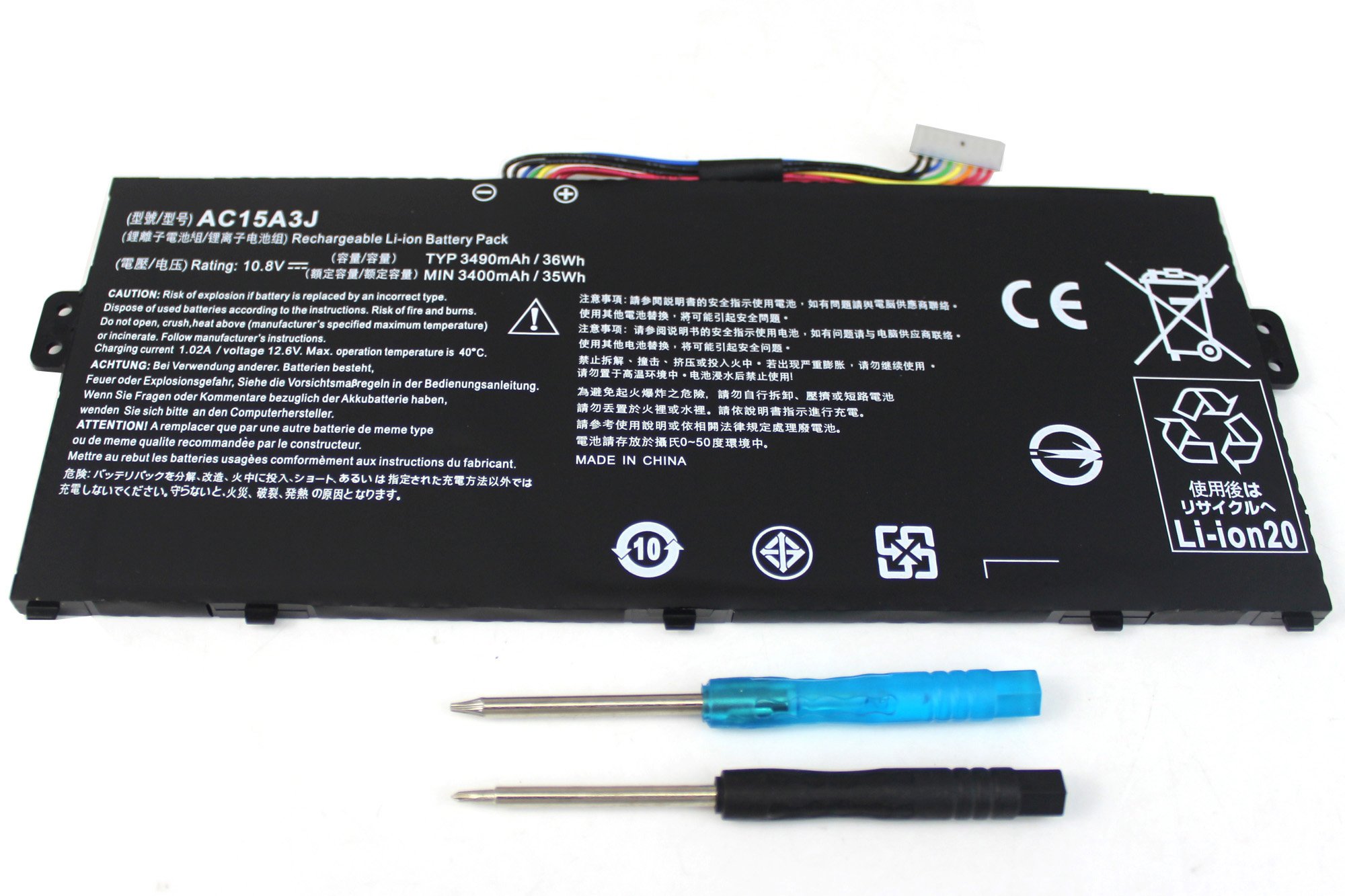
Description
Domallk Inc. is dedicated to provide high quality products and top-notch service for our customers and your item is backed by 12-months warranty,our online Customer Service Group always here for you.As you begin to use the product, please let us know if there is anything we can assist you with,thanks.
"Ctrl+F"totally find your laptop models,if you are not sure,please kindly let us know.
Compatible for Part Numbers:
AC15A3J, AC15A8J, KT.00303.017, 3ICP5/57/80
This Laptop Battery is also compatible with the following models:
For Acer
Chromebook 11 C735 Series :
11 C735-C7Y9, 11 CB3-131, 11 CB3-131-C1CA, 11 CB3-131-C3KD, 11 CB3-131-C3SZ, 11 CB3-131-C4RW
Chromebook C738T Series :
R 11 C738T Series,
Chromebook R11 Series :
R11 CB5-132T, R 11 CB5-132T-C8ZW, R11 CB5-132T-C32M, R11 CB5-132T-C732, R11 CB5-132T-C8KL
Acer Chromebook 11
CB3-111 13 CB5-311 15 C910
Acer Aspire
V3-111 V3-111P V5-122 V5-122P V5-132 V5-132P
E3-111 E3-112 E3-112M ES1-511 ES1-512
Acer TravelMate
X359 X349
Acer Gateway NE512
Acer Spin 5
Acer Swift 3
Maintenance of Laptop Battery
(1) If you don't use the battery for a long time(3 months or more), you should charged the battery to a minimum level of 50%. Otherwise it may not be able to charge again after long time storage.
(2) Never take out the battery from the laptop while it's charging or discharging
(3) When discharging the battery,do not discharge to 3% or lower.It is strictly prohibited to discharge the battery until the laptop lost power or 0%
"Ctrl+F"totally find your laptop models,if you are not sure,please kindly let us know.
Compatible for Part Numbers:
AC15A3J, AC15A8J, KT.00303.017, 3ICP5/57/80
This Laptop Battery is also compatible with the following models:
For Acer
Chromebook 11 C735 Series :
11 C735-C7Y9, 11 CB3-131, 11 CB3-131-C1CA, 11 CB3-131-C3KD, 11 CB3-131-C3SZ, 11 CB3-131-C4RW
Chromebook C738T Series :
R 11 C738T Series,
Chromebook R11 Series :
R11 CB5-132T, R 11 CB5-132T-C8ZW, R11 CB5-132T-C32M, R11 CB5-132T-C732, R11 CB5-132T-C8KL
Acer Chromebook 11
CB3-111 13 CB5-311 15 C910
Acer Aspire
V3-111 V3-111P V5-122 V5-122P V5-132 V5-132P
E3-111 E3-112 E3-112M ES1-511 ES1-512
Acer TravelMate
X359 X349
Acer Gateway NE512
Acer Spin 5
Acer Swift 3
Maintenance of Laptop Battery
(1) If you don't use the battery for a long time(3 months or more), you should charged the battery to a minimum level of 50%. Otherwise it may not be able to charge again after long time storage.
(2) Never take out the battery from the laptop while it's charging or discharging
(3) When discharging the battery,do not discharge to 3% or lower.It is strictly prohibited to discharge the battery until the laptop lost power or 0%
Domallk New AC15A3J Laptop Battery for Acer Chromebook R11 CB5-132T CB5-132T-C1LK CB5-132T-C8ZW C738T Chromebook 11 CB3-131 C735 C735-C7Y9 Series
Current Price
$24.29
Average
$24.29
Min Price
$24.29
Max Price
$24.29
Description
Domallk Inc. is dedicated to provide high quality products and top-notch service for our customers and your item is backed by 12-months warranty,our online Customer Service Group always here for you.As you begin to use the product, please let us know if there is anything we can assist you with,thanks.
"Ctrl+F"totally find your laptop models,if you are not sure,please kindly let us know.
Compatible for Part Numbers:
AC15A3J, AC15A8J, KT.00303.017, 3ICP5/57/80
This Laptop Battery is also compatible with the following models:
For Acer
Chromebook 11 C735 Series :
11 C735-C7Y9, 11 CB3-131, 11 CB3-131-C1CA, 11 CB3-131-C3KD, 11 CB3-131-C3SZ, 11 CB3-131-C4RW
Chromebook C738T Series :
R 11 C738T Series,
Chromebook R11 Series :
R11 CB5-132T, R 11 CB5-132T-C8ZW, R11 CB5-132T-C32M, R11 CB5-132T-C732, R11 CB5-132T-C8KL
Acer Chromebook 11
CB3-111 13 CB5-311 15 C910
Acer Aspire
V3-111 V3-111P V5-122 V5-122P V5-132 V5-132P
E3-111 E3-112 E3-112M ES1-511 ES1-512
Acer TravelMate
X359 X349
Acer Gateway NE512
Acer Spin 5
Acer Swift 3
Maintenance of Laptop Battery
(1) If you don't use the battery for a long time(3 months or more), you should charged the battery to a minimum level of 50%. Otherwise it may not be able to charge again after long time storage.
(2) Never take out the battery from the laptop while it's charging or discharging
(3) When discharging the battery,do not discharge to 3% or lower.It is strictly prohibited to discharge the battery until the laptop lost power or 0%
"Ctrl+F"totally find your laptop models,if you are not sure,please kindly let us know.
Compatible for Part Numbers:
AC15A3J, AC15A8J, KT.00303.017, 3ICP5/57/80
This Laptop Battery is also compatible with the following models:
For Acer
Chromebook 11 C735 Series :
11 C735-C7Y9, 11 CB3-131, 11 CB3-131-C1CA, 11 CB3-131-C3KD, 11 CB3-131-C3SZ, 11 CB3-131-C4RW
Chromebook C738T Series :
R 11 C738T Series,
Chromebook R11 Series :
R11 CB5-132T, R 11 CB5-132T-C8ZW, R11 CB5-132T-C32M, R11 CB5-132T-C732, R11 CB5-132T-C8KL
Acer Chromebook 11
CB3-111 13 CB5-311 15 C910
Acer Aspire
V3-111 V3-111P V5-122 V5-122P V5-132 V5-132P
E3-111 E3-112 E3-112M ES1-511 ES1-512
Acer TravelMate
X359 X349
Acer Gateway NE512
Acer Spin 5
Acer Swift 3
Maintenance of Laptop Battery
(1) If you don't use the battery for a long time(3 months or more), you should charged the battery to a minimum level of 50%. Otherwise it may not be able to charge again after long time storage.
(2) Never take out the battery from the laptop while it's charging or discharging
(3) When discharging the battery,do not discharge to 3% or lower.It is strictly prohibited to discharge the battery until the laptop lost power or 0%
Price will be lower
in next 2 weeks
in next 2 weeks
According to the data, price will be lower in next two weeks, so not waste your money and track better price!
Product review & video
you hello today we'll be showing you how to replace the battery in your Acer Chromebook 11 first you will need a few tools an anti-static mat is recommended to avoid electrostatic discharge which can damage electronic parts a small magnetic tip Phillips head screwdriver will be necessary for this replacement a spudger will be necessary for this replacement you can use either plastic or metal whichever you prefer you will need thermal paste during this replacement tweezers may also come in handy during this replacement as they might be helpful when handling small parts the first step will be to remove the 12 bottom cover screws now you will use your spudger to carefully pry the bottom cover apart from the palm rest assembly make sure you don't pull the bottom cover too hard or far once it's separated because the daughterboard cable on the bottom cover is still attached to the motherboard



Similar products