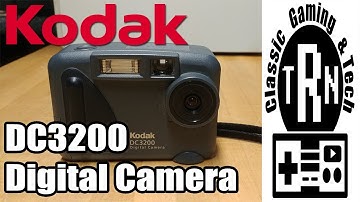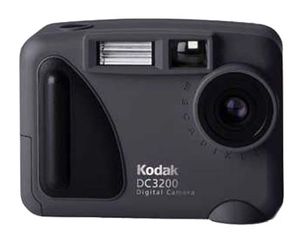
It's as though Kodak asked us, "What's the minimum set of features you feel are necessary in an entry-level digital camera?" and built the DC3200 around these specifications. There's a traditional optical viewfinder (great if you want to save batteries or you like to compose photos the old-fashioned way), an LCD screen (for previewing and reviewing photos to ensure you're getting exactly the shot you want), 1 megapixel of image resolution (enough detail to produce sharp 4-by-6-inch prints), video-out mode (for viewing your pictures on a TV), a flash, plus expandable memory (via a CompactFlash slot). You can find digital cameras that cost less, but they're almost certainly lacking at least one of these key features.
Where did Kodak cut corners to keep costs low? The lens is quite basic: it's fixed-focus instead of autofocus, and there's no zoom or macro--or even a lens cap. To transfer images to your computer, you use an older (and slower) serial cable instead of an increasingly common and much quicker USB cable. Finally, the 2 MB of memory that comes with the camera is internal and not on a removable card, so you can't use a separate card reader to transfer your photos. And last, you're forced to use Kodak's image-transfer software (compatible with Windows 95, 98, and 2000, but not Mac version) to put the photos on your computer.
Camera operation is extremely easy. To take a picture, you just turn the camera on and press the shutter release--true point-and-shoot simplicity. Transferring images to your computer is nearly as easy: install the included software, connect the cable between your computer and your camera, set the camera to "PC Connect" mode, and start the software. A th
Kodak DC3200 1MP Digital Camera
It's as though Kodak asked us, "What's the minimum set of features you feel are necessary in an entry-level digital camera?" and built the DC3200 around these specifications. There's a traditional optical viewfinder (great if you want to save batteries or you like to compose photos the old-fashioned way), an LCD screen (for previewing and reviewing photos to ensure you're getting exactly the shot you want), 1 megapixel of image resolution (enough detail to produce sharp 4-by-6-inch prints), video-out mode (for viewing your pictures on a TV), a flash, plus expandable memory (via a CompactFlash slot). You can find digital cameras that cost less, but they're almost certainly lacking at least one of these key features.
Where did Kodak cut corners to keep costs low? The lens is quite basic: it's fixed-focus instead of autofocus, and there's no zoom or macro--or even a lens cap. To transfer images to your computer, you use an older (and slower) serial cable instead of an increasingly common and much quicker USB cable. Finally, the 2 MB of memory that comes with the camera is internal and not on a removable card, so you can't use a separate card reader to transfer your photos. And last, you're forced to use Kodak's image-transfer software (compatible with Windows 95, 98, and 2000, but not Mac version) to put the photos on your computer.
Camera operation is extremely easy. To take a picture, you just turn the camera on and press the shutter release--true point-and-shoot simplicity. Transferring images to your computer is nearly as easy: install the included software, connect the cable between your computer and your camera, set the camera to "PC Connect" mode, and start the software. A th
in next 2 weeks