Description
Technical Parameters:
Bluetooth:V4.1
FrequencyResponse:50-10KHZ
Profile Support:A2DP/AVRCP
Operating distance: up to 10m (free space)
Talk/Music time: up to 5-6 hrs
Standby time: 160 hrs;
Charger time: 1.5 hrs
Package:
Bluetooth headset x1
Charging cable x1
Wireless Headset Cover x1
User manual x1
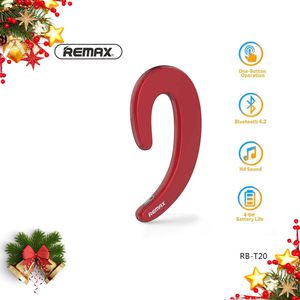
It is close to the ear, it is not in the ear and does not block the ear canal or eardrum. This will help you listen to your surroundings during a call or music, allowing you to walk safer on the street or in certain scenes, making it easier for business and work. Wear it with one ear, and the left or right ear can be worn.
Instructions for use:
1. Power on: In the off state, long press the MFB button for about 4 seconds, accompanied by a "boot" tone.
2. Power-on pairing: long press the MFB button for about 6 seconds, white light flashes 3 times, red and white light double flash, the handset has: boot into the pairing mode "prompt tone.
3. Shutdown: In any state, long press the MFB button for about 5 seconds, accompanied by a "shutdown" tone.
4. Automatic connection: When you turn on the phone, you will automatically connect to the default last phone.
5. Hang up the phone: During the call, click the MFB button and there is a "beep" prompt.
6. Reject the call: When calling, press and hold the MFB button for about 2 seconds, there is a buzzer sound.
7. Button answering: When you call, you will read the phone number by voice and click the MFB button to answer.
8. Over-distance warning: There is a "broken link" voice, red light flashes and a tone.
9. Music Play/Pause: Click the MFB button once, and repeat the operation to pause.
10. Music switch: Press and hold the MFB button for 2 seconds during music playback, you can switch the next track, one cycle.
We will ship directly from Amazon's warehouse and we can ensure that you receive the package safely and quickly.
Bluetooth:V4.1
FrequencyResponse:50-10KHZ
Profile Support:A2DP/AVRCP
Operating distance: up to 10m (free space)
Talk/Music time: up to 5-6 hrs
Standby time: 160 hrs;
Charger time: 1.5 hrs
Package:
Bluetooth headset x1
Charging cable x1
Wireless Headset Cover x1
User manual x1
It is close to the ear, it is not in the ear and does not block the ear canal or eardrum. This will help you listen to your surroundings during a call or music, allowing you to walk safer on the street or in certain scenes, making it easier for business and work. Wear it with one ear, and the left or right ear can be worn.
Instructions for use:
1. Power on: In the off state, long press the MFB button for about 4 seconds, accompanied by a "boot" tone.
2. Power-on pairing: long press the MFB button for about 6 seconds, white light flashes 3 times, red and white light double flash, the handset has: boot into the pairing mode "prompt tone.
3. Shutdown: In any state, long press the MFB button for about 5 seconds, accompanied by a "shutdown" tone.
4. Automatic connection: When you turn on the phone, you will automatically connect to the default last phone.
5. Hang up the phone: During the call, click the MFB button and there is a "beep" prompt.
6. Reject the call: When calling, press and hold the MFB button for about 2 seconds, there is a buzzer sound.
7. Button answering: When you call, you will read the phone number by voice and click the MFB button to answer.
8. Over-distance warning: There is a "broken link" voice, red light flashes and a tone.
9. Music Play/Pause: Click the MFB button once, and repeat the operation to pause.
10. Music switch: Press and hold the MFB button for 2 seconds during music playback, you can switch the next track, one cycle.
We will ship directly from Amazon's warehouse and we can ensure that you receive the package safely and quickly.
REMAX Upgraded Bluetooth Earpiece Noise Cancelling Earbuds, Minimalist Wireless Ear Hook Business Headset Non in Ear Headphone Compatible for Cellphone, Smartphone (Red)
Price is below average
Current Price
$13.59
Average
$14.56
Min Price
$13.39
Max Price
$18.99
Price dynamics
7%
Description
Technical Parameters:
Bluetooth:V4.1
FrequencyResponse:50-10KHZ
Profile Support:A2DP/AVRCP
Operating distance: up to 10m (free space)
Talk/Music time: up to 5-6 hrs
Standby time: 160 hrs;
Charger time: 1.5 hrs
Package:
Bluetooth headset x1
Charging cable x1
Wireless Headset Cover x1
User manual x1
It is close to the ear, it is not in the ear and does not block the ear canal or eardrum. This will help you listen to your surroundings during a call or music, allowing you to walk safer on the street or in certain scenes, making it easier for business and work. Wear it with one ear, and the left or right ear can be worn.
Instructions for use:
1. Power on: In the off state, long press the MFB button for about 4 seconds, accompanied by a "boot" tone.
2. Power-on pairing: long press the MFB button for about 6 seconds, white light flashes 3 times, red and white light double flash, the handset has: boot into the pairing mode "prompt tone.
3. Shutdown: In any state, long press the MFB button for about 5 seconds, accompanied by a "shutdown" tone.
4. Automatic connection: When you turn on the phone, you will automatically connect to the default last phone.
5. Hang up the phone: During the call, click the MFB button and there is a "beep" prompt.
6. Reject the call: When calling, press and hold the MFB button for about 2 seconds, there is a buzzer sound.
7. Button answering: When you call, you will read the phone number by voice and click the MFB button to answer.
8. Over-distance warning: There is a "broken link" voice, red light flashes and a tone.
9. Music Play/Pause: Click the MFB button once, and repeat the operation to pause.
10. Music switch: Press and hold the MFB button for 2 seconds during music playback, you can switch the next track, one cycle.
We will ship directly from Amazon's warehouse and we can ensure that you receive the package safely and quickly.
Bluetooth:V4.1
FrequencyResponse:50-10KHZ
Profile Support:A2DP/AVRCP
Operating distance: up to 10m (free space)
Talk/Music time: up to 5-6 hrs
Standby time: 160 hrs;
Charger time: 1.5 hrs
Package:
Bluetooth headset x1
Charging cable x1
Wireless Headset Cover x1
User manual x1
It is close to the ear, it is not in the ear and does not block the ear canal or eardrum. This will help you listen to your surroundings during a call or music, allowing you to walk safer on the street or in certain scenes, making it easier for business and work. Wear it with one ear, and the left or right ear can be worn.
Instructions for use:
1. Power on: In the off state, long press the MFB button for about 4 seconds, accompanied by a "boot" tone.
2. Power-on pairing: long press the MFB button for about 6 seconds, white light flashes 3 times, red and white light double flash, the handset has: boot into the pairing mode "prompt tone.
3. Shutdown: In any state, long press the MFB button for about 5 seconds, accompanied by a "shutdown" tone.
4. Automatic connection: When you turn on the phone, you will automatically connect to the default last phone.
5. Hang up the phone: During the call, click the MFB button and there is a "beep" prompt.
6. Reject the call: When calling, press and hold the MFB button for about 2 seconds, there is a buzzer sound.
7. Button answering: When you call, you will read the phone number by voice and click the MFB button to answer.
8. Over-distance warning: There is a "broken link" voice, red light flashes and a tone.
9. Music Play/Pause: Click the MFB button once, and repeat the operation to pause.
10. Music switch: Press and hold the MFB button for 2 seconds during music playback, you can switch the next track, one cycle.
We will ship directly from Amazon's warehouse and we can ensure that you receive the package safely and quickly.
Price will be lower
in next 2 weeks
in next 2 weeks
According to the data, price will be lower in next two weeks, so not waste your money and track better price!

Similar products



































