- HomeElectronicsAccessories & SuppliesAudio & Video AccessoriesCables & InterconnectsVideo CablesHDMI Cables
Description
Note that Samsung S2 is 5pin and Samsung S3 is 11pin.
Compatible with:
Samsung Galaxy S i9100/i9188/i997 Infuse 4G/Galaxy Nexus/Galaxy Note.
HTC Amaze4G/Sensation/SensationXE/Rezound/Edge/EVO 3D/Vivid/Z710/e/t/Flyer/Jetstream.
LG Nitro HD/Optimus LTE/Prada 3.0/Spectrum.
NOKIA N10/Lumia
Fujitsu Arrows
HUAWEI Ascend p1/s
MEIZU MX and other MHL-Enabled device.
Xiaomi 2
DOES NOT WORK WITH:
Samsung Galaxy S6 Edge,S7,Tab 3 7.0,Note 3 N9008V,Note 5,Note 10.1 (20XX Edition),Grand Prime, Stratosphere II
Google Nexus 5 7
LG G2 G3 G4 V10 Vista
Kindle Fire
Nokia 635
Motorola Moto E 2nd Gen Droid
ZTE ZMAX 2
Asus Zenfone 2
User Guide:
1. Plug the Micro USB(MHL) cable to your devices directly
2. Plug the HDMI cable to your TV and switch the TV to HDMI channel
3. Plug the USB cable to power adapter (at lease 5V 1A)
4. Reboot your devices after whole connection finished
Warm Tips:
1. Please reboot your phone after whole connection finished
2. Please connect the power port to power this adapter (>5V 1A) while using.
If connect The Micro 5pin to 11 pin adapter(not include) for this cable that will be compatible with Samsung Galaxy S3 / S4 / S5 and Note 2 / Note 3.
If need The Micro 5pin to 11 pin adapter, please inquire B081SGC18G.
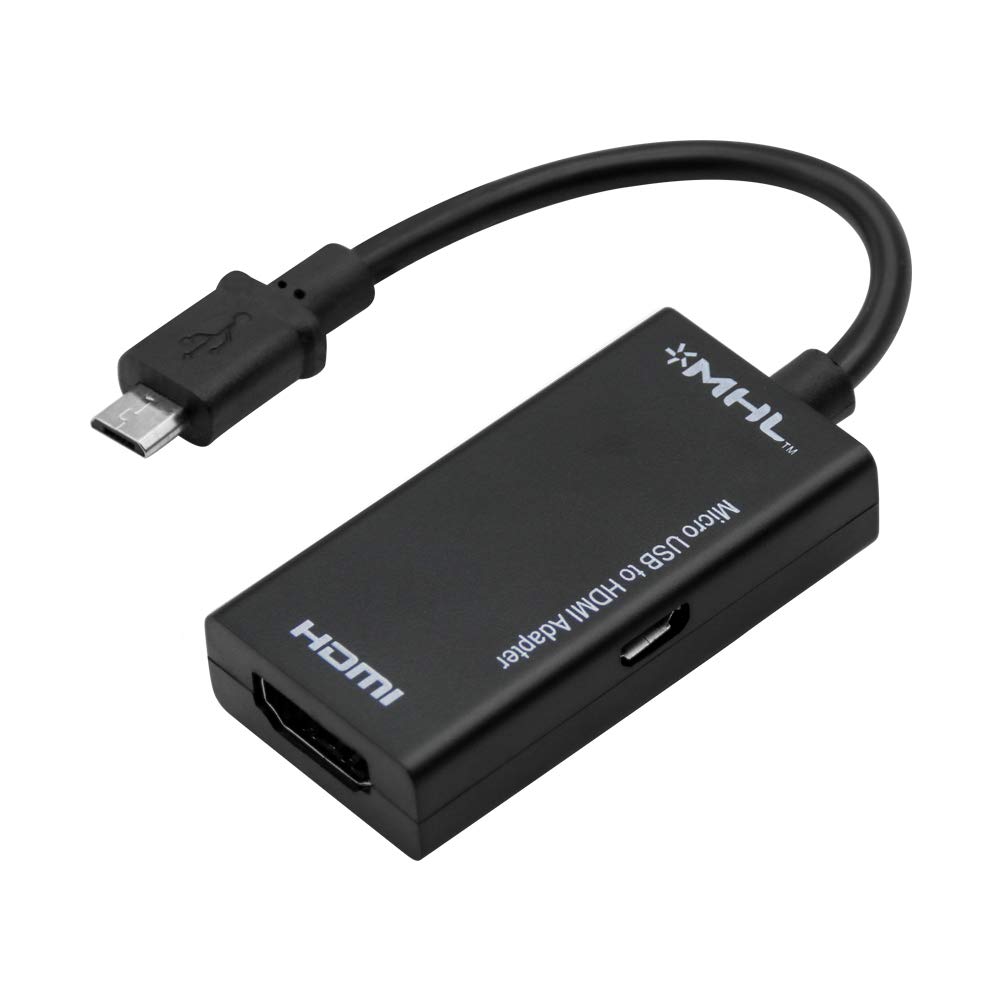
Rumfo MHL Micro USB to HDMI Adapter Converter Cable 1080P HDTV for Android Devices Samsung Galaxy Note 4, Note Edge, S2, LG, Zte, HTC One M8, Xiaomi (5 Pin)
Current Price
$8.99
Average
$8.86
Min Price
$6.99
Max Price
$9.99
Price dynamics
1%
Description
Note that Samsung S2 is 5pin and Samsung S3 is 11pin.
Compatible with:
Samsung Galaxy S i9100/i9188/i997 Infuse 4G/Galaxy Nexus/Galaxy Note.
HTC Amaze4G/Sensation/SensationXE/Rezound/Edge/EVO 3D/Vivid/Z710/e/t/Flyer/Jetstream.
LG Nitro HD/Optimus LTE/Prada 3.0/Spectrum.
NOKIA N10/Lumia
Fujitsu Arrows
HUAWEI Ascend p1/s
MEIZU MX and other MHL-Enabled device.
Xiaomi 2
DOES NOT WORK WITH:
Samsung Galaxy S6 Edge,S7,Tab 3 7.0,Note 3 N9008V,Note 5,Note 10.1 (20XX Edition),Grand Prime, Stratosphere II
Google Nexus 5 7
LG G2 G3 G4 V10 Vista
Kindle Fire
Nokia 635
Motorola Moto E 2nd Gen Droid
ZTE ZMAX 2
Asus Zenfone 2
User Guide:
1. Plug the Micro USB(MHL) cable to your devices directly
2. Plug the HDMI cable to your TV and switch the TV to HDMI channel
3. Plug the USB cable to power adapter (at lease 5V 1A)
4. Reboot your devices after whole connection finished
Warm Tips:
1. Please reboot your phone after whole connection finished
2. Please connect the power port to power this adapter (>5V 1A) while using.
If connect The Micro 5pin to 11 pin adapter(not include) for this cable that will be compatible with Samsung Galaxy S3 / S4 / S5 and Note 2 / Note 3.
If need The Micro 5pin to 11 pin adapter, please inquire B081SGC18G.
Price will be lower
in next 2 weeks
in next 2 weeks
According to the data, price will be lower in next two weeks, so not waste your money and track better price!
Product review & video
everybody this is Dennis from ATX power supplies coming at you again here with another little device today I'm going to be looking at this Samsung Galaxy mobile phone for HD TV so basically what this is supposed to do is take the HDMI port on your cell phone and send it out to the TV so that way you can watch your Netflix and all that kind of stuff so I want to try this out it works good we're going to sell a few of them so what we got here is basically a little cord adapter here that's gonna HDMI it goes to your TV it's got a small HDMI for your cell phone it looks a lot like a Micro Micro USB fan I'm gonna go from there and then they've got a USB that it actually uses to power the HDMI circuit so let's see what this is all about I'm trying this for the first time there has been no practice on this video here so what you're seeing is exactly what I see we're having the first impression



Similar products