Description
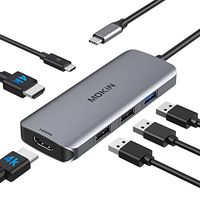
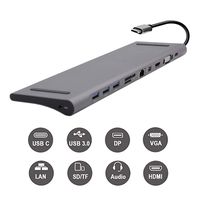
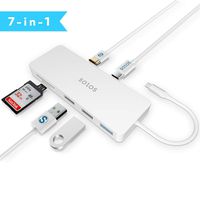
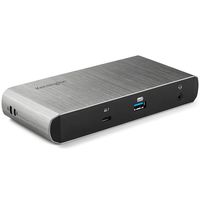
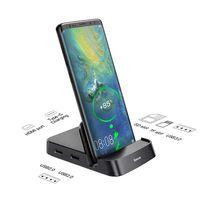
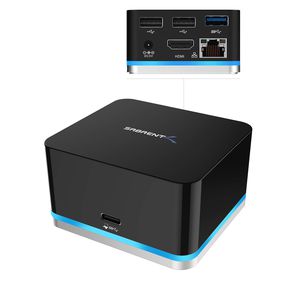
With the Sabrent DS-CMND 5 Port USB Type-C Docking Station you can now connect your phone, tablet, laptop, or PC to multiple USB devices.
The Sabrent Continuum function on Windows 10 Smart phones turns your phone into a desktop computer. Not only can you use your phone to answer phone calls, connect to social media, and use other communication functions, you can now also operate Microsoft office Programs.
Simply connect your phone with the dock and make presentations outside the office or manage your files at home while answering phone calls. This dock allows you to have your own mobile office.
The Type-C connection enables you to transfer data at Super-Speeds, extend your display and much more with one single cable connected to your computer.
Featuring Multi-Device connection, you have the ability of Ethernet connection for all your devices.
The 2 USB 2.0 Type-A ports allow you to transfer data between your peripherals.
With the HDMI port you can expand your displays with an additional monitor.
Charge and Sync with an additional USB 3.0 type-A port.
Features:
HDMI DisplayPort Resolution 1920x1080@60Hz (for phone) 3840x2160 @30Hz (for PC).
Compact Design Ideal For on the go or minimal work space.
2 USB 2.0 Type‐A ideal for additional peripherals.
USB 3.0 Type‐A port for charging and data transfer.
RJ-45 Gigabit 10/100/1000 Ethernet Adapter.
Max. 1.5A USB 3.0 port for device charging port.
Plug and play (No driver installation needed).
System Requirements:
USB‐C Smartphone / Laptop / Tablet / PC and:
Windows 10 enabled phone.
Windows 10 Laptop/Tablet / PC.
Chromebook
Mac OS.
USB‐C requires full features: USB data transfer, HDMI DisplayPort Extension mode, USB Type-A Power Delivery, Ethernet.
Package Contents:
Multi-Function USB Type-C Dock
USB‐C Cable
Power Adapter
User’s Manual
The Sabrent Continuum function on Windows 10 Smart phones turns your phone into a desktop computer. Not only can you use your phone to answer phone calls, connect to social media, and use other communication functions, you can now also operate Microsoft office Programs.
Simply connect your phone with the dock and make presentations outside the office or manage your files at home while answering phone calls. This dock allows you to have your own mobile office.
The Type-C connection enables you to transfer data at Super-Speeds, extend your display and much more with one single cable connected to your computer.
Featuring Multi-Device connection, you have the ability of Ethernet connection for all your devices.
The 2 USB 2.0 Type-A ports allow you to transfer data between your peripherals.
With the HDMI port you can expand your displays with an additional monitor.
Charge and Sync with an additional USB 3.0 type-A port.
Features:
HDMI DisplayPort Resolution 1920x1080@60Hz (for phone) 3840x2160 @30Hz (for PC).
Compact Design Ideal For on the go or minimal work space.
2 USB 2.0 Type‐A ideal for additional peripherals.
USB 3.0 Type‐A port for charging and data transfer.
RJ-45 Gigabit 10/100/1000 Ethernet Adapter.
Max. 1.5A USB 3.0 port for device charging port.
Plug and play (No driver installation needed).
System Requirements:
USB‐C Smartphone / Laptop / Tablet / PC and:
Windows 10 enabled phone.
Windows 10 Laptop/Tablet / PC.
Chromebook
Mac OS.
USB‐C requires full features: USB data transfer, HDMI DisplayPort Extension mode, USB Type-A Power Delivery, Ethernet.
Package Contents:
Multi-Function USB Type-C Dock
USB‐C Cable
Power Adapter
User’s Manual
Sabrent 5 Port USB Type C Mini Continuum Docking Station, Supports up to 3840x2160 at 30HZ (DS-CMND)
Current Price
$88.99
Average
$87.39
Min Price
$78.99
Max Price
$99.48
Price dynamics
2%
Description
With the Sabrent DS-CMND 5 Port USB Type-C Docking Station you can now connect your phone, tablet, laptop, or PC to multiple USB devices.
The Sabrent Continuum function on Windows 10 Smart phones turns your phone into a desktop computer. Not only can you use your phone to answer phone calls, connect to social media, and use other communication functions, you can now also operate Microsoft office Programs.
Simply connect your phone with the dock and make presentations outside the office or manage your files at home while answering phone calls. This dock allows you to have your own mobile office.
The Type-C connection enables you to transfer data at Super-Speeds, extend your display and much more with one single cable connected to your computer.
Featuring Multi-Device connection, you have the ability of Ethernet connection for all your devices.
The 2 USB 2.0 Type-A ports allow you to transfer data between your peripherals.
With the HDMI port you can expand your displays with an additional monitor.
Charge and Sync with an additional USB 3.0 type-A port.
Features:
HDMI DisplayPort Resolution 1920x1080@60Hz (for phone) 3840x2160 @30Hz (for PC).
Compact Design Ideal For on the go or minimal work space.
2 USB 2.0 Type‐A ideal for additional peripherals.
USB 3.0 Type‐A port for charging and data transfer.
RJ-45 Gigabit 10/100/1000 Ethernet Adapter.
Max. 1.5A USB 3.0 port for device charging port.
Plug and play (No driver installation needed).
System Requirements:
USB‐C Smartphone / Laptop / Tablet / PC and:
Windows 10 enabled phone.
Windows 10 Laptop/Tablet / PC.
Chromebook
Mac OS.
USB‐C requires full features: USB data transfer, HDMI DisplayPort Extension mode, USB Type-A Power Delivery, Ethernet.
Package Contents:
Multi-Function USB Type-C Dock
USB‐C Cable
Power Adapter
User’s Manual
The Sabrent Continuum function on Windows 10 Smart phones turns your phone into a desktop computer. Not only can you use your phone to answer phone calls, connect to social media, and use other communication functions, you can now also operate Microsoft office Programs.
Simply connect your phone with the dock and make presentations outside the office or manage your files at home while answering phone calls. This dock allows you to have your own mobile office.
The Type-C connection enables you to transfer data at Super-Speeds, extend your display and much more with one single cable connected to your computer.
Featuring Multi-Device connection, you have the ability of Ethernet connection for all your devices.
The 2 USB 2.0 Type-A ports allow you to transfer data between your peripherals.
With the HDMI port you can expand your displays with an additional monitor.
Charge and Sync with an additional USB 3.0 type-A port.
Features:
HDMI DisplayPort Resolution 1920x1080@60Hz (for phone) 3840x2160 @30Hz (for PC).
Compact Design Ideal For on the go or minimal work space.
2 USB 2.0 Type‐A ideal for additional peripherals.
USB 3.0 Type‐A port for charging and data transfer.
RJ-45 Gigabit 10/100/1000 Ethernet Adapter.
Max. 1.5A USB 3.0 port for device charging port.
Plug and play (No driver installation needed).
System Requirements:
USB‐C Smartphone / Laptop / Tablet / PC and:
Windows 10 enabled phone.
Windows 10 Laptop/Tablet / PC.
Chromebook
Mac OS.
USB‐C requires full features: USB data transfer, HDMI DisplayPort Extension mode, USB Type-A Power Delivery, Ethernet.
Package Contents:
Multi-Function USB Type-C Dock
USB‐C Cable
Power Adapter
User’s Manual
Price will be lower
in next 2 weeks
in next 2 weeks
According to the data, price will be lower in next two weeks, so not waste your money and track better price!
Product review & video
ever wanted to connect additional monitors to your USB see Windows system computer the Sabre USB type-c dual HDMI adapter is the ideal device to add two HDMI monitors to your current work space the ability to increase one's workflow by utilizing multiple monitors or displays is undeniable and the type-c adapter allows you to do precisely that the savoured adapter is very easy to use connect your SE burn USB type-c to dual HDMI adapter to your computer wait for the computer to detect your newly attached sabered device next connect only one HDMI monitor to your saber and device and turn it on wait for the operating system to detect the first monitor now connect the second HDMI monitor in the same way that you connected the first one the quality of the video output is uncompromising with 4k at 30 Hertz resolution the saber duel HDMI adapter requires a USB C port on a Windows 7 or higher PC


Similar products