Description
Redesigned to put more power at your fingertips
Our most advanced S Pen yet. With an elegant, unibody design, it follows your movements, and writes, draws, and controls longer.
Remote control turns your clicks into action
With a click, navigate a presentation, play and pause videos, or snap a photo - all with the S Pen
Air actions give you intuitive control with a wave of your hand
We re-engineered S Pen to match your movements, allowing you to control your phone via simple gestures.
Front camera
Move S Pen clockwise or counterclockwise to change the camera angle and capture a close-crop group shot or the whole scene.
Gallery
Flick left or right in the Gallery app to move to the next photo, or go back to the previous one.
Volume
Turn up the sound by gesturing up. Lower the sound by gesturing down - no need to touch the volume key.
Text export turns your handwriting into text instantly
Jot down your thoughts then simply tap, turning your project notes into readable text you can copy, paste, and share.
As natural as putting pen to paper
Redesigned to be customized, Samsung Notes lets you adjust your S Pen settings like ink color and thickness, and save your favorites.
Screen off memo is ready when you need it.
Pop out the S Pen to use Screen off memo. Write and draw in a variety of colors. Then save your screen to Samsung Notes or pin it to the Always On Display.
Our most advanced S Pen yet. With an elegant, unibody design, it follows your movements, and writes, draws, and controls longer.
Remote control turns your clicks into action
With a click, navigate a presentation, play and pause videos, or snap a photo - all with the S Pen
Air actions give you intuitive control with a wave of your hand
We re-engineered S Pen to match your movements, allowing you to control your phone via simple gestures.
Front camera
Move S Pen clockwise or counterclockwise to change the camera angle and capture a close-crop group shot or the whole scene.
Gallery
Flick left or right in the Gallery app to move to the next photo, or go back to the previous one.
Volume
Turn up the sound by gesturing up. Lower the sound by gesturing down - no need to touch the volume key.
Text export turns your handwriting into text instantly
Jot down your thoughts then simply tap, turning your project notes into readable text you can copy, paste, and share.
As natural as putting pen to paper
Redesigned to be customized, Samsung Notes lets you adjust your S Pen settings like ink color and thickness, and save your favorites.
Screen off memo is ready when you need it.
Pop out the S Pen to use Screen off memo. Write and draw in a variety of colors. Then save your screen to Samsung Notes or pin it to the Always On Display.
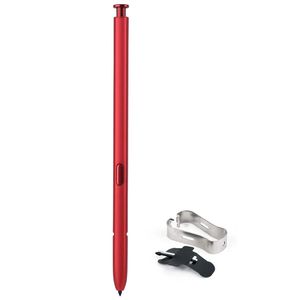
Samsung Galaxy Note 10, and Note 10+ Original Replacement S Pen EJ-PN970BREGKR Red
Current Price
$34.5
Average
$34.5
Min Price
$34.5
Max Price
$34.5
Price dynamics
0%
Description
Redesigned to put more power at your fingertips
Our most advanced S Pen yet. With an elegant, unibody design, it follows your movements, and writes, draws, and controls longer.
Remote control turns your clicks into action
With a click, navigate a presentation, play and pause videos, or snap a photo - all with the S Pen
Air actions give you intuitive control with a wave of your hand
We re-engineered S Pen to match your movements, allowing you to control your phone via simple gestures.
Front camera
Move S Pen clockwise or counterclockwise to change the camera angle and capture a close-crop group shot or the whole scene.
Gallery
Flick left or right in the Gallery app to move to the next photo, or go back to the previous one.
Volume
Turn up the sound by gesturing up. Lower the sound by gesturing down - no need to touch the volume key.
Text export turns your handwriting into text instantly
Jot down your thoughts then simply tap, turning your project notes into readable text you can copy, paste, and share.
As natural as putting pen to paper
Redesigned to be customized, Samsung Notes lets you adjust your S Pen settings like ink color and thickness, and save your favorites.
Screen off memo is ready when you need it.
Pop out the S Pen to use Screen off memo. Write and draw in a variety of colors. Then save your screen to Samsung Notes or pin it to the Always On Display.
Our most advanced S Pen yet. With an elegant, unibody design, it follows your movements, and writes, draws, and controls longer.
Remote control turns your clicks into action
With a click, navigate a presentation, play and pause videos, or snap a photo - all with the S Pen
Air actions give you intuitive control with a wave of your hand
We re-engineered S Pen to match your movements, allowing you to control your phone via simple gestures.
Front camera
Move S Pen clockwise or counterclockwise to change the camera angle and capture a close-crop group shot or the whole scene.
Gallery
Flick left or right in the Gallery app to move to the next photo, or go back to the previous one.
Volume
Turn up the sound by gesturing up. Lower the sound by gesturing down - no need to touch the volume key.
Text export turns your handwriting into text instantly
Jot down your thoughts then simply tap, turning your project notes into readable text you can copy, paste, and share.
As natural as putting pen to paper
Redesigned to be customized, Samsung Notes lets you adjust your S Pen settings like ink color and thickness, and save your favorites.
Screen off memo is ready when you need it.
Pop out the S Pen to use Screen off memo. Write and draw in a variety of colors. Then save your screen to Samsung Notes or pin it to the Always On Display.
Price will be lower
in next 2 weeks
in next 2 weeks
According to the data, price will be lower in next two weeks, so not waste your money and track better price!
Product review & video
hey guys welcome back to my vlog welcome back to my youtube channel the dimpled engineer and if this is the first time you're watching my channel i would just like to introduce myself i'm louise so i recently got a new s-pen for my galaxy note 10 plus so i just got this today october 19 2020 so i would just like to make a quick video and quick tutorial on how you can pair or how can you connect your new s-pen to your galaxy note 10 plus so the reason why i bought a new s-pen i'll explain it on the next clip so let's go guys so okay guys this is my galaxy note 10 plus and this is the new s pen that i recently got so the reason why i'm replacing the old by the way this is the old s pen is because uh unfortunately this uh old s pen the air actions suddenly stopped working actually i i search uh every solution here in youtube on how you can uh repair or reconnect your old s-pen but unfortun



Similar products


































