Description
Redesigned to put more power at your fingertips
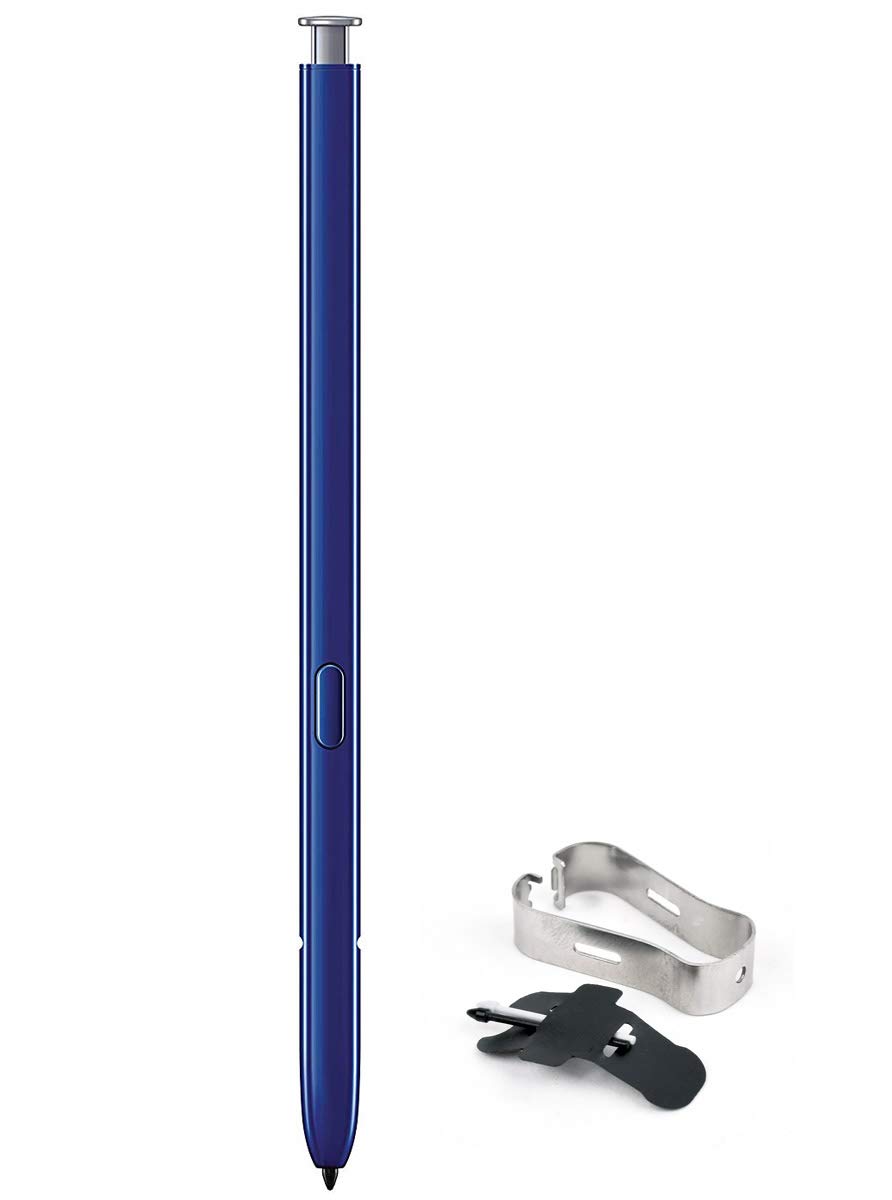
Our most advanced S Pen yet. With an elegant, unibody design, it follows your movements, and writes, draws, and controls longer.
Remote control turns your clicks into action
With a click, navigate a presentation, play and pause videos, or snap a photo - all with the S Pen
Air actions give you intuitive control with a wave of your hand
We re-engineered S Pen to match your movements, allowing you to control your phone via simple gestures.
Front camera
Move S Pen clockwise or counterclockwise to change the camera angle and capture a close-crop group shot or the whole scene.
Gallery
Flick left or right in the Gallery app to move to the next photo, or go back to the previous one.
Volume
Turn up the sound by gesturing up. Lower the sound by gesturing down - no need to touch the volume key.
Text export turns your handwriting into text instantly
Jot down your thoughts then simply tap, turning your project notes into readable text you can copy, paste, and share.
As natural as putting pen to paper
Redesigned to be customized, Samsung Notes lets you adjust your S Pen settings like ink color and thickness, and save your favorites.
Screen off memo is ready when you need it.
Pop out the S Pen to use Screen off memo. Write and draw in a variety of colors. Then save your screen to Samsung Notes or pin it to the Always On Display.
Our most advanced S Pen yet. With an elegant, unibody design, it follows your movements, and writes, draws, and controls longer.
Remote control turns your clicks into action
With a click, navigate a presentation, play and pause videos, or snap a photo - all with the S Pen
Air actions give you intuitive control with a wave of your hand
We re-engineered S Pen to match your movements, allowing you to control your phone via simple gestures.
Front camera
Move S Pen clockwise or counterclockwise to change the camera angle and capture a close-crop group shot or the whole scene.
Gallery
Flick left or right in the Gallery app to move to the next photo, or go back to the previous one.
Volume
Turn up the sound by gesturing up. Lower the sound by gesturing down - no need to touch the volume key.
Text export turns your handwriting into text instantly
Jot down your thoughts then simply tap, turning your project notes into readable text you can copy, paste, and share.
As natural as putting pen to paper
Redesigned to be customized, Samsung Notes lets you adjust your S Pen settings like ink color and thickness, and save your favorites.
Screen off memo is ready when you need it.
Pop out the S Pen to use Screen off memo. Write and draw in a variety of colors. Then save your screen to Samsung Notes or pin it to the Always On Display.
Samsung Galaxy Note 10, and Note 10+ Original Replacement S Pen EJ-PN970BSEGKR Silver
Price is below average
Current Price
$23.99
Average
$32.09
Min Price
$23.99
Max Price
$34.5
Price dynamics
25%
Description
Redesigned to put more power at your fingertips
Our most advanced S Pen yet. With an elegant, unibody design, it follows your movements, and writes, draws, and controls longer.
Remote control turns your clicks into action
With a click, navigate a presentation, play and pause videos, or snap a photo - all with the S Pen
Air actions give you intuitive control with a wave of your hand
We re-engineered S Pen to match your movements, allowing you to control your phone via simple gestures.
Front camera
Move S Pen clockwise or counterclockwise to change the camera angle and capture a close-crop group shot or the whole scene.
Gallery
Flick left or right in the Gallery app to move to the next photo, or go back to the previous one.
Volume
Turn up the sound by gesturing up. Lower the sound by gesturing down - no need to touch the volume key.
Text export turns your handwriting into text instantly
Jot down your thoughts then simply tap, turning your project notes into readable text you can copy, paste, and share.
As natural as putting pen to paper
Redesigned to be customized, Samsung Notes lets you adjust your S Pen settings like ink color and thickness, and save your favorites.
Screen off memo is ready when you need it.
Pop out the S Pen to use Screen off memo. Write and draw in a variety of colors. Then save your screen to Samsung Notes or pin it to the Always On Display.
Our most advanced S Pen yet. With an elegant, unibody design, it follows your movements, and writes, draws, and controls longer.
Remote control turns your clicks into action
With a click, navigate a presentation, play and pause videos, or snap a photo - all with the S Pen
Air actions give you intuitive control with a wave of your hand
We re-engineered S Pen to match your movements, allowing you to control your phone via simple gestures.
Front camera
Move S Pen clockwise or counterclockwise to change the camera angle and capture a close-crop group shot or the whole scene.
Gallery
Flick left or right in the Gallery app to move to the next photo, or go back to the previous one.
Volume
Turn up the sound by gesturing up. Lower the sound by gesturing down - no need to touch the volume key.
Text export turns your handwriting into text instantly
Jot down your thoughts then simply tap, turning your project notes into readable text you can copy, paste, and share.
As natural as putting pen to paper
Redesigned to be customized, Samsung Notes lets you adjust your S Pen settings like ink color and thickness, and save your favorites.
Screen off memo is ready when you need it.
Pop out the S Pen to use Screen off memo. Write and draw in a variety of colors. Then save your screen to Samsung Notes or pin it to the Always On Display.
Price will be lower
in next 2 weeks
in next 2 weeks
According to the data, price will be lower in next two weeks, so not waste your money and track better price!
Product review & video
it is perhaps the biggest differentiator among smartphones Samsung's Note lineup offers an included stylus or what's called their s-pen for accomplishing all kinds of tasks I'm Erin from tech gadgets Canada comm and if you're new to Samsung phones or just the new note 10 here or the bigger Note 10 plus you might be wondering what it can do and if you need to use it consider this your Samsung S Pen primer right away you'll notice the s-pen feels very natural to use when you write with it it doesn't have that metal on glass teeth scraping feeling of old tablets or styluses so do you need to use the s-pen with the note 10 or the note 10 plus the short answer is no you don't need to but there's all kinds of fun and productivity reasons why you might want to one really handy feature though it's technically not new is the ability to write quick notes on the screen even if the phone screen is



Similar products