Description
Precision
A natural extension of you.
Bring your ideas to life with S Pen's responsiveness and control. With its fine 0.7mm tip and 4096 levels of pressure, your precise strokes will feel as graceful as putting pen to paper.
Remote camera access
Point, pose, and click from anywhere.
No more rushing to beat the timer, straining your arm for a selfie, or getting left out of a group shot. The S Pen's remote camera feature lets you be photographer, subject, and art director all at once.
Presentation control
Command your slideshow without touching your phone.
Own the pitch. Connect your Note9 to Samsung DeX, pull up your presentation, and switch slides with the S Pen to make an impression with just the press of a button.
Enhanced apps
Your favorite apps, but better.
The S Pen doesn't just snap selfies and switch slides. Use the S Pen to shuffle music or pause and play shows from up to 30 feet away.1 Connect your S Pen to a variety of installed and third-party apps3 or set custom commands for more control than ever.
Screen off memo
Ready when you are.
Pop out the S Pen to turn on the Screen off memo notepad?all without unlocking your phone. From to-do lists to notes, write and pin them to the Always On Display for easy access or find it later in the Samsung Notes app. See coordinating colors below.
Samsung Notes
Powerful productivity at your fingertips.
Discover the simplest way to keep it all together. The Samsung Notes app tracks your brainstorms, stores your Screen off memos, and categorizes your ideas so you can access meeting notes, project drawings, and other essentials with ease.
A natural extension of you.
Bring your ideas to life with S Pen's responsiveness and control. With its fine 0.7mm tip and 4096 levels of pressure, your precise strokes will feel as graceful as putting pen to paper.
Remote camera access
Point, pose, and click from anywhere.
No more rushing to beat the timer, straining your arm for a selfie, or getting left out of a group shot. The S Pen's remote camera feature lets you be photographer, subject, and art director all at once.
Presentation control
Command your slideshow without touching your phone.
Own the pitch. Connect your Note9 to Samsung DeX, pull up your presentation, and switch slides with the S Pen to make an impression with just the press of a button.
Enhanced apps
Your favorite apps, but better.
The S Pen doesn't just snap selfies and switch slides. Use the S Pen to shuffle music or pause and play shows from up to 30 feet away.1 Connect your S Pen to a variety of installed and third-party apps3 or set custom commands for more control than ever.
Screen off memo
Ready when you are.
Pop out the S Pen to turn on the Screen off memo notepad?all without unlocking your phone. From to-do lists to notes, write and pin them to the Always On Display for easy access or find it later in the Samsung Notes app. See coordinating colors below.
Samsung Notes
Powerful productivity at your fingertips.
Discover the simplest way to keep it all together. The Samsung Notes app tracks your brainstorms, stores your Screen off memos, and categorizes your ideas so you can access meeting notes, project drawings, and other essentials with ease.
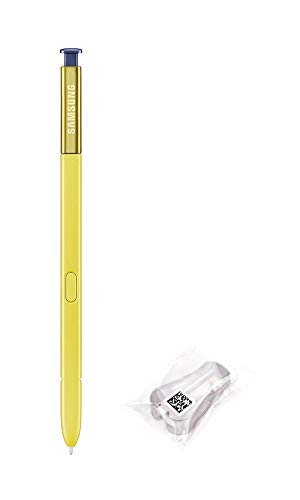
Samsung Galaxy Note9 Original Replacement S Pen EJ-PN960BLKGKR Yellow/Ocean Blue
Price is below average
Current Price
$29.99
Average
$33.51
Min Price
$26
Max Price
$49.99
Price dynamics
11%
Description
Precision
A natural extension of you.
Bring your ideas to life with S Pen's responsiveness and control. With its fine 0.7mm tip and 4096 levels of pressure, your precise strokes will feel as graceful as putting pen to paper.
Remote camera access
Point, pose, and click from anywhere.
No more rushing to beat the timer, straining your arm for a selfie, or getting left out of a group shot. The S Pen's remote camera feature lets you be photographer, subject, and art director all at once.
Presentation control
Command your slideshow without touching your phone.
Own the pitch. Connect your Note9 to Samsung DeX, pull up your presentation, and switch slides with the S Pen to make an impression with just the press of a button.
Enhanced apps
Your favorite apps, but better.
The S Pen doesn't just snap selfies and switch slides. Use the S Pen to shuffle music or pause and play shows from up to 30 feet away.1 Connect your S Pen to a variety of installed and third-party apps3 or set custom commands for more control than ever.
Screen off memo
Ready when you are.
Pop out the S Pen to turn on the Screen off memo notepad?all without unlocking your phone. From to-do lists to notes, write and pin them to the Always On Display for easy access or find it later in the Samsung Notes app. See coordinating colors below.
Samsung Notes
Powerful productivity at your fingertips.
Discover the simplest way to keep it all together. The Samsung Notes app tracks your brainstorms, stores your Screen off memos, and categorizes your ideas so you can access meeting notes, project drawings, and other essentials with ease.
A natural extension of you.
Bring your ideas to life with S Pen's responsiveness and control. With its fine 0.7mm tip and 4096 levels of pressure, your precise strokes will feel as graceful as putting pen to paper.
Remote camera access
Point, pose, and click from anywhere.
No more rushing to beat the timer, straining your arm for a selfie, or getting left out of a group shot. The S Pen's remote camera feature lets you be photographer, subject, and art director all at once.
Presentation control
Command your slideshow without touching your phone.
Own the pitch. Connect your Note9 to Samsung DeX, pull up your presentation, and switch slides with the S Pen to make an impression with just the press of a button.
Enhanced apps
Your favorite apps, but better.
The S Pen doesn't just snap selfies and switch slides. Use the S Pen to shuffle music or pause and play shows from up to 30 feet away.1 Connect your S Pen to a variety of installed and third-party apps3 or set custom commands for more control than ever.
Screen off memo
Ready when you are.
Pop out the S Pen to turn on the Screen off memo notepad?all without unlocking your phone. From to-do lists to notes, write and pin them to the Always On Display for easy access or find it later in the Samsung Notes app. See coordinating colors below.
Samsung Notes
Powerful productivity at your fingertips.
Discover the simplest way to keep it all together. The Samsung Notes app tracks your brainstorms, stores your Screen off memos, and categorizes your ideas so you can access meeting notes, project drawings, and other essentials with ease.
Price will be lower
in next 2 weeks
in next 2 weeks
According to the data, price will be lower in next two weeks, so not waste your money and track better price!
Product review & video
[Applause] alright get up in your beak on here we check out once again my neighbor is uh doing some yard work or I might smeared work done rather I'm so sorry if you can hear that in the background but this is the new s-pen that I ordered for my ebay note 9 they came with a fake s-pen that does not fully work it's in a pretty big box for some reason I thought it would just be in like one of those little padded envelopes but it is not but whatever we're gonna unbox this work and then we'll put it in the phone and try and set it up and see if it works do we have the packing slip some material and then we have the s-pen here so this is the s-pen for the samsung galaxy note 9 the ocean blue so it's the yellow S Pen movie box out of the way real quick they totally could have put it in like something like that and save like five dollars on shipping but or whatever so let's see what we get I'v



Similar products