Description
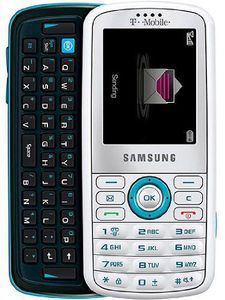
On the front of the Gravity is a 2.1-inch diagonal display with support for 262,000 colors, plus it has a 176x220-pixel resolution. Colors really stand out, and the overall display is bright and vibrant. We like the simple animated menu interface, as well as the large font size. You can adjust the backlight time, add a calendar to the home screen, change the style and color of the information text on the home screen, the size and color of the dialing font, plus the background color when dialing. You can also add a greeting on the home screen if you wish.
Underneath the display is the navigation array, which consists of two soft keys, a dedicated messaging key, a Clear key, a round toggle with middle OK key, and the Send and End/Power keys. The toggle also doubles as shortcuts to your call records, a new audio postcard, the contacts list, and a new message. You can remap the messaging key to point to the in-box, the instant-messaging application, or a new e-mail as well. We're definitely fans of the Gravity's keypad--not only is it spacious, the keys are quite big and are sufficiently raised above the surface of the phone, which makes it easy to dial by feel.
Slide the Gravity to the right, and you'll reveal a full QWERTY keyboard on your left. Once you slide out the keyboard, the screen orientation changes from portrait to landscape mode. To the left and right side of the keyboard are two soft keys, which are appropriate for when the screen is in landscape mode. Similar to the keypad, we found the QWERTY keyboard quite roomy, and each key has a smooth bubblelike texture that make for easy and responsive texting. We wished the keyboard had arrow keys so that we didn't need to use the toggle for navigating the phone when in landscape mode, but it's not a big deal.
SAMSUNG Gravity I T459 T-Mobile White/Aqua GSM NO Contract
Current Price
$99
Average
$72.33
Min Price
$59
Max Price
$99
Price dynamics
27%
Description
On the front of the Gravity is a 2.1-inch diagonal display with support for 262,000 colors, plus it has a 176x220-pixel resolution. Colors really stand out, and the overall display is bright and vibrant. We like the simple animated menu interface, as well as the large font size. You can adjust the backlight time, add a calendar to the home screen, change the style and color of the information text on the home screen, the size and color of the dialing font, plus the background color when dialing. You can also add a greeting on the home screen if you wish.
Underneath the display is the navigation array, which consists of two soft keys, a dedicated messaging key, a Clear key, a round toggle with middle OK key, and the Send and End/Power keys. The toggle also doubles as shortcuts to your call records, a new audio postcard, the contacts list, and a new message. You can remap the messaging key to point to the in-box, the instant-messaging application, or a new e-mail as well. We're definitely fans of the Gravity's keypad--not only is it spacious, the keys are quite big and are sufficiently raised above the surface of the phone, which makes it easy to dial by feel.
Slide the Gravity to the right, and you'll reveal a full QWERTY keyboard on your left. Once you slide out the keyboard, the screen orientation changes from portrait to landscape mode. To the left and right side of the keyboard are two soft keys, which are appropriate for when the screen is in landscape mode. Similar to the keypad, we found the QWERTY keyboard quite roomy, and each key has a smooth bubblelike texture that make for easy and responsive texting. We wished the keyboard had arrow keys so that we didn't need to use the toggle for navigating the phone when in landscape mode, but it's not a big deal.
Price will be lower
in next 2 weeks
in next 2 weeks
According to the data, price will be lower in next two weeks, so not waste your money and track better price!

Similar products