Description
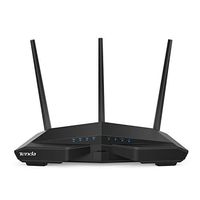
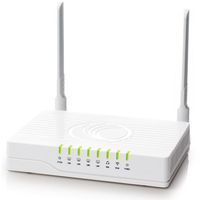
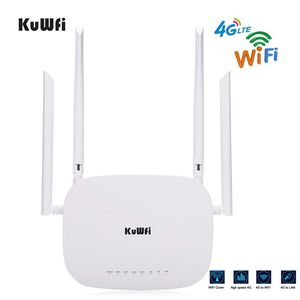
The 4G wireless wifi router Mainly applicable to Europe,Asia, Southeast Asia Australia Africa Middle East and some South America countries
Product features:
☆300Mbps wireless internet router for sharing your 4G LTE network with up to 32 wifi users and enjoy download 4G speeds up to 150Mbps and 50Mbps upload speed.
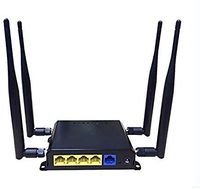
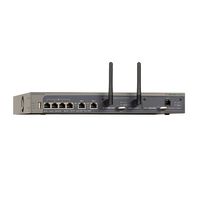
☆This 4g router is equipped with 4 LAN interface,when the 4G router transmits the WiFi,you may connect to other Devices simultaneously.
☆Internal dual-antenna,selectable 3G/4G signal a stylish and slim design to fit in perfectly with your home/office.
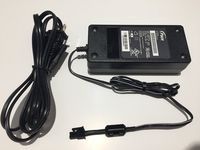
☆It support 12V 1A power adapter.with LED indicator display,see the status easily.
☆The LTE CPE Router with powerful signal with antenna,Internet access to internet via HSPA/LTE Data SIM Card. or Internet access/PPPoE work mode.
☆4G wireless mode(Default):Choose 3G/4G Wireless modem mode as default, pulg in to standard SIM Card, KuWFi CPE will identify 3G/4G automatically.for some SIM Card should be update APN.
Working Mode:
☆4G to LAN: Insert 3G/4G SIM card to the router,connect the LAN cable the router to PC/Desktop.
☆Wired Mode:Standard wireless modem mode:Static online mode/Dynamic Internet access/PPPoE online modem.
Please notice:
☆As we all know that have so many operator and frequncy in the world ,you can check this link to learn it : https://www.frequencycheck.com/.please check the frequancy of the sim card,if you do not know the frequncy ,please ask your operator first.
☆If the frequncy is right ,but can not connect automaticly,for this can enter the ip address ,then setting the APN of the sim(the info can consult operator)
☆If signal is unstable, you can also manage the settings page, lock 4G network,can effectively improve the stability of the network.
Product features:
☆300Mbps wireless internet router for sharing your 4G LTE network with up to 32 wifi users and enjoy download 4G speeds up to 150Mbps and 50Mbps upload speed.
☆This 4g router is equipped with 4 LAN interface,when the 4G router transmits the WiFi,you may connect to other Devices simultaneously.
☆Internal dual-antenna,selectable 3G/4G signal a stylish and slim design to fit in perfectly with your home/office.
☆It support 12V 1A power adapter.with LED indicator display,see the status easily.
☆The LTE CPE Router with powerful signal with antenna,Internet access to internet via HSPA/LTE Data SIM Card. or Internet access/PPPoE work mode.
☆4G wireless mode(Default):Choose 3G/4G Wireless modem mode as default, pulg in to standard SIM Card, KuWFi CPE will identify 3G/4G automatically.for some SIM Card should be update APN.
Working Mode:
☆4G to LAN: Insert 3G/4G SIM card to the router,connect the LAN cable the router to PC/Desktop.
☆Wired Mode:Standard wireless modem mode:Static online mode/Dynamic Internet access/PPPoE online modem.
Please notice:
☆As we all know that have so many operator and frequncy in the world ,you can check this link to learn it : https://www.frequencycheck.com/.please check the frequancy of the sim card,if you do not know the frequncy ,please ask your operator first.
☆If the frequncy is right ,but can not connect automaticly,for this can enter the ip address ,then setting the APN of the sim(the info can consult operator)
☆If signal is unstable, you can also manage the settings page, lock 4G network,can effectively improve the stability of the network.
4G Wireless WiFi Router with SIM Card Slot 300Mbps Wireless Internet Router 4 LAN Port, 4 Antennas, WiFi Hotspot Support B1 / B3 / B7 / B8 / B20
Current Price
$65.99
Average
$65.99
Min Price
$65.99
Max Price
$65.99
Description
The 4G wireless wifi router Mainly applicable to Europe,Asia, Southeast Asia Australia Africa Middle East and some South America countries
Product features:
☆300Mbps wireless internet router for sharing your 4G LTE network with up to 32 wifi users and enjoy download 4G speeds up to 150Mbps and 50Mbps upload speed.
☆This 4g router is equipped with 4 LAN interface,when the 4G router transmits the WiFi,you may connect to other Devices simultaneously.
☆Internal dual-antenna,selectable 3G/4G signal a stylish and slim design to fit in perfectly with your home/office.
☆It support 12V 1A power adapter.with LED indicator display,see the status easily.
☆The LTE CPE Router with powerful signal with antenna,Internet access to internet via HSPA/LTE Data SIM Card. or Internet access/PPPoE work mode.
☆4G wireless mode(Default):Choose 3G/4G Wireless modem mode as default, pulg in to standard SIM Card, KuWFi CPE will identify 3G/4G automatically.for some SIM Card should be update APN.
Working Mode:
☆4G to LAN: Insert 3G/4G SIM card to the router,connect the LAN cable the router to PC/Desktop.
☆Wired Mode:Standard wireless modem mode:Static online mode/Dynamic Internet access/PPPoE online modem.
Please notice:
☆As we all know that have so many operator and frequncy in the world ,you can check this link to learn it : https://www.frequencycheck.com/.please check the frequancy of the sim card,if you do not know the frequncy ,please ask your operator first.
☆If the frequncy is right ,but can not connect automaticly,for this can enter the ip address ,then setting the APN of the sim(the info can consult operator)
☆If signal is unstable, you can also manage the settings page, lock 4G network,can effectively improve the stability of the network.
Product features:
☆300Mbps wireless internet router for sharing your 4G LTE network with up to 32 wifi users and enjoy download 4G speeds up to 150Mbps and 50Mbps upload speed.
☆This 4g router is equipped with 4 LAN interface,when the 4G router transmits the WiFi,you may connect to other Devices simultaneously.
☆Internal dual-antenna,selectable 3G/4G signal a stylish and slim design to fit in perfectly with your home/office.
☆It support 12V 1A power adapter.with LED indicator display,see the status easily.
☆The LTE CPE Router with powerful signal with antenna,Internet access to internet via HSPA/LTE Data SIM Card. or Internet access/PPPoE work mode.
☆4G wireless mode(Default):Choose 3G/4G Wireless modem mode as default, pulg in to standard SIM Card, KuWFi CPE will identify 3G/4G automatically.for some SIM Card should be update APN.
Working Mode:
☆4G to LAN: Insert 3G/4G SIM card to the router,connect the LAN cable the router to PC/Desktop.
☆Wired Mode:Standard wireless modem mode:Static online mode/Dynamic Internet access/PPPoE online modem.
Please notice:
☆As we all know that have so many operator and frequncy in the world ,you can check this link to learn it : https://www.frequencycheck.com/.please check the frequancy of the sim card,if you do not know the frequncy ,please ask your operator first.
☆If the frequncy is right ,but can not connect automaticly,for this can enter the ip address ,then setting the APN of the sim(the info can consult operator)
☆If signal is unstable, you can also manage the settings page, lock 4G network,can effectively improve the stability of the network.
Price will be lower
in next 2 weeks
in next 2 weeks
According to the data, price will be lower in next two weeks, so not waste your money and track better price!