Description
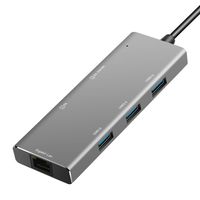
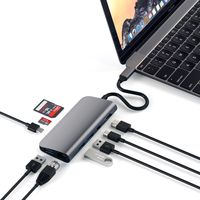
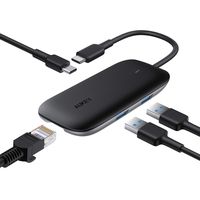
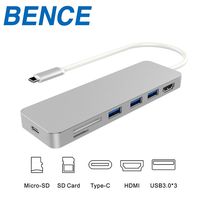
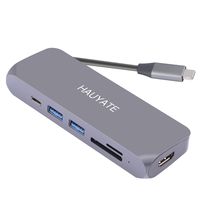
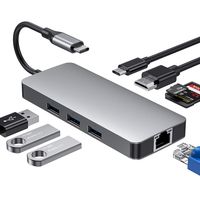
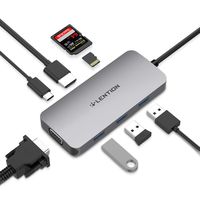
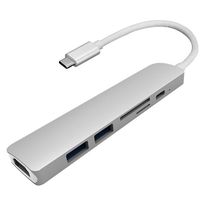
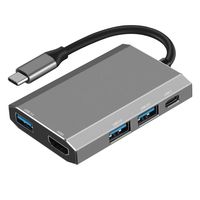
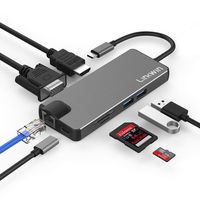
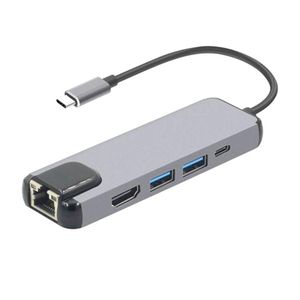
Semoic,a legal trade mark, has been registered. Only those who are authorized are available to sell items under Semoic. Semoic will bring you joyful shopping experience. 5 in 1 USB 3.1 USB-C Type C Hub with HDMI 4K HD 1000M Rj45 Lan Adapter USB 3.0 Hub Type C PD Charging Adapter for Macbook Pro
Material: aluminum
color: grey
Note:
1. Make sure that the host USB-C port on your device complies with the USB 3.0 / USB 3.1 specification. Compatible with USB 2.0 Type-C device.
2. To use the HD output port, the host USB-C port from your device must support DisplayPort Alt Mode.
3. To use the Power Delivery function to power and charge a connected USB-C laptop, the host USB-C port from your device must support USB Power Delivery. The USB-C input charging port cannot be used for data transmission.
4. Please do not rely on the USB-A ports for charging your phones, tablets or other devices.
5. For a stable connection, do not use this hub with high-power devices. It supports one hard drive max.
6. Charging Power Delivery enabled Dell USB-C laptops via the PD USB-C charging port requires using your 55W or above original power adapter.
Tips: Here are 4 ways to help reduce the USB 3.0 radio frequency interference to the wireless connection of some laptops:
Option 1: Connect the laptop to a 5GHz Wi-Fi network.
Option 2: Connect devices (e.g., mouse, keyboard and hard disk drive) to USB 2.0 ports on the laptop.
Option 3: Connect the USB 3.0 hub to the laptop with a high-quality 1-foot or longer USB 3.0 extension cable. Keep USB 3.0 devices away from the host computer.
Option 4: Use high-quality shielded USB 3.0 devices/cables/connectors.
Package included:
1 x 5 in 1 type c hub
Note: Light shooting and different displays may cause the color of the item in the picture a little different from the real thing. The measurement allowed error is +/- 1-3cm.
Material: aluminum
color: grey
Note:
1. Make sure that the host USB-C port on your device complies with the USB 3.0 / USB 3.1 specification. Compatible with USB 2.0 Type-C device.
2. To use the HD output port, the host USB-C port from your device must support DisplayPort Alt Mode.
3. To use the Power Delivery function to power and charge a connected USB-C laptop, the host USB-C port from your device must support USB Power Delivery. The USB-C input charging port cannot be used for data transmission.
4. Please do not rely on the USB-A ports for charging your phones, tablets or other devices.
5. For a stable connection, do not use this hub with high-power devices. It supports one hard drive max.
6. Charging Power Delivery enabled Dell USB-C laptops via the PD USB-C charging port requires using your 55W or above original power adapter.
Tips: Here are 4 ways to help reduce the USB 3.0 radio frequency interference to the wireless connection of some laptops:
Option 1: Connect the laptop to a 5GHz Wi-Fi network.
Option 2: Connect devices (e.g., mouse, keyboard and hard disk drive) to USB 2.0 ports on the laptop.
Option 3: Connect the USB 3.0 hub to the laptop with a high-quality 1-foot or longer USB 3.0 extension cable. Keep USB 3.0 devices away from the host computer.
Option 4: Use high-quality shielded USB 3.0 devices/cables/connectors.
Package included:
1 x 5 in 1 type c hub
Note: Light shooting and different displays may cause the color of the item in the picture a little different from the real thing. The measurement allowed error is +/- 1-3cm.
Semoic 5 in 1 USB 3.1 USB-C Type C Hub with HDMI 4K HD 1000M Rj45 LAN Adapter USB 3.0 Hub Type C PD Charging Adapter for MacBook Pro
Price is below average
Current Price
$21.91
Average
$23.72
Min Price
$21.66
Max Price
$26.47
Price dynamics
8%
Description
Semoic,a legal trade mark, has been registered. Only those who are authorized are available to sell items under Semoic. Semoic will bring you joyful shopping experience. 5 in 1 USB 3.1 USB-C Type C Hub with HDMI 4K HD 1000M Rj45 Lan Adapter USB 3.0 Hub Type C PD Charging Adapter for Macbook Pro
Material: aluminum
color: grey
Note:
1. Make sure that the host USB-C port on your device complies with the USB 3.0 / USB 3.1 specification. Compatible with USB 2.0 Type-C device.
2. To use the HD output port, the host USB-C port from your device must support DisplayPort Alt Mode.
3. To use the Power Delivery function to power and charge a connected USB-C laptop, the host USB-C port from your device must support USB Power Delivery. The USB-C input charging port cannot be used for data transmission.
4. Please do not rely on the USB-A ports for charging your phones, tablets or other devices.
5. For a stable connection, do not use this hub with high-power devices. It supports one hard drive max.
6. Charging Power Delivery enabled Dell USB-C laptops via the PD USB-C charging port requires using your 55W or above original power adapter.
Tips: Here are 4 ways to help reduce the USB 3.0 radio frequency interference to the wireless connection of some laptops:
Option 1: Connect the laptop to a 5GHz Wi-Fi network.
Option 2: Connect devices (e.g., mouse, keyboard and hard disk drive) to USB 2.0 ports on the laptop.
Option 3: Connect the USB 3.0 hub to the laptop with a high-quality 1-foot or longer USB 3.0 extension cable. Keep USB 3.0 devices away from the host computer.
Option 4: Use high-quality shielded USB 3.0 devices/cables/connectors.
Package included:
1 x 5 in 1 type c hub
Note: Light shooting and different displays may cause the color of the item in the picture a little different from the real thing. The measurement allowed error is +/- 1-3cm.
Material: aluminum
color: grey
Note:
1. Make sure that the host USB-C port on your device complies with the USB 3.0 / USB 3.1 specification. Compatible with USB 2.0 Type-C device.
2. To use the HD output port, the host USB-C port from your device must support DisplayPort Alt Mode.
3. To use the Power Delivery function to power and charge a connected USB-C laptop, the host USB-C port from your device must support USB Power Delivery. The USB-C input charging port cannot be used for data transmission.
4. Please do not rely on the USB-A ports for charging your phones, tablets or other devices.
5. For a stable connection, do not use this hub with high-power devices. It supports one hard drive max.
6. Charging Power Delivery enabled Dell USB-C laptops via the PD USB-C charging port requires using your 55W or above original power adapter.
Tips: Here are 4 ways to help reduce the USB 3.0 radio frequency interference to the wireless connection of some laptops:
Option 1: Connect the laptop to a 5GHz Wi-Fi network.
Option 2: Connect devices (e.g., mouse, keyboard and hard disk drive) to USB 2.0 ports on the laptop.
Option 3: Connect the USB 3.0 hub to the laptop with a high-quality 1-foot or longer USB 3.0 extension cable. Keep USB 3.0 devices away from the host computer.
Option 4: Use high-quality shielded USB 3.0 devices/cables/connectors.
Package included:
1 x 5 in 1 type c hub
Note: Light shooting and different displays may cause the color of the item in the picture a little different from the real thing. The measurement allowed error is +/- 1-3cm.
Price will be lower
in next 2 weeks
in next 2 weeks
According to the data, price will be lower in next two weeks, so not waste your money and track better price!
Similar products