Description
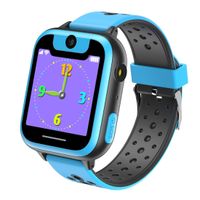
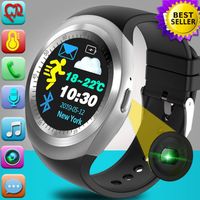
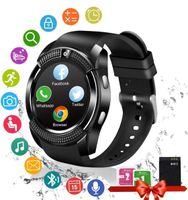
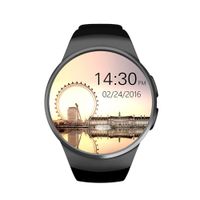
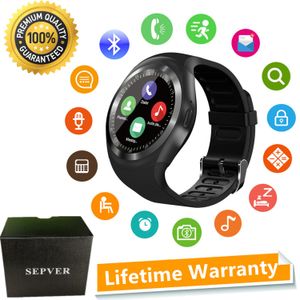
You can use this smart watch to make calls, Answer calls, send and receive text messages, sync notification, sync phone book, sync call history, play music, set alarm, count your step, monitor your sleep quality, remind you to have a drink, view image, remote control your mobile phone to take pictures, find your mobile phone etc.
For Android phone, all features of this smart watch works. For iPhone, not support BT notifications, sync message, remote notifier, send sessage , phone book.
Please note 1 : Remote notifier, Remote capture, Anti lost, need to download an Funrun App in your Android smart phone fisrt.
Please note 2 : Image viewer, Audio player, need put a TF card in this smart watch.(TF card maximum support 32GB )
Please note 3 : If you want to use this smartwatch to work without a mobile phone, you need to put a SIM card into this smart watch. (It only supports Nano SIM card: GSM/GPRS 850/900/1800/1900)
Customer FAQ:
Q1: How can I set up the watch with my Android Smart Phone?
A1: Firstly, User need to use the Android smart phone to scan the QR code from the watch to download the Funrun APP and install it in the mobile phone. Secondly, Run the Funrun APP, connect the watch with the Android smart phone by bluetooth, then watch will work well with the smart phone. Check below link to learn: https://youtu.be/krxtNX_63Cc
Q2: is there an APP work for IOS phone?
A2: No, there is no App work for IOS phones.
Q3: I can not download the APP by scanning the QR code from the watch, what do I do?
A3: Please go to Google Play store to search the Funrun App and download it.
Q4: Can I make it silent or vibrate only in the meeting?
A4:Yes, you can go to the "Profile" to choose "Silent" or "Meeting".
Package Includes:
1 x Smart Watch
1 x USB Charging Cable
1 x User Manual
For Android phone, all features of this smart watch works. For iPhone, not support BT notifications, sync message, remote notifier, send sessage , phone book.
Please note 1 : Remote notifier, Remote capture, Anti lost, need to download an Funrun App in your Android smart phone fisrt.
Please note 2 : Image viewer, Audio player, need put a TF card in this smart watch.(TF card maximum support 32GB )
Please note 3 : If you want to use this smartwatch to work without a mobile phone, you need to put a SIM card into this smart watch. (It only supports Nano SIM card: GSM/GPRS 850/900/1800/1900)
Customer FAQ:
Q1: How can I set up the watch with my Android Smart Phone?
A1: Firstly, User need to use the Android smart phone to scan the QR code from the watch to download the Funrun APP and install it in the mobile phone. Secondly, Run the Funrun APP, connect the watch with the Android smart phone by bluetooth, then watch will work well with the smart phone. Check below link to learn: https://youtu.be/krxtNX_63Cc
Q2: is there an APP work for IOS phone?
A2: No, there is no App work for IOS phones.
Q3: I can not download the APP by scanning the QR code from the watch, what do I do?
A3: Please go to Google Play store to search the Funrun App and download it.
Q4: Can I make it silent or vibrate only in the meeting?
A4:Yes, you can go to the "Profile" to choose "Silent" or "Meeting".
Package Includes:
1 x Smart Watch
1 x USB Charging Cable
1 x User Manual
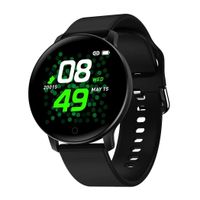
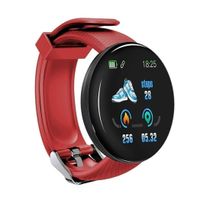
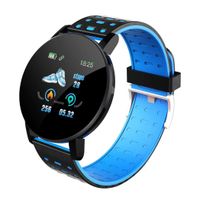
SEPVER Smart Watch Round Bluetooth Smartwatch with SIM Card Slot Compatible with Samsung LG Sony HTC Huawei Google Xiaomi Android Smart Phones for Women Men Kids Boys Girls (Black)
Current Price
$59.96
Average
$44.97
Min Price
$29.98
Max Price
$59.96
Price dynamics
25%
Description
You can use this smart watch to make calls, Answer calls, send and receive text messages, sync notification, sync phone book, sync call history, play music, set alarm, count your step, monitor your sleep quality, remind you to have a drink, view image, remote control your mobile phone to take pictures, find your mobile phone etc.
For Android phone, all features of this smart watch works. For iPhone, not support BT notifications, sync message, remote notifier, send sessage , phone book.
Please note 1 : Remote notifier, Remote capture, Anti lost, need to download an Funrun App in your Android smart phone fisrt.
Please note 2 : Image viewer, Audio player, need put a TF card in this smart watch.(TF card maximum support 32GB )
Please note 3 : If you want to use this smartwatch to work without a mobile phone, you need to put a SIM card into this smart watch. (It only supports Nano SIM card: GSM/GPRS 850/900/1800/1900)
Customer FAQ:
Q1: How can I set up the watch with my Android Smart Phone?
A1: Firstly, User need to use the Android smart phone to scan the QR code from the watch to download the Funrun APP and install it in the mobile phone. Secondly, Run the Funrun APP, connect the watch with the Android smart phone by bluetooth, then watch will work well with the smart phone. Check below link to learn: https://youtu.be/krxtNX_63Cc
Q2: is there an APP work for IOS phone?
A2: No, there is no App work for IOS phones.
Q3: I can not download the APP by scanning the QR code from the watch, what do I do?
A3: Please go to Google Play store to search the Funrun App and download it.
Q4: Can I make it silent or vibrate only in the meeting?
A4:Yes, you can go to the "Profile" to choose "Silent" or "Meeting".
Package Includes:
1 x Smart Watch
1 x USB Charging Cable
1 x User Manual
For Android phone, all features of this smart watch works. For iPhone, not support BT notifications, sync message, remote notifier, send sessage , phone book.
Please note 1 : Remote notifier, Remote capture, Anti lost, need to download an Funrun App in your Android smart phone fisrt.
Please note 2 : Image viewer, Audio player, need put a TF card in this smart watch.(TF card maximum support 32GB )
Please note 3 : If you want to use this smartwatch to work without a mobile phone, you need to put a SIM card into this smart watch. (It only supports Nano SIM card: GSM/GPRS 850/900/1800/1900)
Customer FAQ:
Q1: How can I set up the watch with my Android Smart Phone?
A1: Firstly, User need to use the Android smart phone to scan the QR code from the watch to download the Funrun APP and install it in the mobile phone. Secondly, Run the Funrun APP, connect the watch with the Android smart phone by bluetooth, then watch will work well with the smart phone. Check below link to learn: https://youtu.be/krxtNX_63Cc
Q2: is there an APP work for IOS phone?
A2: No, there is no App work for IOS phones.
Q3: I can not download the APP by scanning the QR code from the watch, what do I do?
A3: Please go to Google Play store to search the Funrun App and download it.
Q4: Can I make it silent or vibrate only in the meeting?
A4:Yes, you can go to the "Profile" to choose "Silent" or "Meeting".
Package Includes:
1 x Smart Watch
1 x USB Charging Cable
1 x User Manual
Price will be lower
in next 2 weeks
in next 2 weeks
According to the data, price will be lower in next two weeks, so not waste your money and track better price!
Similar products