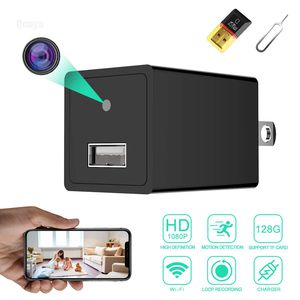
Description
How to Connect it to Wi-Fi:
*Mode 1 - Camera Signal Connection
Step1: Scan the qr code to download our App
Step2: Connect your phone to the camera's WIFI hotspot.No password needed, just click and connect.
Step3: Open the APP, you will see your camera successfully added. Then you can see live video in the app.
*Mode 2 - Wifi Connection
(Important: Please remember that you need to finish mode 1, then you can start mode 2.)
Step 4: Open the APP now, locate setting icon - Device Settings - WiFi Config, then you will see a WIFI list in the APP. Choose your WIFI and enter password.
Step 5: Wait till camera gets back online in a few seconds. If not, close the APP and reopen it. If still nothing, then repeat all the steps above.
Technical specifications:
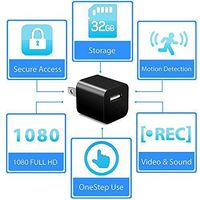
- Resolution: 1920x1080
- Wide Angle: 90°
- Compressed Format: H.264
- Frame: 25fps
- Memory: Supsport TF card up to 128
- Body Size: 1.77 in x 1.18 in x 1.18 in.
Warm Tips:
1. Pls to check whether you connect your 2.4Ghz home wifi, the camera only works on 2.4Ghz wifi, not 5G.
2. If you need to reset it, please wait 2 minutes after turn on, and then reset it.
3. The camera supports loop recording, we suggest you timely file, prevent video files from being overwritten.
4. We've prepared the professional and detailed user manual in the package, you can find all the instructions there.
Anything makes you unsatisfied, please contact our email: ymstech@outlook.com . Our customer service team will reply to you ASAP.
*Mode 1 - Camera Signal Connection
Step1: Scan the qr code to download our App
Step2: Connect your phone to the camera's WIFI hotspot.No password needed, just click and connect.
Step3: Open the APP, you will see your camera successfully added. Then you can see live video in the app.
*Mode 2 - Wifi Connection
(Important: Please remember that you need to finish mode 1, then you can start mode 2.)
Step 4: Open the APP now, locate setting icon - Device Settings - WiFi Config, then you will see a WIFI list in the APP. Choose your WIFI and enter password.
Step 5: Wait till camera gets back online in a few seconds. If not, close the APP and reopen it. If still nothing, then repeat all the steps above.
Technical specifications:
- Resolution: 1920x1080
- Wide Angle: 90°
- Compressed Format: H.264
- Frame: 25fps
- Memory: Supsport TF card up to 128
- Body Size: 1.77 in x 1.18 in x 1.18 in.
Warm Tips:
1. Pls to check whether you connect your 2.4Ghz home wifi, the camera only works on 2.4Ghz wifi, not 5G.
2. If you need to reset it, please wait 2 minutes after turn on, and then reset it.
3. The camera supports loop recording, we suggest you timely file, prevent video files from being overwritten.
4. We've prepared the professional and detailed user manual in the package, you can find all the instructions there.
Anything makes you unsatisfied, please contact our email: ymstech@outlook.com . Our customer service team will reply to you ASAP.
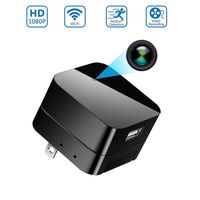
Spy Camera Wireless Hidden Camera WiFi Camera - 1080P HD Nanny Cam Spy Hidden Charger Camera - Indoor Home Security Camera with Remote Viewing/Motion Activated, APP Supports iOS/Android/PC
Current Price
$45.99
Average
$43.37
Min Price
$38.99
Max Price
$48.99
Price dynamics
6%
Description
How to Connect it to Wi-Fi:
*Mode 1 - Camera Signal Connection
Step1: Scan the qr code to download our App
Step2: Connect your phone to the camera's WIFI hotspot.No password needed, just click and connect.
Step3: Open the APP, you will see your camera successfully added. Then you can see live video in the app.
*Mode 2 - Wifi Connection
(Important: Please remember that you need to finish mode 1, then you can start mode 2.)
Step 4: Open the APP now, locate setting icon - Device Settings - WiFi Config, then you will see a WIFI list in the APP. Choose your WIFI and enter password.
Step 5: Wait till camera gets back online in a few seconds. If not, close the APP and reopen it. If still nothing, then repeat all the steps above.
Technical specifications:
- Resolution: 1920x1080
- Wide Angle: 90°
- Compressed Format: H.264
- Frame: 25fps
- Memory: Supsport TF card up to 128
- Body Size: 1.77 in x 1.18 in x 1.18 in.
Warm Tips:
1. Pls to check whether you connect your 2.4Ghz home wifi, the camera only works on 2.4Ghz wifi, not 5G.
2. If you need to reset it, please wait 2 minutes after turn on, and then reset it.
3. The camera supports loop recording, we suggest you timely file, prevent video files from being overwritten.
4. We've prepared the professional and detailed user manual in the package, you can find all the instructions there.
Anything makes you unsatisfied, please contact our email: ymstech@outlook.com . Our customer service team will reply to you ASAP.
*Mode 1 - Camera Signal Connection
Step1: Scan the qr code to download our App
Step2: Connect your phone to the camera's WIFI hotspot.No password needed, just click and connect.
Step3: Open the APP, you will see your camera successfully added. Then you can see live video in the app.
*Mode 2 - Wifi Connection
(Important: Please remember that you need to finish mode 1, then you can start mode 2.)
Step 4: Open the APP now, locate setting icon - Device Settings - WiFi Config, then you will see a WIFI list in the APP. Choose your WIFI and enter password.
Step 5: Wait till camera gets back online in a few seconds. If not, close the APP and reopen it. If still nothing, then repeat all the steps above.
Technical specifications:
- Resolution: 1920x1080
- Wide Angle: 90°
- Compressed Format: H.264
- Frame: 25fps
- Memory: Supsport TF card up to 128
- Body Size: 1.77 in x 1.18 in x 1.18 in.
Warm Tips:
1. Pls to check whether you connect your 2.4Ghz home wifi, the camera only works on 2.4Ghz wifi, not 5G.
2. If you need to reset it, please wait 2 minutes after turn on, and then reset it.
3. The camera supports loop recording, we suggest you timely file, prevent video files from being overwritten.
4. We've prepared the professional and detailed user manual in the package, you can find all the instructions there.
Anything makes you unsatisfied, please contact our email: ymstech@outlook.com . Our customer service team will reply to you ASAP.
Price will be lower
in next 2 weeks
in next 2 weeks
According to the data, price will be lower in next two weeks, so not waste your money and track better price!
Product review & video
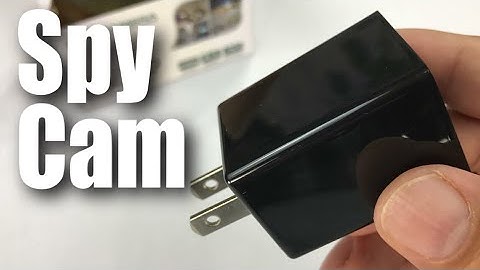
what's up hand ination Peter Vaughn Pandey here hey this is an HD camera but it's kind of interesting because it's kind of a nanny-cam spy camera and it's a hidden in a charger and that's what kind of makes it pretty interesting now you may want this for a variety of different reasons I don't know why you will but let me just brought some reasons that you might maybe you are actually worried about the nanny yeah right you want to see if she's beating your kids or stealing your jewelry well you can you can certainly do that maybe you want to just keep an eye on your pet and see what they're actually doing you know did that obedience school pay off maybe your just creep like me whatever it might be so there could be all sorts of reasons but I was really curious if it worked and how well it works so it does look like it's wrapped up in plastic here pretty nicely does look like generally ma

Similar products