Description
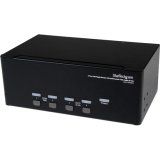
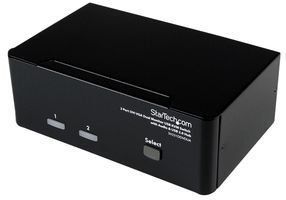
The SV231DDVDUA 2-port Dual Monitor KVM Switch (DVI+VGA) offers a complete multimedia switching solution, letting users control two Dual Display computers using a single USB mouse and keyboard peripheral set. With support for high-resolution video interfaces, this dual view KVM switch provides one VGA (analog) and one DVI-I port per computer connection, as well as audio switching capability between connected computers. Delivering versatility for virtually any application, the DVI/VGA KVM switch features an integrated 2-port USB hub that allows connected USB 2.0 peripherals to be shared between connected computers, eliminating the need to purchase duplicate peripherals. Suitable for any workspace, the dual monitor KVM switch offers a compact desktop KVM design and features a rugged metal chassis that helps ensure durable performance. This product is TAA compliant and backed by a Startech.com 3-year warranty with free lifetime technical support. Package Contents: 2 Port DVI VGA Dual Monitor KVM Switch with Audio & USB Hub 4 x Foot Pads 1 x Universal power adapter (NA/EU/UK/AU) 1 x Instruction manual Product Type: KVM Switchbox Product Type: KVM Switchbox Manufacturer Part Number: SV231DDVDUA Packaged Quantity: 1 Limited Warranty: 3 Year Weight (Approximate): 1.72 lb Form Factor: Desktop Form Factor: Desktop Manufacturer: StarTech.com Product Name: 2 Port DVI VGA Dual Monitor KVM Switch with Audio & USB Hub Brand Name: StarTech.com Input Voltage Range: 110 V AC - 240 V AC Brand Name: StarTech.com Input Voltage Range: 110 V AC - 240 V AC Height: 2.2 Width: 6.3 Depth: 3.9 Maximum Video Resolution: 1920 x 1440 USB: Yes DVI: Yes VGA: Yes Number of Computers Supported: 2 TAA Compliant: Yes Environmentally Friendly: Yes Environmental Certification: REACH Environmental Certification: WEEE Environmental Certification: RoHS Maximum Video Resolution: 1920 x 1440 USB: Yes DVI: Yes VGA: Yes Number of USB Ports: 6 Number of VGA Ports: 3 Number of DVI Ports: 3 Number of
StarTech SV231DDVDUA 2 Port DVI VGA KVM Switch USB with Audio/USB Retail
Price is below average
Current Price
$180.16
Average
$183.42
Min Price
$178.61
Max Price
$195.2
Price dynamics
2%
Description
The SV231DDVDUA 2-port Dual Monitor KVM Switch (DVI+VGA) offers a complete multimedia switching solution, letting users control two Dual Display computers using a single USB mouse and keyboard peripheral set. With support for high-resolution video interfaces, this dual view KVM switch provides one VGA (analog) and one DVI-I port per computer connection, as well as audio switching capability between connected computers. Delivering versatility for virtually any application, the DVI/VGA KVM switch features an integrated 2-port USB hub that allows connected USB 2.0 peripherals to be shared between connected computers, eliminating the need to purchase duplicate peripherals. Suitable for any workspace, the dual monitor KVM switch offers a compact desktop KVM design and features a rugged metal chassis that helps ensure durable performance. This product is TAA compliant and backed by a Startech.com 3-year warranty with free lifetime technical support. Package Contents: 2 Port DVI VGA Dual Monitor KVM Switch with Audio & USB Hub 4 x Foot Pads 1 x Universal power adapter (NA/EU/UK/AU) 1 x Instruction manual Product Type: KVM Switchbox Product Type: KVM Switchbox Manufacturer Part Number: SV231DDVDUA Packaged Quantity: 1 Limited Warranty: 3 Year Weight (Approximate): 1.72 lb Form Factor: Desktop Form Factor: Desktop Manufacturer: StarTech.com Product Name: 2 Port DVI VGA Dual Monitor KVM Switch with Audio & USB Hub Brand Name: StarTech.com Input Voltage Range: 110 V AC - 240 V AC Brand Name: StarTech.com Input Voltage Range: 110 V AC - 240 V AC Height: 2.2 Width: 6.3 Depth: 3.9 Maximum Video Resolution: 1920 x 1440 USB: Yes DVI: Yes VGA: Yes Number of Computers Supported: 2 TAA Compliant: Yes Environmentally Friendly: Yes Environmental Certification: REACH Environmental Certification: WEEE Environmental Certification: RoHS Maximum Video Resolution: 1920 x 1440 USB: Yes DVI: Yes VGA: Yes Number of USB Ports: 6 Number of VGA Ports: 3 Number of DVI Ports: 3 Number of
Price will be lower
in next 2 weeks
in next 2 weeks
According to the data, price will be lower in next two weeks, so not waste your money and track better price!
Product review & video
[Music] [Applause] [Music] hello my name is keith from startac.com today we'd like to talk about physically setting up a kvm switch setting up a kvm switch can seem a bit daunting as there are a lot of connections and cables once you understand the purpose of each connection and how the kvm switch is laid out it will seem much easier in general the front of a kvm switch will have numbered buttons and leds the leds are used to tell you which computer is being controlled and the buttons are used to switch between them depending on the kvm switch it may also have hotkey support which will allow you to switch the controlled computer by using certain keyboard combinations or hotkeys refer to the manual for a given kvm switch for more information in general the back of a kvm switch will have a section for console ports and a section for each computer to be controlled the console ports are for


Similar products