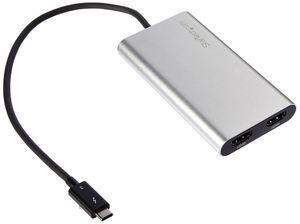
Description
This high-performance Thunderbolt 3 (male) to dual HDMI (female) adapter lets you add two 4K 30Hz HDMI monitors to your Windows computer through a single Thunderbolt 3 port. Please note: your computer system must support Thunderbolt 3 in order for the adapter to function as expected. If you connect the adapter to a USB Type C port that does not support Thunderbolt 3, the adapter will not function. Your system must also support dual display capabilities to output onto two monitors. With 20Gbps of throughput, TB3 to HDMI adapter uses a single port to output dual 4K (3840x2160) at 30Hz to two independent displays. This performance enables you to run resource-demanding applications on two screens (mirrored or independent), which is ideal for editing 4K video or performing other graphic intensive tasks (CAD drawings or photoshop images). For added versatility, the USB C Thunderbolt 3 to HDMI adapter is backward compatible with your 1080p monitors, making it the perfect great accessory for creative business professionals. Functioning as an external graphics adapter with audio support, this TB3 to HDMI converter is a compact and convenient alternative to a laptop dock when you don’t need full docking capability. With two UHD 4K displays, you can work more efficiently from your laptop, so you can accomplish more in the same amount of time. This Thunderbolt 3 to dual HDMI adapter is backed by a 3-year StarTech.com warranty and free lifetime technical support. Note: Please confirm your BIOS, Thunderbolt firmware, TB3 controller drivers and software are up to date to ensure your TB3 port is functioning properly.
StarTech.com Thunderbolt 3 to Dual HDMI Display Adapter - 4K 30Hz - Certified TB3 to HDMI Monitor Adapter - Compatible w/Windows Only (TB32HD2)
Current Price
$91.52
Average
$88.38
Min Price
$53.99
Max Price
$109.99
Price dynamics
3%
Description
This high-performance Thunderbolt 3 (male) to dual HDMI (female) adapter lets you add two 4K 30Hz HDMI monitors to your Windows computer through a single Thunderbolt 3 port. Please note: your computer system must support Thunderbolt 3 in order for the adapter to function as expected. If you connect the adapter to a USB Type C port that does not support Thunderbolt 3, the adapter will not function. Your system must also support dual display capabilities to output onto two monitors. With 20Gbps of throughput, TB3 to HDMI adapter uses a single port to output dual 4K (3840x2160) at 30Hz to two independent displays. This performance enables you to run resource-demanding applications on two screens (mirrored or independent), which is ideal for editing 4K video or performing other graphic intensive tasks (CAD drawings or photoshop images). For added versatility, the USB C Thunderbolt 3 to HDMI adapter is backward compatible with your 1080p monitors, making it the perfect great accessory for creative business professionals. Functioning as an external graphics adapter with audio support, this TB3 to HDMI converter is a compact and convenient alternative to a laptop dock when you don’t need full docking capability. With two UHD 4K displays, you can work more efficiently from your laptop, so you can accomplish more in the same amount of time. This Thunderbolt 3 to dual HDMI adapter is backed by a 3-year StarTech.com warranty and free lifetime technical support. Note: Please confirm your BIOS, Thunderbolt firmware, TB3 controller drivers and software are up to date to ensure your TB3 port is functioning properly.
Price will be lower
in next 2 weeks
in next 2 weeks
According to the data, price will be lower in next two weeks, so not waste your money and track better price!
Product review & video
[Music] hello everyone welcome to our Channel today I'll show you guys how to easily set up a dual monitor system for a laptop with a single USBC port which is the case with most of the slim laptops nowadays so let's get started if you're someone new to our channel please consider subscribing to our channel is you do regular reduce for very smart watches and smartphones tech tutorials like this one and much more also check out our playlist ape to find categorized videos for various content we post on this channel ok let's start with a situation if you have a laptop like I do which is the Asus Zenbook 3 this has only one USB type-c port this can be the case with most of the laptops which are ultra-thin and portable as to save space the manufacturer compromises with the i/o right off the back such situation can be very tricky as you need to charge the device and attach accessories like a


Similar products