Description
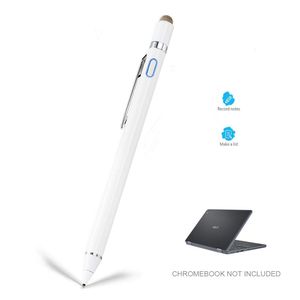
Stylus for Asus Chromebook Flip, EDIVIA Digital Pencil with 1.5mm Ultra Fine Tip Stylus Pen for Asus Chromebook Flip, White
1.5mm Fine Point Stylus Pen for Asus Chromebook Flip lets you draw,write and navigate with pinpoint accuracy and offers comfortable pen-like control for Samsung Galaxy S10 Stylus Pencil
Anodized aluminum body Stylus Pencil for Asus Chromebook Flip Provide durability and offers a stylish appearance
Pocket Clip keep the drawing stylist pen for Asus Chromebook Flip within reach for easy portability
Soft Tip Pen for Asus Chromebook Flip allows you to interact with your device's touch screen without leaving scratches or smudges
Magetic Cap offers easy operation while provides protection against dust and damage, available as normal tip while active stylus is out of power
Follow Below Steps to Start Using:
1. Press the power button, no additional bluetooth connection required
2. Open writing/drawing/sketching applications in your device and change the input method to handwriting.
3. Bingo. Enjoy design with the stylus from your imagination. Now you can start using it at your style.
4. Tip: Kindly keep the stylus at safe place, don't let it drop from height as it would do damage to the internal chip.
This is a great creative pencil tool for you to draw, color, paint, write and work on a touchscreen tablet and smartphones.
A-Must-Have digital pencil for people who's willing to turn a pad to an art tablet. It helps you with new creative possibilities and wide range of artistic effects, with pixel-perfect precision and accuracy.
If you have any question or concern, don't hesitate to contact us, we will help on troubleshooting and guide you on resolving problems.
1.5mm Fine Point Stylus Pen for Asus Chromebook Flip lets you draw,write and navigate with pinpoint accuracy and offers comfortable pen-like control for Samsung Galaxy S10 Stylus Pencil
Anodized aluminum body Stylus Pencil for Asus Chromebook Flip Provide durability and offers a stylish appearance
Pocket Clip keep the drawing stylist pen for Asus Chromebook Flip within reach for easy portability
Soft Tip Pen for Asus Chromebook Flip allows you to interact with your device's touch screen without leaving scratches or smudges
Magetic Cap offers easy operation while provides protection against dust and damage, available as normal tip while active stylus is out of power
Follow Below Steps to Start Using:
1. Press the power button, no additional bluetooth connection required
2. Open writing/drawing/sketching applications in your device and change the input method to handwriting.
3. Bingo. Enjoy design with the stylus from your imagination. Now you can start using it at your style.
4. Tip: Kindly keep the stylus at safe place, don't let it drop from height as it would do damage to the internal chip.
This is a great creative pencil tool for you to draw, color, paint, write and work on a touchscreen tablet and smartphones.
A-Must-Have digital pencil for people who's willing to turn a pad to an art tablet. It helps you with new creative possibilities and wide range of artistic effects, with pixel-perfect precision and accuracy.
If you have any question or concern, don't hesitate to contact us, we will help on troubleshooting and guide you on resolving problems.
Stylus for Asus Chromebook Flip, EDIVIA Digital Pencil with 1.5mm Ultra Fine Tip Pencil for Asus Chromebook Flip Stylus, White
Price is below average
Current Price
$28.99
Average
$29.49
Min Price
$28.99
Max Price
$29.99
Price dynamics
2%
Description
Stylus for Asus Chromebook Flip, EDIVIA Digital Pencil with 1.5mm Ultra Fine Tip Stylus Pen for Asus Chromebook Flip, White
1.5mm Fine Point Stylus Pen for Asus Chromebook Flip lets you draw,write and navigate with pinpoint accuracy and offers comfortable pen-like control for Samsung Galaxy S10 Stylus Pencil
Anodized aluminum body Stylus Pencil for Asus Chromebook Flip Provide durability and offers a stylish appearance
Pocket Clip keep the drawing stylist pen for Asus Chromebook Flip within reach for easy portability
Soft Tip Pen for Asus Chromebook Flip allows you to interact with your device's touch screen without leaving scratches or smudges
Magetic Cap offers easy operation while provides protection against dust and damage, available as normal tip while active stylus is out of power
Follow Below Steps to Start Using:
1. Press the power button, no additional bluetooth connection required
2. Open writing/drawing/sketching applications in your device and change the input method to handwriting.
3. Bingo. Enjoy design with the stylus from your imagination. Now you can start using it at your style.
4. Tip: Kindly keep the stylus at safe place, don't let it drop from height as it would do damage to the internal chip.
This is a great creative pencil tool for you to draw, color, paint, write and work on a touchscreen tablet and smartphones.
A-Must-Have digital pencil for people who's willing to turn a pad to an art tablet. It helps you with new creative possibilities and wide range of artistic effects, with pixel-perfect precision and accuracy.
If you have any question or concern, don't hesitate to contact us, we will help on troubleshooting and guide you on resolving problems.
1.5mm Fine Point Stylus Pen for Asus Chromebook Flip lets you draw,write and navigate with pinpoint accuracy and offers comfortable pen-like control for Samsung Galaxy S10 Stylus Pencil
Anodized aluminum body Stylus Pencil for Asus Chromebook Flip Provide durability and offers a stylish appearance
Pocket Clip keep the drawing stylist pen for Asus Chromebook Flip within reach for easy portability
Soft Tip Pen for Asus Chromebook Flip allows you to interact with your device's touch screen without leaving scratches or smudges
Magetic Cap offers easy operation while provides protection against dust and damage, available as normal tip while active stylus is out of power
Follow Below Steps to Start Using:
1. Press the power button, no additional bluetooth connection required
2. Open writing/drawing/sketching applications in your device and change the input method to handwriting.
3. Bingo. Enjoy design with the stylus from your imagination. Now you can start using it at your style.
4. Tip: Kindly keep the stylus at safe place, don't let it drop from height as it would do damage to the internal chip.
This is a great creative pencil tool for you to draw, color, paint, write and work on a touchscreen tablet and smartphones.
A-Must-Have digital pencil for people who's willing to turn a pad to an art tablet. It helps you with new creative possibilities and wide range of artistic effects, with pixel-perfect precision and accuracy.
If you have any question or concern, don't hesitate to contact us, we will help on troubleshooting and guide you on resolving problems.
Price will be lower
in next 2 weeks
in next 2 weeks
According to the data, price will be lower in next two weeks, so not waste your money and track better price!
Product review & video
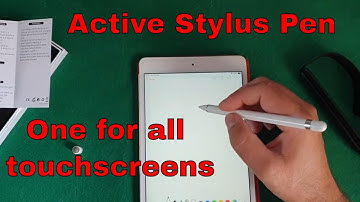
hello guys if you're following this channel for a long time you know that the one thing I miss the most from my note 4 is the s-pen I've recently got this iPad Mini 4 and I wanted to use something like this all the styles available are very very thick pointer so they're not really doing the job and I decided to go for this one active styles pen I'm going to link it in the description so let's try and connect it and see if it works as it's supposed to be and let's zoom using this little box here so I have this little twin once timespan two-in-one active style pen instruction it's suitable for most capacitive touchscreen devices and so on so on so on so I have the microUSB port for charging the power button and to have something on the language I don't understand here and something on the language I do understand so that's the model is the built in battery and all the information that you


Similar products


































