Description
【Technical Details】
Dimension: 153.5*9 2mm
Charge Port: Micro-USB
Power Source: 150mAh Li Battery
Battery life: up to 12hours continuous use
Automatic turn off: 20 minutes
【Feature】
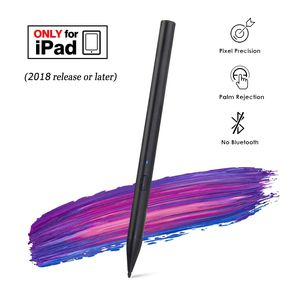
Pixel Precision:
Using advanced technology, the pencil can accurately locate each pixel and work like an Apple pencil.
Palm rejection:
You can use the Pencil like a real pencil an paper even when you rest your palm an the display.
Tap the screen to make a quick note:
Tap your iPad display with the pencil to open the Notes app, and collect your ideas easily.
【Compatible Devices】
iPad Air (3rd generation or later)
iPad Mini (5th generation or later)
iPad (6th generation or later)
iPad Pro (3rd generation or later)
*All iPad Models must be updated to iOS 12.2 and above.
【Quick Guide】
Turn on-Press the button once to turn on the Pencil. Once the indicator light turns blue, the Pencil is active.
Turn off-Press the button once to turn the Pencil off. The Pencil will also automatically turn itself off after 20 minutes of inactivity. Once the indicator light is off, the Pencil is off.
Charging-The indicator will blink red when the battery is low. Connect the Micro USB cable to the charger port to charge the Pencil. The indicator will be red while charging, and turn blue when it is fully charged.
Replace the pen tip-Unscrew the tip counter-clockwise to extract, and clockwise to secure.
*If your iPad was paired with an Apple pencil before, please unpair it before using the Pencil.
【LED Indicator Light】
When Blue Light is ON-power on and battery power is in normal status.
When Red Light is flashing -low Battery power and needs charging.
When Red Light is ON -the Pencil is charging.
When Light is OFF-the Pencil is off.
Dimension: 153.5*9 2mm
Charge Port: Micro-USB
Power Source: 150mAh Li Battery
Battery life: up to 12hours continuous use
Automatic turn off: 20 minutes
【Feature】
Pixel Precision:
Using advanced technology, the pencil can accurately locate each pixel and work like an Apple pencil.
Palm rejection:
You can use the Pencil like a real pencil an paper even when you rest your palm an the display.
Tap the screen to make a quick note:
Tap your iPad display with the pencil to open the Notes app, and collect your ideas easily.
【Compatible Devices】
iPad Air (3rd generation or later)
iPad Mini (5th generation or later)
iPad (6th generation or later)
iPad Pro (3rd generation or later)
*All iPad Models must be updated to iOS 12.2 and above.
【Quick Guide】
Turn on-Press the button once to turn on the Pencil. Once the indicator light turns blue, the Pencil is active.
Turn off-Press the button once to turn the Pencil off. The Pencil will also automatically turn itself off after 20 minutes of inactivity. Once the indicator light is off, the Pencil is off.
Charging-The indicator will blink red when the battery is low. Connect the Micro USB cable to the charger port to charge the Pencil. The indicator will be red while charging, and turn blue when it is fully charged.
Replace the pen tip-Unscrew the tip counter-clockwise to extract, and clockwise to secure.
*If your iPad was paired with an Apple pencil before, please unpair it before using the Pencil.
【LED Indicator Light】
When Blue Light is ON-power on and battery power is in normal status.
When Red Light is flashing -low Battery power and needs charging.
When Red Light is ON -the Pencil is charging.
When Light is OFF-the Pencil is off.
Stylus Pen for Apple iPad Pro Palm Rejection , Active Digital Pencil for iPad pro 3rd Gen 11/12.9 Inch/Air 3rd Gen / iPad 6th Gen / iPad mini 5th Gen After 2018-Black
Price is below average
Current Price
$39.99
Average
$62.77
Min Price
$39.99
Max Price
$79.99
Price dynamics
36%
Description
【Technical Details】
Dimension: 153.5*9 2mm
Charge Port: Micro-USB
Power Source: 150mAh Li Battery
Battery life: up to 12hours continuous use
Automatic turn off: 20 minutes
【Feature】
Pixel Precision:
Using advanced technology, the pencil can accurately locate each pixel and work like an Apple pencil.
Palm rejection:
You can use the Pencil like a real pencil an paper even when you rest your palm an the display.
Tap the screen to make a quick note:
Tap your iPad display with the pencil to open the Notes app, and collect your ideas easily.
【Compatible Devices】
iPad Air (3rd generation or later)
iPad Mini (5th generation or later)
iPad (6th generation or later)
iPad Pro (3rd generation or later)
*All iPad Models must be updated to iOS 12.2 and above.
【Quick Guide】
Turn on-Press the button once to turn on the Pencil. Once the indicator light turns blue, the Pencil is active.
Turn off-Press the button once to turn the Pencil off. The Pencil will also automatically turn itself off after 20 minutes of inactivity. Once the indicator light is off, the Pencil is off.
Charging-The indicator will blink red when the battery is low. Connect the Micro USB cable to the charger port to charge the Pencil. The indicator will be red while charging, and turn blue when it is fully charged.
Replace the pen tip-Unscrew the tip counter-clockwise to extract, and clockwise to secure.
*If your iPad was paired with an Apple pencil before, please unpair it before using the Pencil.
【LED Indicator Light】
When Blue Light is ON-power on and battery power is in normal status.
When Red Light is flashing -low Battery power and needs charging.
When Red Light is ON -the Pencil is charging.
When Light is OFF-the Pencil is off.
Dimension: 153.5*9 2mm
Charge Port: Micro-USB
Power Source: 150mAh Li Battery
Battery life: up to 12hours continuous use
Automatic turn off: 20 minutes
【Feature】
Pixel Precision:
Using advanced technology, the pencil can accurately locate each pixel and work like an Apple pencil.
Palm rejection:
You can use the Pencil like a real pencil an paper even when you rest your palm an the display.
Tap the screen to make a quick note:
Tap your iPad display with the pencil to open the Notes app, and collect your ideas easily.
【Compatible Devices】
iPad Air (3rd generation or later)
iPad Mini (5th generation or later)
iPad (6th generation or later)
iPad Pro (3rd generation or later)
*All iPad Models must be updated to iOS 12.2 and above.
【Quick Guide】
Turn on-Press the button once to turn on the Pencil. Once the indicator light turns blue, the Pencil is active.
Turn off-Press the button once to turn the Pencil off. The Pencil will also automatically turn itself off after 20 minutes of inactivity. Once the indicator light is off, the Pencil is off.
Charging-The indicator will blink red when the battery is low. Connect the Micro USB cable to the charger port to charge the Pencil. The indicator will be red while charging, and turn blue when it is fully charged.
Replace the pen tip-Unscrew the tip counter-clockwise to extract, and clockwise to secure.
*If your iPad was paired with an Apple pencil before, please unpair it before using the Pencil.
【LED Indicator Light】
When Blue Light is ON-power on and battery power is in normal status.
When Red Light is flashing -low Battery power and needs charging.
When Red Light is ON -the Pencil is charging.
When Light is OFF-the Pencil is off.
Price will be lower
in next 2 weeks
in next 2 weeks
According to the data, price will be lower in next two weeks, so not waste your money and track better price!
Product review & video
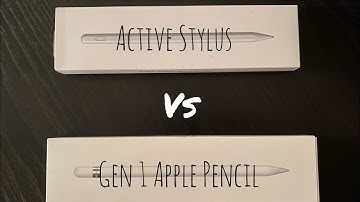
[Music] - what's going on okay so you see I have an Apple pencil here but that is not what this video is about today I am going to unbox this alternative cheaper stylus pen active stylus pen - Apple pencil I mean looks good feels good haven't used it but I opened it to see what it looks like so first we're gonna see what its compatible with pretty much the same thing that the other well the regular Apple pencil is compatible with I'm using the generation one I can't really speak for the generation - Apple pencil but this kinda sorta looks like it and it even is magnetic and will attach to the iPad pros so let's open it and let's take it out of the nice little plastic sheath thingy thing give it an overlooked physical power button one piece no removable cap quite sure the tip is replaceable so I also noticed there's a little hole here so let's go ahead and get the rest we have a USB litt


Similar products


































