Description
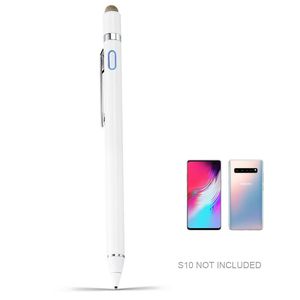
Stylus Pen for Samaung Galaxy S10 Pencil, EVACH Digital Pencil with 1.5mm Ultra Fine Tip Stylus for Samaung Galaxy S10, White
1.5mm Fine Point Stylus Pen for Samaung Galaxy S10 lets you draw,write and navigate with pinpoint accuracy and offers comfortable pen-like control for Samaung Galaxy S10 Stylus Pen
Anodized aluminum body Stylus Pencil for Samaung Galaxy S10 Provide durability and offers a stylish appearance
Pocket Clip keep the drawing stylist pen for Samaung Galaxy S10 within reach for easy portability
Soft Tip Pen for Samaung Galaxy S10 allows you to interact with your device's touch screen without leaving scratches or smudges
Magetic Cap offers easy operation while provides protection against dust and damage, available as normal tip while active stylus is out of power
Follow Below Steps to Begin Using:
1. Press the power button easily and there you go now.
2. Open sketching/writing/drawing applications in your device and set the input to handwriting mode.
3. Now you can start using it. Enjoy design/sketch/draw/write as you want
4. Tip: there isn't bluetooth connection or cable connection with your device.
If you have any question or concern, just let us know, we will help on troubleshooting.
1.5mm Fine Point Stylus Pen for Samaung Galaxy S10 lets you draw,write and navigate with pinpoint accuracy and offers comfortable pen-like control for Samaung Galaxy S10 Stylus Pen
Anodized aluminum body Stylus Pencil for Samaung Galaxy S10 Provide durability and offers a stylish appearance
Pocket Clip keep the drawing stylist pen for Samaung Galaxy S10 within reach for easy portability
Soft Tip Pen for Samaung Galaxy S10 allows you to interact with your device's touch screen without leaving scratches or smudges
Magetic Cap offers easy operation while provides protection against dust and damage, available as normal tip while active stylus is out of power
Follow Below Steps to Begin Using:
1. Press the power button easily and there you go now.
2. Open sketching/writing/drawing applications in your device and set the input to handwriting mode.
3. Now you can start using it. Enjoy design/sketch/draw/write as you want
4. Tip: there isn't bluetooth connection or cable connection with your device.
If you have any question or concern, just let us know, we will help on troubleshooting.
Stylus Pen for Samaung Galaxy S10 Pencil, EVACH Digital Pencil with 1.5mm Ultra Fine Tip Stylus for Samaung Galaxy S10, White
Current Price
$29.99
Average
$29.99
Min Price
$29.99
Max Price
$29.99
Description
Stylus Pen for Samaung Galaxy S10 Pencil, EVACH Digital Pencil with 1.5mm Ultra Fine Tip Stylus for Samaung Galaxy S10, White
1.5mm Fine Point Stylus Pen for Samaung Galaxy S10 lets you draw,write and navigate with pinpoint accuracy and offers comfortable pen-like control for Samaung Galaxy S10 Stylus Pen
Anodized aluminum body Stylus Pencil for Samaung Galaxy S10 Provide durability and offers a stylish appearance
Pocket Clip keep the drawing stylist pen for Samaung Galaxy S10 within reach for easy portability
Soft Tip Pen for Samaung Galaxy S10 allows you to interact with your device's touch screen without leaving scratches or smudges
Magetic Cap offers easy operation while provides protection against dust and damage, available as normal tip while active stylus is out of power
Follow Below Steps to Begin Using:
1. Press the power button easily and there you go now.
2. Open sketching/writing/drawing applications in your device and set the input to handwriting mode.
3. Now you can start using it. Enjoy design/sketch/draw/write as you want
4. Tip: there isn't bluetooth connection or cable connection with your device.
If you have any question or concern, just let us know, we will help on troubleshooting.
1.5mm Fine Point Stylus Pen for Samaung Galaxy S10 lets you draw,write and navigate with pinpoint accuracy and offers comfortable pen-like control for Samaung Galaxy S10 Stylus Pen
Anodized aluminum body Stylus Pencil for Samaung Galaxy S10 Provide durability and offers a stylish appearance
Pocket Clip keep the drawing stylist pen for Samaung Galaxy S10 within reach for easy portability
Soft Tip Pen for Samaung Galaxy S10 allows you to interact with your device's touch screen without leaving scratches or smudges
Magetic Cap offers easy operation while provides protection against dust and damage, available as normal tip while active stylus is out of power
Follow Below Steps to Begin Using:
1. Press the power button easily and there you go now.
2. Open sketching/writing/drawing applications in your device and set the input to handwriting mode.
3. Now you can start using it. Enjoy design/sketch/draw/write as you want
4. Tip: there isn't bluetooth connection or cable connection with your device.
If you have any question or concern, just let us know, we will help on troubleshooting.
Price will be lower
in next 2 weeks
in next 2 weeks
According to the data, price will be lower in next two weeks, so not waste your money and track better price!

Similar products


































