IMPORTANT INSTRUCTIONS:
1. Please make sure both the device screen and the disc are clean before using the stylus on your device, dirt can catch onto the disc which may result in reduced sensitivity, and in some cases may even scratch your screen.
2. If you suspect that your disc has been damaged in any way, discontinue use. A damage disc may scratch the screen. Please replace with a new disc.
3.DO NOT remove the plastic disc at the end of tip, or the tip won't work. the round disc part of tip to conduct and receive signal from the screens.
How to change the disc tip?
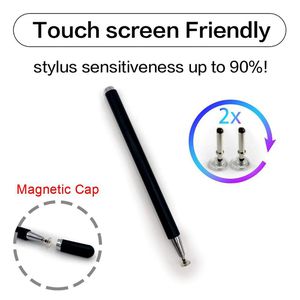
If you want to change the disc tip, the backup disc tip is on the top side of the stylus,unscrew the cap and you will get the disc tip.
To replace the disc tip, please pull it out by holding the middle part of the small metal bar, then push a new disc tip into the stylus.
Common use problem:
1, When you use this stylus, please let the disc fully touch the screen.
2, If you can not write smooth on the device, the reason would maybe the device is not running enough, please restart the device or turn off other apps.
3, There are dust or grease cover the disc tip, please keep the disc tip clean and well.
4, You can slide the screen, but can not write in the software, please check the software settings or confirm whether the software supports handwriting editing.











![Galaxy Tab Pro 12.2 Stylus Pen, BoxWave [Capacitive Styra] Capacitive Stylus with Rollerball Pen for Samsung Galaxy Tab Pro 12.2 - Magnet Purple](https://use4coins.com/thumbs/unsafe/fit-in/200x200/https://images-na.ssl-images-amazon.com/images/I/31my%2BgU-3-L.jpg)
![BoxWave iPad 2 Stylus Pen, [mini Capacitive Stylus - Sparkle Edition] Mini Rubber Tip Capacitive Stylus Pen for Apple iPad 2 - Jet Black](https://use4coins.com/thumbs/unsafe/fit-in/200x200/https://images-na.ssl-images-amazon.com/images/I/41qQEpT90XL.jpg)

![BoxWave Dell Venue 8 Pro Stylus Pen, [FineTouch Capacitive Stylus] Super Precise Stylus Pen for Dell Venue 8 Pro - Lunar Blue](https://use4coins.com/thumbs/unsafe/fit-in/200x200/https://images-na.ssl-images-amazon.com/images/I/71npyZ14e7L.jpg)




![Tek Styz PRO Stylus for Samsung Galaxy Book 12-inch 128GB High Accuracy Sensitive in Compact Form for Touch Screens [3 Pack-Multi-Color]](https://use4coins.com/thumbs/unsafe/fit-in/200x200/https://images-na.ssl-images-amazon.com/images/I/61cxegjHEAL.jpg)















![aibow Capacitive Stylus Pens for iPad, iPhone, Tablets, Cell Phones, All Touch Screens [ Fine Point & High Sensitivity Disc Tip Series ] with 2 Replaceable Disc Tips, Slide Cap Type2 (Black/Blue)](https://use4coins.com/thumbs/unsafe/fit-in/200x200/https://images-na.ssl-images-amazon.com/images/I/61WM3pkV09L.jpg)





