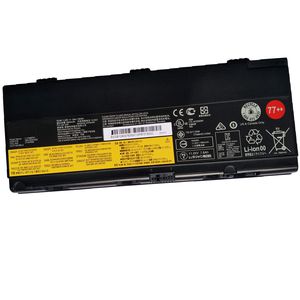
Description
*About SUNNEAR:
SUNNEAR focus on laptop batteries, To each of our customers with high quality laptop battery, the satisfaction from customer is our forever target.
We have a professional Team,Focus our major and Value every client. Thanks for your purchase!
*Specification:
*Voltage: 11.25V.
*Capacity: 90Wh.
*Compatible Part Number:
L17L6P51 L17M6P51 SB10K97634 SB10K97635 01AV495 01AV496 SB10H45078 00NY493 00NY492 SB10H45077 77+ 77++ .
*Fit for:( Use "Ctrl" + "F" to find your models quickly)
Lenovo ThinkPad P50 P51 P52 Series Notebook
*Package Included :
1x 01AV496 battery.
*Skills to use battery:
For the new battery , we suggest that all of our customer should fully charge it with AC power adapter ,and this process takes a long period,
the capacity might have been drained by inner PCB circuit, in order to protect your battery life,you should fully charge the battery to 100% and drain it to 1% 2 times,
then the capacity will recover.Charge the battery regularly, at least once a month.
SUNNEAR focus on laptop batteries, To each of our customers with high quality laptop battery, the satisfaction from customer is our forever target.
We have a professional Team,Focus our major and Value every client. Thanks for your purchase!
*Specification:
*Voltage: 11.25V.
*Capacity: 90Wh.
*Compatible Part Number:
L17L6P51 L17M6P51 SB10K97634 SB10K97635 01AV495 01AV496 SB10H45078 00NY493 00NY492 SB10H45077 77+ 77++ .
*Fit for:( Use "Ctrl" + "F" to find your models quickly)
Lenovo ThinkPad P50 P51 P52 Series Notebook
*Package Included :
1x 01AV496 battery.
*Skills to use battery:
For the new battery , we suggest that all of our customer should fully charge it with AC power adapter ,and this process takes a long period,
the capacity might have been drained by inner PCB circuit, in order to protect your battery life,you should fully charge the battery to 100% and drain it to 1% 2 times,
then the capacity will recover.Charge the battery regularly, at least once a month.
SUNNEAR Replacement Laptop Battery 01AV496 90Wh for Lenovo ThinkPad P50 P51 P52 Series Notebook L17M6P51 SB10K97634 01AV495 SB10H45078 00NY493 00NY492 SB10H45077 77+ 77++
Current Price
$89.93
Average
$87.19
Min Price
$79.93
Max Price
$99.99
Price dynamics
3%
Description
*About SUNNEAR:
SUNNEAR focus on laptop batteries, To each of our customers with high quality laptop battery, the satisfaction from customer is our forever target.
We have a professional Team,Focus our major and Value every client. Thanks for your purchase!
*Specification:
*Voltage: 11.25V.
*Capacity: 90Wh.
*Compatible Part Number:
L17L6P51 L17M6P51 SB10K97634 SB10K97635 01AV495 01AV496 SB10H45078 00NY493 00NY492 SB10H45077 77+ 77++ .
*Fit for:( Use "Ctrl" + "F" to find your models quickly)
Lenovo ThinkPad P50 P51 P52 Series Notebook
*Package Included :
1x 01AV496 battery.
*Skills to use battery:
For the new battery , we suggest that all of our customer should fully charge it with AC power adapter ,and this process takes a long period,
the capacity might have been drained by inner PCB circuit, in order to protect your battery life,you should fully charge the battery to 100% and drain it to 1% 2 times,
then the capacity will recover.Charge the battery regularly, at least once a month.
SUNNEAR focus on laptop batteries, To each of our customers with high quality laptop battery, the satisfaction from customer is our forever target.
We have a professional Team,Focus our major and Value every client. Thanks for your purchase!
*Specification:
*Voltage: 11.25V.
*Capacity: 90Wh.
*Compatible Part Number:
L17L6P51 L17M6P51 SB10K97634 SB10K97635 01AV495 01AV496 SB10H45078 00NY493 00NY492 SB10H45077 77+ 77++ .
*Fit for:( Use "Ctrl" + "F" to find your models quickly)
Lenovo ThinkPad P50 P51 P52 Series Notebook
*Package Included :
1x 01AV496 battery.
*Skills to use battery:
For the new battery , we suggest that all of our customer should fully charge it with AC power adapter ,and this process takes a long period,
the capacity might have been drained by inner PCB circuit, in order to protect your battery life,you should fully charge the battery to 100% and drain it to 1% 2 times,
then the capacity will recover.Charge the battery regularly, at least once a month.
Price will be lower
in next 2 weeks
in next 2 weeks
According to the data, price will be lower in next two weeks, so not waste your money and track better price!
Product review & video
Hello, everyone. I'm Mike with Lenovo and today I'm here with the ThinkPad P51. Today, we're going to be replacing the battery. The process should take about five minutes and it should be easy enough for anyone to do. There are no tools required to do this. Before we continue, we need to make sure that we're protected against electrostatic discharge, or ESD. Make sure you shut down the computer and disconnect all cables and accessories from the system. For more information watch our understanding electrostatic discharge video by clicking the link in the description. Now that we're ready, let's get started. Pull the latch to the unlocked position. Pivot the battery up and lift it from the system. Place the battery into the compartment. Press down until it locks into place.



Similar products






































