Description
BRIGNG YOUR IDEAS INTO REALITY
Highly Sensitive and Precise Writing & Painting Experience,Ensures your Paintings has High Artistic Precision.Perfect for Hand Writing, Drawing, Marking, Signing and Making Notes Anytime and Anywhere by Artists, Architects, Officers, Teachers, Students and Children.
USE DRIECTLY
Pick up and go, no drive or Bluetooth setting required. You only need put an AAAA battery into the pen then it will work right away.
Compatible Model List
✮ Surface Go
✮ Surface Pro (2019)
✮ Surface Pro (2018)
✮ Surface Pro (2017)
✮ Surface Book 2
✮ Surface laptop
✮ Surface Studio
✮ Surface Pro 6
✮ Surface Pro 5
✮ Surface Pro 4
✮ Surface Pro 3
✮ Surface 3
✮ASUS Transformer MiniT102HA/T103HA
✮ASUS Transformer 3 Pro T303UA
✮ASUS Transformer 3 T305CA
✮ASUS Transformer Pro T304UA
✮ASUS ZenBook Flip UX560UA/UQ/UX & UX561UA/UN/UD
✮ASUS Vivobook Flip TP510UA/UQ & TP203NA & TP401NA/CA & TP410UA
✮ASUS Vivobook Pro X580VD
✮ASUS Notebook Q405UA & Q325UA
✮HP Envy 17-aexxx
✮HP Envy x360 15-bp0xx
✮HP Envy x360 15-bq0xx
✮HP Pavilion x360 11m-ad0xx
✮HP Pavilion x360 14m-ba0xx
✮HP Pavilion x360 15-br0xx
✮HP Spectre x2 12-c0xx
✮HP Spectre x360 13-ac0xx
✮HP Spectre x360 15-bl0xx(2017)
✮Vaio Z Canvas
✮Vaio Z flip
✮Sony VAIO Duo 13
✮Sony VAIO Duo 11
Warm Tips:
1. No Magnetic, can not be adsorbed to the side of tablet like original surface pen.
2. Bluetooth Function is NOT included, OneNote shortcut not supported.
3. Not Supports Surface Pro 1, Surface 1, Surface Pro 2, Surface 2, Surface RT. Check the compatible model before you buy.
4.Come with a same tip for replacement.
Package Contents
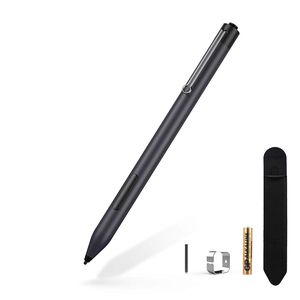
Surface Pen * 1
AAAA Battery * 1
Replaced Tip * 1
Tip Replacement Tool * 1
1 x pencil pouch
Highly Sensitive and Precise Writing & Painting Experience,Ensures your Paintings has High Artistic Precision.Perfect for Hand Writing, Drawing, Marking, Signing and Making Notes Anytime and Anywhere by Artists, Architects, Officers, Teachers, Students and Children.
USE DRIECTLY
Pick up and go, no drive or Bluetooth setting required. You only need put an AAAA battery into the pen then it will work right away.
Compatible Model List
✮ Surface Go
✮ Surface Pro (2019)
✮ Surface Pro (2018)
✮ Surface Pro (2017)
✮ Surface Book 2
✮ Surface laptop
✮ Surface Studio
✮ Surface Pro 6
✮ Surface Pro 5
✮ Surface Pro 4
✮ Surface Pro 3
✮ Surface 3
✮ASUS Transformer MiniT102HA/T103HA
✮ASUS Transformer 3 Pro T303UA
✮ASUS Transformer 3 T305CA
✮ASUS Transformer Pro T304UA
✮ASUS ZenBook Flip UX560UA/UQ/UX & UX561UA/UN/UD
✮ASUS Vivobook Flip TP510UA/UQ & TP203NA & TP401NA/CA & TP410UA
✮ASUS Vivobook Pro X580VD
✮ASUS Notebook Q405UA & Q325UA
✮HP Envy 17-aexxx
✮HP Envy x360 15-bp0xx
✮HP Envy x360 15-bq0xx
✮HP Pavilion x360 11m-ad0xx
✮HP Pavilion x360 14m-ba0xx
✮HP Pavilion x360 15-br0xx
✮HP Spectre x2 12-c0xx
✮HP Spectre x360 13-ac0xx
✮HP Spectre x360 15-bl0xx(2017)
✮Vaio Z Canvas
✮Vaio Z flip
✮Sony VAIO Duo 13
✮Sony VAIO Duo 11
Warm Tips:
1. No Magnetic, can not be adsorbed to the side of tablet like original surface pen.
2. Bluetooth Function is NOT included, OneNote shortcut not supported.
3. Not Supports Surface Pro 1, Surface 1, Surface Pro 2, Surface 2, Surface RT. Check the compatible model before you buy.
4.Come with a same tip for replacement.
Package Contents
Surface Pen * 1
AAAA Battery * 1
Replaced Tip * 1
Tip Replacement Tool * 1
1 x pencil pouch
Surface Pen,Stylus Pen for Surface GO,Pen for Surface Pro 6,5,4,3, Surface Pro 2019/2018/2017,Surface 3,Surface Laptop 2/Book/Studio,Pen for Acer/HP,etc,Aluminum Body (Navy Blue)
Price is below average
Current Price
$34.99
Average
$36.04
Min Price
$32.99
Max Price
$39.99
Price dynamics
3%
Description
BRIGNG YOUR IDEAS INTO REALITY
Highly Sensitive and Precise Writing & Painting Experience,Ensures your Paintings has High Artistic Precision.Perfect for Hand Writing, Drawing, Marking, Signing and Making Notes Anytime and Anywhere by Artists, Architects, Officers, Teachers, Students and Children.
USE DRIECTLY
Pick up and go, no drive or Bluetooth setting required. You only need put an AAAA battery into the pen then it will work right away.
Compatible Model List
✮ Surface Go
✮ Surface Pro (2019)
✮ Surface Pro (2018)
✮ Surface Pro (2017)
✮ Surface Book 2
✮ Surface laptop
✮ Surface Studio
✮ Surface Pro 6
✮ Surface Pro 5
✮ Surface Pro 4
✮ Surface Pro 3
✮ Surface 3
✮ASUS Transformer MiniT102HA/T103HA
✮ASUS Transformer 3 Pro T303UA
✮ASUS Transformer 3 T305CA
✮ASUS Transformer Pro T304UA
✮ASUS ZenBook Flip UX560UA/UQ/UX & UX561UA/UN/UD
✮ASUS Vivobook Flip TP510UA/UQ & TP203NA & TP401NA/CA & TP410UA
✮ASUS Vivobook Pro X580VD
✮ASUS Notebook Q405UA & Q325UA
✮HP Envy 17-aexxx
✮HP Envy x360 15-bp0xx
✮HP Envy x360 15-bq0xx
✮HP Pavilion x360 11m-ad0xx
✮HP Pavilion x360 14m-ba0xx
✮HP Pavilion x360 15-br0xx
✮HP Spectre x2 12-c0xx
✮HP Spectre x360 13-ac0xx
✮HP Spectre x360 15-bl0xx(2017)
✮Vaio Z Canvas
✮Vaio Z flip
✮Sony VAIO Duo 13
✮Sony VAIO Duo 11
Warm Tips:
1. No Magnetic, can not be adsorbed to the side of tablet like original surface pen.
2. Bluetooth Function is NOT included, OneNote shortcut not supported.
3. Not Supports Surface Pro 1, Surface 1, Surface Pro 2, Surface 2, Surface RT. Check the compatible model before you buy.
4.Come with a same tip for replacement.
Package Contents
Surface Pen * 1
AAAA Battery * 1
Replaced Tip * 1
Tip Replacement Tool * 1
1 x pencil pouch
Highly Sensitive and Precise Writing & Painting Experience,Ensures your Paintings has High Artistic Precision.Perfect for Hand Writing, Drawing, Marking, Signing and Making Notes Anytime and Anywhere by Artists, Architects, Officers, Teachers, Students and Children.
USE DRIECTLY
Pick up and go, no drive or Bluetooth setting required. You only need put an AAAA battery into the pen then it will work right away.
Compatible Model List
✮ Surface Go
✮ Surface Pro (2019)
✮ Surface Pro (2018)
✮ Surface Pro (2017)
✮ Surface Book 2
✮ Surface laptop
✮ Surface Studio
✮ Surface Pro 6
✮ Surface Pro 5
✮ Surface Pro 4
✮ Surface Pro 3
✮ Surface 3
✮ASUS Transformer MiniT102HA/T103HA
✮ASUS Transformer 3 Pro T303UA
✮ASUS Transformer 3 T305CA
✮ASUS Transformer Pro T304UA
✮ASUS ZenBook Flip UX560UA/UQ/UX & UX561UA/UN/UD
✮ASUS Vivobook Flip TP510UA/UQ & TP203NA & TP401NA/CA & TP410UA
✮ASUS Vivobook Pro X580VD
✮ASUS Notebook Q405UA & Q325UA
✮HP Envy 17-aexxx
✮HP Envy x360 15-bp0xx
✮HP Envy x360 15-bq0xx
✮HP Pavilion x360 11m-ad0xx
✮HP Pavilion x360 14m-ba0xx
✮HP Pavilion x360 15-br0xx
✮HP Spectre x2 12-c0xx
✮HP Spectre x360 13-ac0xx
✮HP Spectre x360 15-bl0xx(2017)
✮Vaio Z Canvas
✮Vaio Z flip
✮Sony VAIO Duo 13
✮Sony VAIO Duo 11
Warm Tips:
1. No Magnetic, can not be adsorbed to the side of tablet like original surface pen.
2. Bluetooth Function is NOT included, OneNote shortcut not supported.
3. Not Supports Surface Pro 1, Surface 1, Surface Pro 2, Surface 2, Surface RT. Check the compatible model before you buy.
4.Come with a same tip for replacement.
Package Contents
Surface Pen * 1
AAAA Battery * 1
Replaced Tip * 1
Tip Replacement Tool * 1
1 x pencil pouch
Price will be lower
in next 2 weeks
in next 2 weeks
According to the data, price will be lower in next two weeks, so not waste your money and track better price!
Product review & video
>> It was very important
for us as we're building Windows 10 to make sure that this does more than just
take handwritten notes, sign your name or circle something. We want to make it, so that
you can use your Surface Pen as a mouse and a keyboard
throughout Windows. So I want to show you a bit
about how that works. By default, your pen will behave
like a mouse throughout Windows. So as I press the Start Menu or if I'm scrolling through the different
apps and tiles that I have, click and drag is
just press and hold, and move your Pen across the screen. It will behave like that mouse. Now, if I want to
right-click on something, on the barrel of my Pen, this flat edge here, is where I have this button. I'm going to press and hold
on this right-click button, and then tap anywhere on the screen. That's going to perform
the right-click function wherever I'd like. So I have all of
that nice ad


Similar products


































