Description
The Other Features:
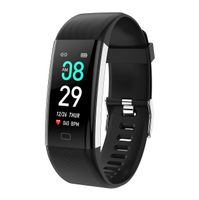
1. Messages reminder/Message push When there is new message, the device will vibrate to remind you and display the message on screen. The corresponding message displays the corresponding icon,it will retain the current 3 messages.And the messages support Multi-language display: Russian, English, Spanish, French, German, Italian, Portuguese,Ukrainian, Czech, Turkish, Japanese
2. More Function Incoming call remind, Drink water reminder, Alarm clock, Sedentary reminder, Find bracelet, Remote control camera.
Specification:
Screen Material: Color TFT
Charge: USB charger cable
Chip: nordic52832
Connection: Bluetooth 4.0
Screen Size: 1.3inch
Water resistant: IP67
Battery type: Polymer lithium battery
Capacity: 180mah
How to Use the Smart Watch?
(1) Fully charging the device before using.
(2) Open the [GPS] of your phone.
(3) Start scanning two-dimensional code to download the APP named [WearHealth] in your phone,you can find it
on the back of the retail box,or in the User Manual.There are three kinds to choose,please choose the system
of your phone to download.
(4) After the download is complete,new user registration or third-party login.
(5) Then Open the bluetooth of your phone and make sure it is on. (Do not connect the fitness tracker directly
via the bluetooth,follow the next step).
(6) Enter the app->Click [Mine]->Click [Connect a bracelet ]->Find the Q9 bluetooth name then connect it
successfully,and fill in the weaer's personal information.
(7) According to your own habits to star set the bracelet setting
More setting can be setup in the APP:Mine > Device Management.
1. Messages reminder/Message push When there is new message, the device will vibrate to remind you and display the message on screen. The corresponding message displays the corresponding icon,it will retain the current 3 messages.And the messages support Multi-language display: Russian, English, Spanish, French, German, Italian, Portuguese,Ukrainian, Czech, Turkish, Japanese
2. More Function Incoming call remind, Drink water reminder, Alarm clock, Sedentary reminder, Find bracelet, Remote control camera.
Specification:
Screen Material: Color TFT
Charge: USB charger cable
Chip: nordic52832
Connection: Bluetooth 4.0
Screen Size: 1.3inch
Water resistant: IP67
Battery type: Polymer lithium battery
Capacity: 180mah
How to Use the Smart Watch?
(1) Fully charging the device before using.
(2) Open the [GPS] of your phone.
(3) Start scanning two-dimensional code to download the APP named [WearHealth] in your phone,you can find it
on the back of the retail box,or in the User Manual.There are three kinds to choose,please choose the system
of your phone to download.
(4) After the download is complete,new user registration or third-party login.
(5) Then Open the bluetooth of your phone and make sure it is on. (Do not connect the fitness tracker directly
via the bluetooth,follow the next step).
(6) Enter the app->Click [Mine]->Click [Connect a bracelet ]->Find the Q9 bluetooth name then connect it
successfully,and fill in the weaer's personal information.
(7) According to your own habits to star set the bracelet setting
More setting can be setup in the APP:Mine > Device Management.
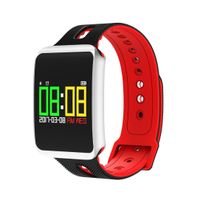
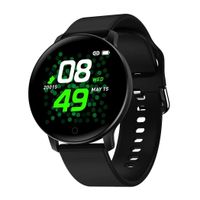
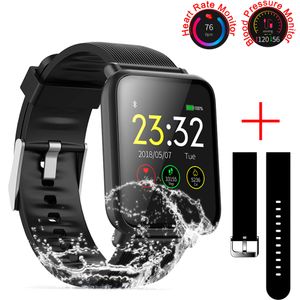
SZHAIYU Blood Pressure Heart Rate Monitor Smart Watch Android iOS IP67 Waterproof Sport Fitness Trakcer Watch Men Women Smartwatch (Black)
Price is below average
Current Price
$35.99
Average
$37.05
Min Price
$35.99
Max Price
$37.99
Price dynamics
3%
Description
The Other Features:
1. Messages reminder/Message push When there is new message, the device will vibrate to remind you and display the message on screen. The corresponding message displays the corresponding icon,it will retain the current 3 messages.And the messages support Multi-language display: Russian, English, Spanish, French, German, Italian, Portuguese,Ukrainian, Czech, Turkish, Japanese
2. More Function Incoming call remind, Drink water reminder, Alarm clock, Sedentary reminder, Find bracelet, Remote control camera.
Specification:
Screen Material: Color TFT
Charge: USB charger cable
Chip: nordic52832
Connection: Bluetooth 4.0
Screen Size: 1.3inch
Water resistant: IP67
Battery type: Polymer lithium battery
Capacity: 180mah
How to Use the Smart Watch?
(1) Fully charging the device before using.
(2) Open the [GPS] of your phone.
(3) Start scanning two-dimensional code to download the APP named [WearHealth] in your phone,you can find it
on the back of the retail box,or in the User Manual.There are three kinds to choose,please choose the system
of your phone to download.
(4) After the download is complete,new user registration or third-party login.
(5) Then Open the bluetooth of your phone and make sure it is on. (Do not connect the fitness tracker directly
via the bluetooth,follow the next step).
(6) Enter the app->Click [Mine]->Click [Connect a bracelet ]->Find the Q9 bluetooth name then connect it
successfully,and fill in the weaer's personal information.
(7) According to your own habits to star set the bracelet setting
More setting can be setup in the APP:Mine > Device Management.
1. Messages reminder/Message push When there is new message, the device will vibrate to remind you and display the message on screen. The corresponding message displays the corresponding icon,it will retain the current 3 messages.And the messages support Multi-language display: Russian, English, Spanish, French, German, Italian, Portuguese,Ukrainian, Czech, Turkish, Japanese
2. More Function Incoming call remind, Drink water reminder, Alarm clock, Sedentary reminder, Find bracelet, Remote control camera.
Specification:
Screen Material: Color TFT
Charge: USB charger cable
Chip: nordic52832
Connection: Bluetooth 4.0
Screen Size: 1.3inch
Water resistant: IP67
Battery type: Polymer lithium battery
Capacity: 180mah
How to Use the Smart Watch?
(1) Fully charging the device before using.
(2) Open the [GPS] of your phone.
(3) Start scanning two-dimensional code to download the APP named [WearHealth] in your phone,you can find it
on the back of the retail box,or in the User Manual.There are three kinds to choose,please choose the system
of your phone to download.
(4) After the download is complete,new user registration or third-party login.
(5) Then Open the bluetooth of your phone and make sure it is on. (Do not connect the fitness tracker directly
via the bluetooth,follow the next step).
(6) Enter the app->Click [Mine]->Click [Connect a bracelet ]->Find the Q9 bluetooth name then connect it
successfully,and fill in the weaer's personal information.
(7) According to your own habits to star set the bracelet setting
More setting can be setup in the APP:Mine > Device Management.
Price will be lower
in next 2 weeks
in next 2 weeks
According to the data, price will be lower in next two weeks, so not waste your money and track better price!
Product review & video
The LW11 smart watch is really user-friendly, and it has a much better battery life than my expensive watch. it's a really good smart watch that won't break the bank, so stay with me and I will show you everything about it. welcome back - Adam - #FamilyPopTV The LW11 Smartwatch has a beautiful matte finish giving the smartwatch a good look. It has a waterproof sporty silicone strap - I'll show you how to replace the straps later in this video [11:02] It looks good and it's having an IP68 waterproof rating, so no worries about getting it wet while washing your hands or taking a bath or even swim. We performed a simple waterproof test, as in our past reviews many of you been asking: - "are these watches really waterproof?" To recap: IP67 means the unit can be dropped into a body of water up to a meter deep for half an hour, while the LW11 we testing has an IP68 certificate, which guarant


Similar products