Description
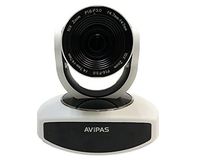
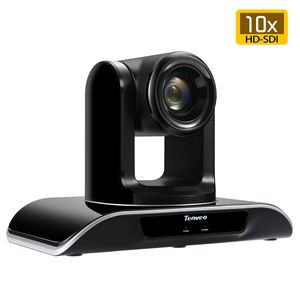
Tenveo video conference camera is convenient for you to make a video conference with your team anywhere and it can also help you to achieve customers with a face to face full HD video conference. It can be widely used in video conferencing, distance learning, telemedicine, teleconferencing, distance training, distance interview, Classroom camera, Church camera and so on.
Product: 10X Optical Zoom TEVO-VHD10N
SDI PTZ camera:
Support 328ft(100m) HD-SDI video transfer.
Pan: 0 to 340 degree (max speed 80°/S)
Tilt: 0 to 120 degree. (max speed 60°/S)
Zoom: 10X optical zoom, 2.1 mega pixel.
Video output: HD-SDI, HDMI
Control Protocol: VISCA,PELCO-D/P(RS-232,RS485)
Video output pixel: 1920x1080p 25/30fps, 1280x720p 25/30fps
Installation: Support desktop, wall mount, tripod mount(1/4" screw hole) and ceiling mounting
Lens: f=5.5-50.0mm
Image Sensor: 1/3" Exmor CMOS
Effective pixel: 2.1 mega pixel(16:9)
Signal standard: NTSC/PAL
Horizontal Angle: Near-end 51.30°~Far-end 4.64°
Gain control: Auto/manual
Focus: Auto/manual
Shutter speed: 8 to1/10000s,Auto
Baud rate: 2400/4800/9600/19200bps
Tip 1: Connect SDI Camera -SDI cable -SDI Capture Device -USB3.0 cable -Laptop/PC. Then start your live streaming, video conferencing or broadcast. The effective transmission distance of HD-SDI cable is 328ft(100m+).
Tip 2: Connect it to a Smart TV via HDMI cable(Not Included) for video conferencing with your team or clients anywhere.The effective transmission distance of HDMI cable is 98ft(30m+).
Tip 3: Press the Number(1-9) directly to call the reserved preset. More Fast and Smooth.
PRESET+Number: To set preset position of this number.
RESET+Number: To clear preset position of this number.
Tip 4: Image Flip. Press MENU - T/P SET - IMAGE, and adjust UP/DOWN to manipulate image flip.
Product: 10X Optical Zoom TEVO-VHD10N
SDI PTZ camera:
Support 328ft(100m) HD-SDI video transfer.
Pan: 0 to 340 degree (max speed 80°/S)
Tilt: 0 to 120 degree. (max speed 60°/S)
Zoom: 10X optical zoom, 2.1 mega pixel.
Video output: HD-SDI, HDMI
Control Protocol: VISCA,PELCO-D/P(RS-232,RS485)
Video output pixel: 1920x1080p 25/30fps, 1280x720p 25/30fps
Installation: Support desktop, wall mount, tripod mount(1/4" screw hole) and ceiling mounting
Lens: f=5.5-50.0mm
Image Sensor: 1/3" Exmor CMOS
Effective pixel: 2.1 mega pixel(16:9)
Signal standard: NTSC/PAL
Horizontal Angle: Near-end 51.30°~Far-end 4.64°
Gain control: Auto/manual
Focus: Auto/manual
Shutter speed: 8 to1/10000s,Auto
Baud rate: 2400/4800/9600/19200bps
Tip 1: Connect SDI Camera -SDI cable -SDI Capture Device -USB3.0 cable -Laptop/PC. Then start your live streaming, video conferencing or broadcast. The effective transmission distance of HD-SDI cable is 328ft(100m+).
Tip 2: Connect it to a Smart TV via HDMI cable(Not Included) for video conferencing with your team or clients anywhere.The effective transmission distance of HDMI cable is 98ft(30m+).
Tip 3: Press the Number(1-9) directly to call the reserved preset. More Fast and Smooth.
PRESET+Number: To set preset position of this number.
RESET+Number: To clear preset position of this number.
Tip 4: Image Flip. Press MENU - T/P SET - IMAGE, and adjust UP/DOWN to manipulate image flip.
Tenveo 10X-SDI Optical Zoom Video Conference Camera Full HD 1080p HDMI HD-SDI PTZ conferencing Camera for Business Meetings (10X Zoom TEVO-VHD10N)
Current Price
$499.99
Average
$499.99
Min Price
$499.99
Max Price
$499.99
Description
Tenveo video conference camera is convenient for you to make a video conference with your team anywhere and it can also help you to achieve customers with a face to face full HD video conference. It can be widely used in video conferencing, distance learning, telemedicine, teleconferencing, distance training, distance interview, Classroom camera, Church camera and so on.
Product: 10X Optical Zoom TEVO-VHD10N
SDI PTZ camera:
Support 328ft(100m) HD-SDI video transfer.
Pan: 0 to 340 degree (max speed 80°/S)
Tilt: 0 to 120 degree. (max speed 60°/S)
Zoom: 10X optical zoom, 2.1 mega pixel.
Video output: HD-SDI, HDMI
Control Protocol: VISCA,PELCO-D/P(RS-232,RS485)
Video output pixel: 1920x1080p 25/30fps, 1280x720p 25/30fps
Installation: Support desktop, wall mount, tripod mount(1/4" screw hole) and ceiling mounting
Lens: f=5.5-50.0mm
Image Sensor: 1/3" Exmor CMOS
Effective pixel: 2.1 mega pixel(16:9)
Signal standard: NTSC/PAL
Horizontal Angle: Near-end 51.30°~Far-end 4.64°
Gain control: Auto/manual
Focus: Auto/manual
Shutter speed: 8 to1/10000s,Auto
Baud rate: 2400/4800/9600/19200bps
Tip 1: Connect SDI Camera -SDI cable -SDI Capture Device -USB3.0 cable -Laptop/PC. Then start your live streaming, video conferencing or broadcast. The effective transmission distance of HD-SDI cable is 328ft(100m+).
Tip 2: Connect it to a Smart TV via HDMI cable(Not Included) for video conferencing with your team or clients anywhere.The effective transmission distance of HDMI cable is 98ft(30m+).
Tip 3: Press the Number(1-9) directly to call the reserved preset. More Fast and Smooth.
PRESET+Number: To set preset position of this number.
RESET+Number: To clear preset position of this number.
Tip 4: Image Flip. Press MENU - T/P SET - IMAGE, and adjust UP/DOWN to manipulate image flip.
Product: 10X Optical Zoom TEVO-VHD10N
SDI PTZ camera:
Support 328ft(100m) HD-SDI video transfer.
Pan: 0 to 340 degree (max speed 80°/S)
Tilt: 0 to 120 degree. (max speed 60°/S)
Zoom: 10X optical zoom, 2.1 mega pixel.
Video output: HD-SDI, HDMI
Control Protocol: VISCA,PELCO-D/P(RS-232,RS485)
Video output pixel: 1920x1080p 25/30fps, 1280x720p 25/30fps
Installation: Support desktop, wall mount, tripod mount(1/4" screw hole) and ceiling mounting
Lens: f=5.5-50.0mm
Image Sensor: 1/3" Exmor CMOS
Effective pixel: 2.1 mega pixel(16:9)
Signal standard: NTSC/PAL
Horizontal Angle: Near-end 51.30°~Far-end 4.64°
Gain control: Auto/manual
Focus: Auto/manual
Shutter speed: 8 to1/10000s,Auto
Baud rate: 2400/4800/9600/19200bps
Tip 1: Connect SDI Camera -SDI cable -SDI Capture Device -USB3.0 cable -Laptop/PC. Then start your live streaming, video conferencing or broadcast. The effective transmission distance of HD-SDI cable is 328ft(100m+).
Tip 2: Connect it to a Smart TV via HDMI cable(Not Included) for video conferencing with your team or clients anywhere.The effective transmission distance of HDMI cable is 98ft(30m+).
Tip 3: Press the Number(1-9) directly to call the reserved preset. More Fast and Smooth.
PRESET+Number: To set preset position of this number.
RESET+Number: To clear preset position of this number.
Tip 4: Image Flip. Press MENU - T/P SET - IMAGE, and adjust UP/DOWN to manipulate image flip.
Price will be lower
in next 2 weeks
in next 2 weeks
According to the data, price will be lower in next two weeks, so not waste your money and track better price!
Similar products