Description
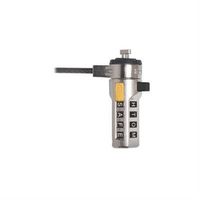
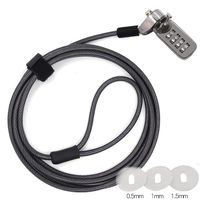
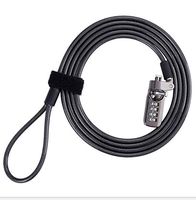
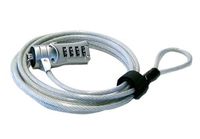
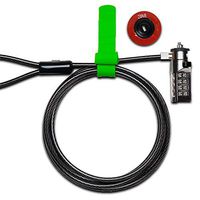
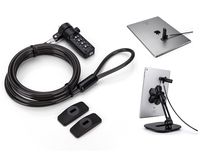
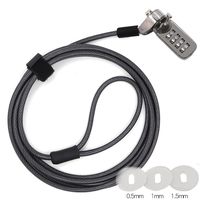
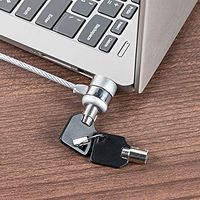
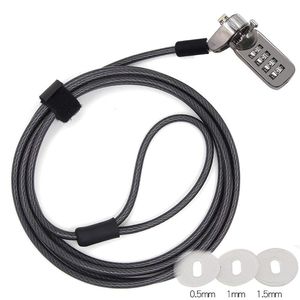
Thanks for choose TLBTEK keyless laptop cable lock.It helps to protect your valuable notebook from being stolen and you don't need worried lost keys.
*DO NOT compatitable with those laptop below:
【Lenovo】U41 / U31 / M41 / S41 / K41 / Ideapad series of products / Flex3 series/XIAOXIN series /Lenovo rescuer r720 series laptops.
【Acer】Aspire V Nitro/E571/acer shadowknight .
【Dell】SPX13 / 7000 / M3800 / Alienware / dell inspiron 15-7548/dell inspiron 11-3148/dell inspiron 11-3157/other Inspiron with square keyhole.
【Apple】Apple air with no keyhole /some model of Apple pro with no keyhole.
How to install this lock?
Pls see detail install method on instruction come together!
How to reset the combination?
1.Set your lock at open status,turn the dials to the original password(The original password of new lock is 0-0-0-0) to align with the combination notching line.
2.Use a pen or pin tool to push the combination resetter and slide it to the slot,set the new password by turning the dials (eg.3-5-2-4)the combination resetter must hold tight until new combination is reseted.
(pay attention:new password is reseted as soon as pin tool is loose ,so don't loose your hands during new password is still finnished)
3.Release the reset button ,new password is done.
4.Check if the switch can be lock and unlock freely.(switch can be move only correct password align with combination notching line)
5.Congratulations if switch can be move freely,that means new password reset successful,then you can lock your laptop now.
6.If switch can't be move,that means you loose you hands during reset the password,and we still can not help with find the wrong password you set by carefully.But we do provide after-sale service,you can contact amazon for replace a new one.
*DO NOT compatitable with those laptop below:
【Lenovo】U41 / U31 / M41 / S41 / K41 / Ideapad series of products / Flex3 series/XIAOXIN series /Lenovo rescuer r720 series laptops.
【Acer】Aspire V Nitro/E571/acer shadowknight .
【Dell】SPX13 / 7000 / M3800 / Alienware / dell inspiron 15-7548/dell inspiron 11-3148/dell inspiron 11-3157/other Inspiron with square keyhole.
【Apple】Apple air with no keyhole /some model of Apple pro with no keyhole.
How to install this lock?
Pls see detail install method on instruction come together!
How to reset the combination?
1.Set your lock at open status,turn the dials to the original password(The original password of new lock is 0-0-0-0) to align with the combination notching line.
2.Use a pen or pin tool to push the combination resetter and slide it to the slot,set the new password by turning the dials (eg.3-5-2-4)the combination resetter must hold tight until new combination is reseted.
(pay attention:new password is reseted as soon as pin tool is loose ,so don't loose your hands during new password is still finnished)
3.Release the reset button ,new password is done.
4.Check if the switch can be lock and unlock freely.(switch can be move only correct password align with combination notching line)
5.Congratulations if switch can be move freely,that means new password reset successful,then you can lock your laptop now.
6.If switch can't be move,that means you loose you hands during reset the password,and we still can not help with find the wrong password you set by carefully.But we do provide after-sale service,you can contact amazon for replace a new one.
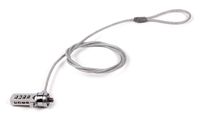
TLBTEK Laptop Locking Cable,4 Number Combination Lock,Computer Portable Security Locks for Most Notebooks,Desktops, Laptops,Computer and Projector
Price is below average
Current Price
$11.75
Average
$12.17
Min Price
$11.75
Max Price
$12.99
Price dynamics
3%
Description
Thanks for choose TLBTEK keyless laptop cable lock.It helps to protect your valuable notebook from being stolen and you don't need worried lost keys.
*DO NOT compatitable with those laptop below:
【Lenovo】U41 / U31 / M41 / S41 / K41 / Ideapad series of products / Flex3 series/XIAOXIN series /Lenovo rescuer r720 series laptops.
【Acer】Aspire V Nitro/E571/acer shadowknight .
【Dell】SPX13 / 7000 / M3800 / Alienware / dell inspiron 15-7548/dell inspiron 11-3148/dell inspiron 11-3157/other Inspiron with square keyhole.
【Apple】Apple air with no keyhole /some model of Apple pro with no keyhole.
How to install this lock?
Pls see detail install method on instruction come together!
How to reset the combination?
1.Set your lock at open status,turn the dials to the original password(The original password of new lock is 0-0-0-0) to align with the combination notching line.
2.Use a pen or pin tool to push the combination resetter and slide it to the slot,set the new password by turning the dials (eg.3-5-2-4)the combination resetter must hold tight until new combination is reseted.
(pay attention:new password is reseted as soon as pin tool is loose ,so don't loose your hands during new password is still finnished)
3.Release the reset button ,new password is done.
4.Check if the switch can be lock and unlock freely.(switch can be move only correct password align with combination notching line)
5.Congratulations if switch can be move freely,that means new password reset successful,then you can lock your laptop now.
6.If switch can't be move,that means you loose you hands during reset the password,and we still can not help with find the wrong password you set by carefully.But we do provide after-sale service,you can contact amazon for replace a new one.
*DO NOT compatitable with those laptop below:
【Lenovo】U41 / U31 / M41 / S41 / K41 / Ideapad series of products / Flex3 series/XIAOXIN series /Lenovo rescuer r720 series laptops.
【Acer】Aspire V Nitro/E571/acer shadowknight .
【Dell】SPX13 / 7000 / M3800 / Alienware / dell inspiron 15-7548/dell inspiron 11-3148/dell inspiron 11-3157/other Inspiron with square keyhole.
【Apple】Apple air with no keyhole /some model of Apple pro with no keyhole.
How to install this lock?
Pls see detail install method on instruction come together!
How to reset the combination?
1.Set your lock at open status,turn the dials to the original password(The original password of new lock is 0-0-0-0) to align with the combination notching line.
2.Use a pen or pin tool to push the combination resetter and slide it to the slot,set the new password by turning the dials (eg.3-5-2-4)the combination resetter must hold tight until new combination is reseted.
(pay attention:new password is reseted as soon as pin tool is loose ,so don't loose your hands during new password is still finnished)
3.Release the reset button ,new password is done.
4.Check if the switch can be lock and unlock freely.(switch can be move only correct password align with combination notching line)
5.Congratulations if switch can be move freely,that means new password reset successful,then you can lock your laptop now.
6.If switch can't be move,that means you loose you hands during reset the password,and we still can not help with find the wrong password you set by carefully.But we do provide after-sale service,you can contact amazon for replace a new one.
Price will be lower
in next 2 weeks
in next 2 weeks
According to the data, price will be lower in next two weeks, so not waste your money and track better price!
Similar products