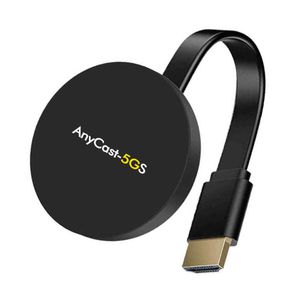
Description
This Wi-Fi display dongle receiver applies to LCD/TV/Projector with HDMI interface sharing picture/video/music of IOS devices, Android smartphones, tablet PCs, etc.
It supports Miracast, DLNA and AirPlay protocol. Enjoy your video on the big screen!.
HOW TO USE( You will only have to do these steps once and the device will automatically connect by " screen mirror/cast " from then on)
For using IOS and Android phones it's a simple process
1. connect the wires together and plug into HDMI port
2. set the TV signal source to the correct HDMI input
3. your phone or any other device connect to the dongle with the WI-FI hotspot signal "Mirroring-xx"" and connect with password 12345678
4.Once connected, go on your phones internet browser and type in the IP Address you see on your television screen , Once you have done this, you can connect to your Wi-Fi network.
It is as simple as that and now you will be able to enjoy all your favorite tv shows and movies with the tap of a "Screen Mirroring/Cast " button
System Compatible with:
iOS 8 or higer, Apple iPhone X/Xr / Xs and Xs Max, iPhone 8 and Plus, iPhone 7 and Plus,iPhone 6s and 6s Plus,iPhone 6 / 6 Plus;iPhone 5/5S/5C/SE,iPad Pro,iPad Air, iPad4/5, iPad mini Android 5 or higher with 1GB RAM, (Samsung/LG/ Sony/Huawei,etc)
Support most laptop with Windows 8.1/ Windows 10 which equiped with Intel i series processor
And MacBook Air / MacBook Pro /New MacBook
Main Features for the wireless hdmi transmitter receiver:
Main chip: RK3036 Dual-core
Transmission distance: Up to 15M to playback music, photo, pdf files and video
-Storage: At least 40MB free space needed.
-Projector: Support Projector with HDMI output interface.Ultra low power consumption, and low heat.
Packing includes:
1x Wireless hdmi tv Dongle
1x USB WIFI Cable(For Power Supply & Link cable network adapter)
1x User Manual Instructions
It supports Miracast, DLNA and AirPlay protocol. Enjoy your video on the big screen!.
HOW TO USE( You will only have to do these steps once and the device will automatically connect by " screen mirror/cast " from then on)
For using IOS and Android phones it's a simple process
1. connect the wires together and plug into HDMI port
2. set the TV signal source to the correct HDMI input
3. your phone or any other device connect to the dongle with the WI-FI hotspot signal "Mirroring-xx"" and connect with password 12345678
4.Once connected, go on your phones internet browser and type in the IP Address you see on your television screen , Once you have done this, you can connect to your Wi-Fi network.
It is as simple as that and now you will be able to enjoy all your favorite tv shows and movies with the tap of a "Screen Mirroring/Cast " button
System Compatible with:
iOS 8 or higer, Apple iPhone X/Xr / Xs and Xs Max, iPhone 8 and Plus, iPhone 7 and Plus,iPhone 6s and 6s Plus,iPhone 6 / 6 Plus;iPhone 5/5S/5C/SE,iPad Pro,iPad Air, iPad4/5, iPad mini Android 5 or higher with 1GB RAM, (Samsung/LG/ Sony/Huawei,etc)
Support most laptop with Windows 8.1/ Windows 10 which equiped with Intel i series processor
And MacBook Air / MacBook Pro /New MacBook
Main Features for the wireless hdmi transmitter receiver:
Main chip: RK3036 Dual-core
Transmission distance: Up to 15M to playback music, photo, pdf files and video
-Storage: At least 40MB free space needed.
-Projector: Support Projector with HDMI output interface.Ultra low power consumption, and low heat.
Packing includes:
1x Wireless hdmi tv Dongle
1x USB WIFI Cable(For Power Supply & Link cable network adapter)
1x User Manual Instructions
5G WiFi Display Dongle Wireless HDMI Transmitter, 1080P HD Mini Display for iOS/Android/Windows/Mac, Supports Airplay/Airplay Screen mirroring/Miracast/DLAN/Chrome APP Cast/Windows WiDi
Price is below average
Current Price
$19.99
Average
$32.81
Min Price
$19.99
Max Price
$39.99
Price dynamics
39%
Description
This Wi-Fi display dongle receiver applies to LCD/TV/Projector with HDMI interface sharing picture/video/music of IOS devices, Android smartphones, tablet PCs, etc.
It supports Miracast, DLNA and AirPlay protocol. Enjoy your video on the big screen!.
HOW TO USE( You will only have to do these steps once and the device will automatically connect by " screen mirror/cast " from then on)
For using IOS and Android phones it's a simple process
1. connect the wires together and plug into HDMI port
2. set the TV signal source to the correct HDMI input
3. your phone or any other device connect to the dongle with the WI-FI hotspot signal "Mirroring-xx"" and connect with password 12345678
4.Once connected, go on your phones internet browser and type in the IP Address you see on your television screen , Once you have done this, you can connect to your Wi-Fi network.
It is as simple as that and now you will be able to enjoy all your favorite tv shows and movies with the tap of a "Screen Mirroring/Cast " button
System Compatible with:
iOS 8 or higer, Apple iPhone X/Xr / Xs and Xs Max, iPhone 8 and Plus, iPhone 7 and Plus,iPhone 6s and 6s Plus,iPhone 6 / 6 Plus;iPhone 5/5S/5C/SE,iPad Pro,iPad Air, iPad4/5, iPad mini Android 5 or higher with 1GB RAM, (Samsung/LG/ Sony/Huawei,etc)
Support most laptop with Windows 8.1/ Windows 10 which equiped with Intel i series processor
And MacBook Air / MacBook Pro /New MacBook
Main Features for the wireless hdmi transmitter receiver:
Main chip: RK3036 Dual-core
Transmission distance: Up to 15M to playback music, photo, pdf files and video
-Storage: At least 40MB free space needed.
-Projector: Support Projector with HDMI output interface.Ultra low power consumption, and low heat.
Packing includes:
1x Wireless hdmi tv Dongle
1x USB WIFI Cable(For Power Supply & Link cable network adapter)
1x User Manual Instructions
It supports Miracast, DLNA and AirPlay protocol. Enjoy your video on the big screen!.
HOW TO USE( You will only have to do these steps once and the device will automatically connect by " screen mirror/cast " from then on)
For using IOS and Android phones it's a simple process
1. connect the wires together and plug into HDMI port
2. set the TV signal source to the correct HDMI input
3. your phone or any other device connect to the dongle with the WI-FI hotspot signal "Mirroring-xx"" and connect with password 12345678
4.Once connected, go on your phones internet browser and type in the IP Address you see on your television screen , Once you have done this, you can connect to your Wi-Fi network.
It is as simple as that and now you will be able to enjoy all your favorite tv shows and movies with the tap of a "Screen Mirroring/Cast " button
System Compatible with:
iOS 8 or higer, Apple iPhone X/Xr / Xs and Xs Max, iPhone 8 and Plus, iPhone 7 and Plus,iPhone 6s and 6s Plus,iPhone 6 / 6 Plus;iPhone 5/5S/5C/SE,iPad Pro,iPad Air, iPad4/5, iPad mini Android 5 or higher with 1GB RAM, (Samsung/LG/ Sony/Huawei,etc)
Support most laptop with Windows 8.1/ Windows 10 which equiped with Intel i series processor
And MacBook Air / MacBook Pro /New MacBook
Main Features for the wireless hdmi transmitter receiver:
Main chip: RK3036 Dual-core
Transmission distance: Up to 15M to playback music, photo, pdf files and video
-Storage: At least 40MB free space needed.
-Projector: Support Projector with HDMI output interface.Ultra low power consumption, and low heat.
Packing includes:
1x Wireless hdmi tv Dongle
1x USB WIFI Cable(For Power Supply & Link cable network adapter)
1x User Manual Instructions
Price will be lower
in next 2 weeks
in next 2 weeks
According to the data, price will be lower in next two weeks, so not waste your money and track better price!
Product review & video
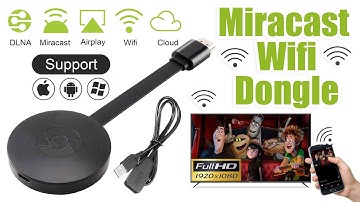
[Music] hello guys uh we are back with one of our new product and today we are going to check this ez chromecast it's a mirror cast device you can easily mirror with your phone to your tv wireless so let's see what we get inside first of all user manual we have main device it's uh actually my phone over here here you can see there is a power port and a reset button and here we can get one wireless receiver power adapter micro usb and usb port you can plug back to your tv or you can use uh adapter 5 volt adapter so it will be easy to get constant 5 for 5.0 volt power you can use this kind of adapter over here just plug it this way it's easy and connect this device to your easier cast and this one goes back to your tv and you can mirror from your phone directly to your tv okay guys so here we have a hdmi cable from back to our tv okay so what we're going to do we just connect it this devi


Similar products





































