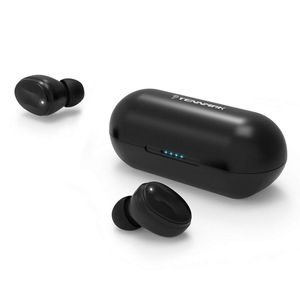
Description
First Time Using:
For the first time to use, need to connect via mobile phone for pairing. After that, whenever the earbuds is boot up, it will connect automatically.
1.Take out earphones from the charge box . please remove the insulation sticker of earphone.
2. Put the earphones into the charge box , then take it out .
3.Earphones will turn on automatically. Voice prompt "power on" and white LED flash 3 times.
4.Right and left sides will auto pair with voice promot "di", then voice prompt "left channel/ right channel " from corresponding channel.
5.Following voice prompt from right side "pairing" and white & orange LED flash quickly by turn.
6.Turn on bluetooth list on your device, search "TENNMAK TWS06" and connect."Connected" will be prompted when connection is completed.
If the " L/ R" earphones can't pair each other , please "CLEAR PAIRING MEMORY"
1. Take off both sides earbud from charging case.
2. Touch the touch key for 2 seconds of both sides at the same time to shut down.
3. Then long touch the touch key of both sides (around 5 seconds) at the same time. You will hear " power on" " pairing " "di-di-di" by turn.Then release the touch key .
Noted: please don't release your finger until you hear the "di-di-di" voice prompt.
4. Put earbud into charging case. then the clear pairing memory is done.
For the next using , please follow the "First Time Using " process .
If you still have problem , please contact seller.
For the first time to use, need to connect via mobile phone for pairing. After that, whenever the earbuds is boot up, it will connect automatically.
1.Take out earphones from the charge box . please remove the insulation sticker of earphone.
2. Put the earphones into the charge box , then take it out .
3.Earphones will turn on automatically. Voice prompt "power on" and white LED flash 3 times.
4.Right and left sides will auto pair with voice promot "di", then voice prompt "left channel/ right channel " from corresponding channel.
5.Following voice prompt from right side "pairing" and white & orange LED flash quickly by turn.
6.Turn on bluetooth list on your device, search "TENNMAK TWS06" and connect."Connected" will be prompted when connection is completed.
If the " L/ R" earphones can't pair each other , please "CLEAR PAIRING MEMORY"
1. Take off both sides earbud from charging case.
2. Touch the touch key for 2 seconds of both sides at the same time to shut down.
3. Then long touch the touch key of both sides (around 5 seconds) at the same time. You will hear " power on" " pairing " "di-di-di" by turn.Then release the touch key .
Noted: please don't release your finger until you hear the "di-di-di" voice prompt.
4. Put earbud into charging case. then the clear pairing memory is done.
For the next using , please follow the "First Time Using " process .
If you still have problem , please contact seller.
TENNMAK TWS06 True Wireless Earphone Earbuds Headphone Bluetooth 5.0 in Ear HiFi Sound Sport Touch Control Earphone with Microphone
Current Price
$32.99
Average
$32.99
Min Price
$32.99
Max Price
$32.99
Description
First Time Using:
For the first time to use, need to connect via mobile phone for pairing. After that, whenever the earbuds is boot up, it will connect automatically.
1.Take out earphones from the charge box . please remove the insulation sticker of earphone.
2. Put the earphones into the charge box , then take it out .
3.Earphones will turn on automatically. Voice prompt "power on" and white LED flash 3 times.
4.Right and left sides will auto pair with voice promot "di", then voice prompt "left channel/ right channel " from corresponding channel.
5.Following voice prompt from right side "pairing" and white & orange LED flash quickly by turn.
6.Turn on bluetooth list on your device, search "TENNMAK TWS06" and connect."Connected" will be prompted when connection is completed.
If the " L/ R" earphones can't pair each other , please "CLEAR PAIRING MEMORY"
1. Take off both sides earbud from charging case.
2. Touch the touch key for 2 seconds of both sides at the same time to shut down.
3. Then long touch the touch key of both sides (around 5 seconds) at the same time. You will hear " power on" " pairing " "di-di-di" by turn.Then release the touch key .
Noted: please don't release your finger until you hear the "di-di-di" voice prompt.
4. Put earbud into charging case. then the clear pairing memory is done.
For the next using , please follow the "First Time Using " process .
If you still have problem , please contact seller.
For the first time to use, need to connect via mobile phone for pairing. After that, whenever the earbuds is boot up, it will connect automatically.
1.Take out earphones from the charge box . please remove the insulation sticker of earphone.
2. Put the earphones into the charge box , then take it out .
3.Earphones will turn on automatically. Voice prompt "power on" and white LED flash 3 times.
4.Right and left sides will auto pair with voice promot "di", then voice prompt "left channel/ right channel " from corresponding channel.
5.Following voice prompt from right side "pairing" and white & orange LED flash quickly by turn.
6.Turn on bluetooth list on your device, search "TENNMAK TWS06" and connect."Connected" will be prompted when connection is completed.
If the " L/ R" earphones can't pair each other , please "CLEAR PAIRING MEMORY"
1. Take off both sides earbud from charging case.
2. Touch the touch key for 2 seconds of both sides at the same time to shut down.
3. Then long touch the touch key of both sides (around 5 seconds) at the same time. You will hear " power on" " pairing " "di-di-di" by turn.Then release the touch key .
Noted: please don't release your finger until you hear the "di-di-di" voice prompt.
4. Put earbud into charging case. then the clear pairing memory is done.
For the next using , please follow the "First Time Using " process .
If you still have problem , please contact seller.
Price will be lower
in next 2 weeks
in next 2 weeks
According to the data, price will be lower in next two weeks, so not waste your money and track better price!
Product review & video
i have done videos on using awesome headphones for gaming we've done many roundups on gaming headsets but today let's give respect to earbuds for gaming and why you should be using them there are many advantages why earbuds are awesome for gaming for one they won't mess up your hair for that voluminous look sure earbuds are also tiny so they're easy to travel with great for mobile gaming with a notebook controller switch or smartphone they're so much better for vr headsets and guaranteed no issues with glasses and also have incredible isolation i think we have a nice selection of earbuds that range in prices features and connectivity but the gaming prerequisite here for me was the inclusion of a built-in microphone on all these pairs that is an important value-add to avoid extra equipment for comps purposes another important value add a sub to channel is music to my ear canals i will be



Similar products



































