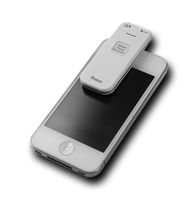
Description
Specifications:
Color: black
Wireless: 2.4G Optical
Optical Resolution: 1200dpi
Connect to Phone: Bluetooth
Wireless Transmission Distance: 10m-20m
Voice Recognition Distance: 2m
Battery: 3.7V 750mA Rechargeable Battery
Size: Approx. 12.5*3.8*1.3CM
Package Weight: 127g
Introduction of the method of use:
(1) The mobile phone connects Wifi, or mobile network, scan the QR code on the product, and download the translation APP of iTranslate;
(2) Set the App according to the Instruction.
(3) Power on the translator; Then open the bluetooth and connect the device "Translator" with your phone;Open APP, it will scan and find the the "iTranslate" device.
(4) There is a menu bar in APP, and the language of more than 30 countries can be selected.
(5) After choosing the translated language, press the button A on the translation stick to start the recording, release the button after the speech is finished, and check the translation results on APP for about 1 second,the translator recognizes the speech as a text,then translates it into foreigh language and plays.
Attention: The speech translate function needs cellular date or WIFI,please make sure that your phone\'s network is connected.When there is poor network,the translator maybe delay or no funtion.
Package List:
1 x Translator
1 x USB Charging Cable
1 x User Manual
The supported languages are as follows:
Simplified Chinese, Cantonese, English (China), English (US), English (UK), English (Australia), English (India), Korean, Japanese, French, German, French (Canada), Spanish, Spanish (Mexico), Thai, Italian, Dutch, Greek, Portuguese, Portuguese (Brazil), Russian, Arabic (Egypt), Arabic (Saudi Arabia), Arabic (International), Hungarian, Romanian, Swedish, Czech, Finnish, Danish, Polish
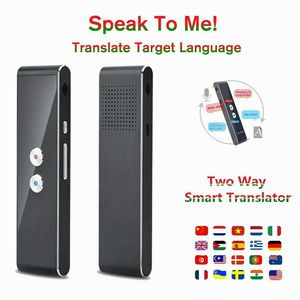
Color: black
Wireless: 2.4G Optical
Optical Resolution: 1200dpi
Connect to Phone: Bluetooth
Wireless Transmission Distance: 10m-20m
Voice Recognition Distance: 2m
Battery: 3.7V 750mA Rechargeable Battery
Size: Approx. 12.5*3.8*1.3CM
Package Weight: 127g
Introduction of the method of use:
(1) The mobile phone connects Wifi, or mobile network, scan the QR code on the product, and download the translation APP of iTranslate;
(2) Set the App according to the Instruction.
(3) Power on the translator; Then open the bluetooth and connect the device "Translator" with your phone;Open APP, it will scan and find the the "iTranslate" device.
(4) There is a menu bar in APP, and the language of more than 30 countries can be selected.
(5) After choosing the translated language, press the button A on the translation stick to start the recording, release the button after the speech is finished, and check the translation results on APP for about 1 second,the translator recognizes the speech as a text,then translates it into foreigh language and plays.
Attention: The speech translate function needs cellular date or WIFI,please make sure that your phone\'s network is connected.When there is poor network,the translator maybe delay or no funtion.
Package List:
1 x Translator
1 x USB Charging Cable
1 x User Manual
The supported languages are as follows:
Simplified Chinese, Cantonese, English (China), English (US), English (UK), English (Australia), English (India), Korean, Japanese, French, German, French (Canada), Spanish, Spanish (Mexico), Thai, Italian, Dutch, Greek, Portuguese, Portuguese (Brazil), Russian, Arabic (Egypt), Arabic (Saudi Arabia), Arabic (International), Hungarian, Romanian, Swedish, Czech, Finnish, Danish, Polish
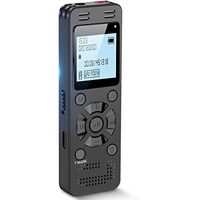
Translaty MUAMA Enence Smart Instant Real Time Voice Languages Translator (Black)
Current Price
$49.99
Average
$49.99
Min Price
$49.99
Max Price
$49.99
Description
Specifications:
Color: black
Wireless: 2.4G Optical
Optical Resolution: 1200dpi
Connect to Phone: Bluetooth
Wireless Transmission Distance: 10m-20m
Voice Recognition Distance: 2m
Battery: 3.7V 750mA Rechargeable Battery
Size: Approx. 12.5*3.8*1.3CM
Package Weight: 127g
Introduction of the method of use:
(1) The mobile phone connects Wifi, or mobile network, scan the QR code on the product, and download the translation APP of iTranslate;
(2) Set the App according to the Instruction.
(3) Power on the translator; Then open the bluetooth and connect the device "Translator" with your phone;Open APP, it will scan and find the the "iTranslate" device.
(4) There is a menu bar in APP, and the language of more than 30 countries can be selected.
(5) After choosing the translated language, press the button A on the translation stick to start the recording, release the button after the speech is finished, and check the translation results on APP for about 1 second,the translator recognizes the speech as a text,then translates it into foreigh language and plays.
Attention: The speech translate function needs cellular date or WIFI,please make sure that your phone\'s network is connected.When there is poor network,the translator maybe delay or no funtion.
Package List:
1 x Translator
1 x USB Charging Cable
1 x User Manual
The supported languages are as follows:
Simplified Chinese, Cantonese, English (China), English (US), English (UK), English (Australia), English (India), Korean, Japanese, French, German, French (Canada), Spanish, Spanish (Mexico), Thai, Italian, Dutch, Greek, Portuguese, Portuguese (Brazil), Russian, Arabic (Egypt), Arabic (Saudi Arabia), Arabic (International), Hungarian, Romanian, Swedish, Czech, Finnish, Danish, Polish
Color: black
Wireless: 2.4G Optical
Optical Resolution: 1200dpi
Connect to Phone: Bluetooth
Wireless Transmission Distance: 10m-20m
Voice Recognition Distance: 2m
Battery: 3.7V 750mA Rechargeable Battery
Size: Approx. 12.5*3.8*1.3CM
Package Weight: 127g
Introduction of the method of use:
(1) The mobile phone connects Wifi, or mobile network, scan the QR code on the product, and download the translation APP of iTranslate;
(2) Set the App according to the Instruction.
(3) Power on the translator; Then open the bluetooth and connect the device "Translator" with your phone;Open APP, it will scan and find the the "iTranslate" device.
(4) There is a menu bar in APP, and the language of more than 30 countries can be selected.
(5) After choosing the translated language, press the button A on the translation stick to start the recording, release the button after the speech is finished, and check the translation results on APP for about 1 second,the translator recognizes the speech as a text,then translates it into foreigh language and plays.
Attention: The speech translate function needs cellular date or WIFI,please make sure that your phone\'s network is connected.When there is poor network,the translator maybe delay or no funtion.
Package List:
1 x Translator
1 x USB Charging Cable
1 x User Manual
The supported languages are as follows:
Simplified Chinese, Cantonese, English (China), English (US), English (UK), English (Australia), English (India), Korean, Japanese, French, German, French (Canada), Spanish, Spanish (Mexico), Thai, Italian, Dutch, Greek, Portuguese, Portuguese (Brazil), Russian, Arabic (Egypt), Arabic (Saudi Arabia), Arabic (International), Hungarian, Romanian, Swedish, Czech, Finnish, Danish, Polish
Price will be lower
in next 2 weeks
in next 2 weeks
According to the data, price will be lower in next two weeks, so not waste your money and track better price!