Description
How to use the wireless earbuds:
1) When you got them please take out earbuds and take off earbuds stickers, put them back the case and close until case lights go out.
2) Take out earbuds and open your phone bluetooth to connect "Blue Wow A7 L".
About the charging case:
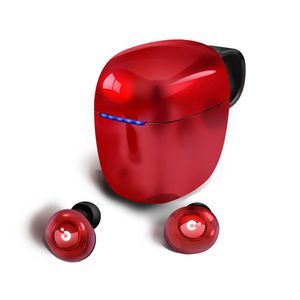
1) Totally 5 blue lights and 1 red light indicator. Blue lights on means power and charging, red light means lack of power or fault put. When red lights on you need to check whether earbuds fit well to its position otherwise you need to recharge the case.
2) Case will be enter standby mode after 30s open without any operation, when you put earbuds back it won't charge even you press earbuds, you need to close the case.
3) Case offering two earbuds recharge three times.
What You Get
2 x Wireless earbuds
1 x Portable Charging Case
1 x USB Charging Cable
3 x S/M/L Pair Silicone Eartips
FAQ:
Q1: They keeps falling offer, not stay in ears.
A: Kindly please make sure you fit the earbuds to ear canal, otherwise they will not with good stay.
Q2: How to use only right earbud?
A: Please take only right earbud out, scan bluetooth to connect "Blue Wow A7 R".
Q3: Why i couldn't go next song?
A: You need to make sure long press on L earbuds 2 seconds and release, otherwise they will be pause.
Q4: Why Siri always on?
A: Siri will come when you long press 3 seconds on earbud, please ignore it.
Q5: Case with a red light, is there any issue on it?
A: Please try to recharge full the case, and correct the earbuds position.
1) When you got them please take out earbuds and take off earbuds stickers, put them back the case and close until case lights go out.
2) Take out earbuds and open your phone bluetooth to connect "Blue Wow A7 L".
About the charging case:
1) Totally 5 blue lights and 1 red light indicator. Blue lights on means power and charging, red light means lack of power or fault put. When red lights on you need to check whether earbuds fit well to its position otherwise you need to recharge the case.
2) Case will be enter standby mode after 30s open without any operation, when you put earbuds back it won't charge even you press earbuds, you need to close the case.
3) Case offering two earbuds recharge three times.
What You Get
2 x Wireless earbuds
1 x Portable Charging Case
1 x USB Charging Cable
3 x S/M/L Pair Silicone Eartips
FAQ:
Q1: They keeps falling offer, not stay in ears.
A: Kindly please make sure you fit the earbuds to ear canal, otherwise they will not with good stay.
Q2: How to use only right earbud?
A: Please take only right earbud out, scan bluetooth to connect "Blue Wow A7 R".
Q3: Why i couldn't go next song?
A: You need to make sure long press on L earbuds 2 seconds and release, otherwise they will be pause.
Q4: Why Siri always on?
A: Siri will come when you long press 3 seconds on earbud, please ignore it.
Q5: Case with a red light, is there any issue on it?
A: Please try to recharge full the case, and correct the earbuds position.
True Wireless Earbuds Bluetooth 5.0, IPX5 Sweatproof 20H Playtime Wireless Headphones, Noise Cancelling Wireless Earphones Small in-Ear, Built-in Mic Volume Control with Portable Charging Case
Price is below average
Current Price
$39.99
Average
$41.99
Min Price
$39.99
Max Price
$43.99
Price dynamics
5%
Description
How to use the wireless earbuds:
1) When you got them please take out earbuds and take off earbuds stickers, put them back the case and close until case lights go out.
2) Take out earbuds and open your phone bluetooth to connect "Blue Wow A7 L".
About the charging case:
1) Totally 5 blue lights and 1 red light indicator. Blue lights on means power and charging, red light means lack of power or fault put. When red lights on you need to check whether earbuds fit well to its position otherwise you need to recharge the case.
2) Case will be enter standby mode after 30s open without any operation, when you put earbuds back it won't charge even you press earbuds, you need to close the case.
3) Case offering two earbuds recharge three times.
What You Get
2 x Wireless earbuds
1 x Portable Charging Case
1 x USB Charging Cable
3 x S/M/L Pair Silicone Eartips
FAQ:
Q1: They keeps falling offer, not stay in ears.
A: Kindly please make sure you fit the earbuds to ear canal, otherwise they will not with good stay.
Q2: How to use only right earbud?
A: Please take only right earbud out, scan bluetooth to connect "Blue Wow A7 R".
Q3: Why i couldn't go next song?
A: You need to make sure long press on L earbuds 2 seconds and release, otherwise they will be pause.
Q4: Why Siri always on?
A: Siri will come when you long press 3 seconds on earbud, please ignore it.
Q5: Case with a red light, is there any issue on it?
A: Please try to recharge full the case, and correct the earbuds position.
1) When you got them please take out earbuds and take off earbuds stickers, put them back the case and close until case lights go out.
2) Take out earbuds and open your phone bluetooth to connect "Blue Wow A7 L".
About the charging case:
1) Totally 5 blue lights and 1 red light indicator. Blue lights on means power and charging, red light means lack of power or fault put. When red lights on you need to check whether earbuds fit well to its position otherwise you need to recharge the case.
2) Case will be enter standby mode after 30s open without any operation, when you put earbuds back it won't charge even you press earbuds, you need to close the case.
3) Case offering two earbuds recharge three times.
What You Get
2 x Wireless earbuds
1 x Portable Charging Case
1 x USB Charging Cable
3 x S/M/L Pair Silicone Eartips
FAQ:
Q1: They keeps falling offer, not stay in ears.
A: Kindly please make sure you fit the earbuds to ear canal, otherwise they will not with good stay.
Q2: How to use only right earbud?
A: Please take only right earbud out, scan bluetooth to connect "Blue Wow A7 R".
Q3: Why i couldn't go next song?
A: You need to make sure long press on L earbuds 2 seconds and release, otherwise they will be pause.
Q4: Why Siri always on?
A: Siri will come when you long press 3 seconds on earbud, please ignore it.
Q5: Case with a red light, is there any issue on it?
A: Please try to recharge full the case, and correct the earbuds position.
Price will be lower
in next 2 weeks
in next 2 weeks
According to the data, price will be lower in next two weeks, so not waste your money and track better price!
Product review & video
hey guys digital David its I'm excited to be unboxing or viewing for you also wireless earbuds right here they do connect via bluetooth so this is really cool I did receive these products to review my channel but any opinion expressed in this video is truly my own so that being said this is feel the music it's the tws dual ear training wireless earbuds and this is how they come packaged tree from amazon go ahead I'll throw a link in my video scription below go ahead check it out let me know what you think you can go see photos read some more tech details on these earbuds from Amazon and see the most accurate price so these are definitely for somebody that's on a budget and they're really cool so it's wireless earbuds seriously no ear no wire between the two buds it's truly wireless so they sync to each other than they seem to your phone and it has that charging case built-in which is re



Similar products



































